

KRS Bumpbar Loader
KRS Bumpbar Loader is made and published by KRS Corporation. AppBrain is an independent app data site and isn't affiliated with KRS Corporation. The app name, icon, screenshots and description belong to KRS Corporation and are shown as published on the App Store.
AppBrain's verdict
- Rating on App Store
- 5.00
- 1 ratings
- Last updated
- August 30, 2025
It doesn't have enough ratings yet to judge what users think.
Rankings
App Store top chartsApp Store Rankings for KRS Bumpbar Loader
Competitors
Similar apps and more from KRS CorporationAlternatives to KRS Bumpbar Loader





More from KRS Corporation

Releases
Updates seen on the App Store- Version
- 1.0
- Launched
- August 2025
No changelog data
User feedback
Ratings and reviews on the App StoreComments on KRS Bumpbar Loader for iOS
We don't have enough comments to show example comments. Please check back later.
Technology
Found in the app by AppBrain- Price
- Free
- App size
- 42.1 MB
- Content rating
- Everyone
Technologies used by KRS Bumpbar Loader
About the app and developer
About KRS Bumpbar Loader
KRS Bumpbar Loader is an utilities app developed by KRS Corporation.
User Ratings
KRS Bumpbar Loader is rated 5.00 out of 5 stars. The rating is based on one rating ratings.
App Information
KRS Bumpbar Loader is freely available from the App Store. The app size is 42.05 MB. The latest version available is 1.0. The last update was on August 30, 2025.
Technical Requirements
The app has a content rating of Everyone. The app has been available on the App Store since August 2025.
Developer information for KRS Corporation
Address:
Store listing
By KRS Corporation, from the App Store


Description by KRS Corporation Written by the developer, not by AppBrain. Click to read.
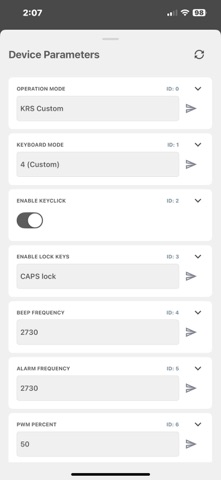
Build your keystroke sequences on our website, save them to iCloud Drive or Files, then use this app to connect to your bumpbar over Bluetooth and load the build in seconds. Once programmed, simply pair the bumpbar with your computer or POS—your saved sequences are ready to go.
What you can do
Connect over Bluetooth LE to a compatible KRS Bluetooth Bumpbar
Import builds you saved to iCloud Drive or the Files app
Load custom keystroke sequences to the bumpbar with a simple flow
Keep multiple builds handy and push the one you need on-site
Program once, use anywhere—disconnect from the phone and use the bumpbar on your computer/POS
How it works
Create your build on the KRS website and save it to iCloud Drive/Files.
Open the app & connect to your KRS Bluetooth Bumpbar.
Select your build & load it to the bumpbar.
Disconnect from the phone and connect the bumpbar to your computer/POS to use the programmed sequences.
Designed for real-world workflows
Whether you’re setting up a new station or updating layouts before a rush, Bluetooth Bumpbar Loader keeps configuration simple, quick, and cable-free.
Requirements
KRS Bluetooth Bumpbar (compatible BLE model)
iPhone with Bluetooth Low Energy enabled
iCloud Drive or Files access to your saved build(s)
Note: This app configures compatible KRS bumpbar hardware. Builds are created on the KRS website; this app does not author new sequences.