
MuffinTerm is made and published by Molly Black. AppBrain is an independent app data site and isn't affiliated with Molly Black. The app name, icon, screenshots and description belong to Molly Black and are shown as published on the App Store.
AppBrain's verdict
- Rating on App Store
- 4.88
- 40 ratings
- Last updated
- February 8, 2024
It doesn't have enough ratings yet to judge what users think.
Rankings
App Store top chartsApp Store Rankings for MuffinTerm
Competitors
Similar apps and more from Molly BlackAlternatives to MuffinTerm








More from Molly Black

Releases
Updates seen on the App Store- Version
- 1.2.7
- Launched
- September 2022
No changelog data
User feedback
Ratings and reviews on the App StoreComments on MuffinTerm for iOS
We don't have enough comments to show example comments. Please check back later.
Technology
Found in the app by AppBrain- Price
- Free
- App size
- 3.09 MB
- Content rating
- Everyone
Technologies used by MuffinTerm
About the app and developer
About MuffinTerm
MuffinTerm is an utilities app developed by Molly Black.
User Ratings
MuffinTerm is rated 4.88 out of 5 stars. The rating is based on 40 ratings.
App Information
MuffinTerm is freely available from the App Store. The app size is 3.09 MB. The latest version available is 1.2.7. The last update was on February 8, 2024.
Technical Requirements
The app has a content rating of Everyone. The app has been available on the App Store since September 2022.
Developer information for Molly Black
Address:
Frequently asked questions about MuffinTerm
Is MuffinTerm free?
Yes. MuffinTerm is free on the App Store.
Is MuffinTerm still available?
Yes. MuffinTerm is on the App Store, and the last update we saw was on February 8, 2024.
How large is MuffinTerm?
MuffinTerm is 3.09 MB.
Is MuffinTerm suitable for children?
App Store rates the content of MuffinTerm as suitable for everyone.
How do people rate MuffinTerm?
MuffinTerm scores 4.88 out of 5 stars, from 40 ratings on the App Store.
Who made MuffinTerm?
MuffinTerm was developed by Molly Black. It is listed in the utilities category on the App Store.
What are the best alternatives to MuffinTerm?
People looking at MuffinTerm also look at these utilities apps: TinyTERM Enterprise AS, A2io, Prompt 2, VCS Companion, iTerminal Pro – SSH Telnet.
Store listing
By Molly Black, from the App Store




Description by Molly Black Written by the developer, not by AppBrain. Click to read.
Dive back into the glory days of dial-up bulletin board systems… just, without the dialing up. (Though we’ll always miss that modem sound.)
BBSes were once the way that almost anyone “online” got online. The modern Internet might have stolen a bit of the spotlight, but BBSes are still around if you know where to look—and MuffinTerm can take you there.
Connect to telnet-enabled BBSes from around the world, with a terminal that’s designed to bring the classic experience to devices of today. (And no more busy signals!)
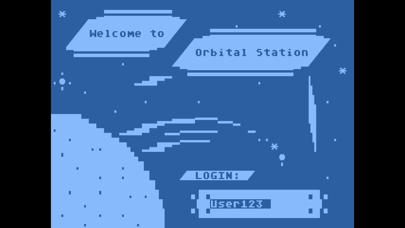
Select from among text modes and terminal hardware of the DOS and home computer era, with pixel-accurate CP437, PETSCII, and ATASCII support for the popular systems of the day, reproduced in exacting detail to help you really feel at home. (All rendered with a custom Metal shader—it is the 21st century, after all.)
• MDA with white (P4), green (P31), or amber (P3) phosphor
• CGA in 40- or 80-column mode
• EGA in 25- or 43-line mode
• VGA in 25- or 50-line mode
• VIC-II (C64/PETSCII) in NTSC, PAL, or borderless mode
• ANTIC (ATASCII) in NTSC, PAL, or borderless mode
Fuel your nostalgia further by enabling various aesthetic effects:
• Simulated modem speed — from the 110cps teletype crawl of the 1970s to the “blazing fast” 56K of the awesome ’90s. Slow down that ANSI animation to look the way it was originally intended, or just relive the feel of watching the bytes roll in. (Fortunately, without the cross-town toll charges this time around.)
• CRT curvature — Turn your flat-screen device into the spitting image of a classic ’tube.
• Scan lines — Reject the modernity of your perfect high-DPI display and embrace the scanlines that once reigned supreme.
• Warm tube tint — Harken back to an era of dubiously calibrated picture tubes and iffy RF adapters.
• VIC-II luma bars — Relive the experience of poorly isolated clock lines (and the resulting visual artifacting).
• Overscan borders — View the terminal as it would appear on a typical TV, or flout the factory calibration and show the full borders of the display field.
• Select a custom app icon from among several inspired by modems of the BBS era (plus a couple of floppy disks).
Some features are functional as well as fun. For example, who hasn’t stuck a sticky note or two to the side of their monitor at some point? Fortunately, the digital era is no bar to this ancient practice. Each BBS in your dialing directory gets its own digital sticky note (pick a color!), plus another that’s shared between them all. Record notes, make reminders, or be naughty and jot down a password or two. (We won’t peek.)
Of course, the basics are still all there. Traditional ANSI, PETSCII, and ATASCII terminal emulation give you the proper BBS experience; teletype (TTY) and “raw mode” provide support for special-use systems. Upload and download files using the standard XMODEM, YMODEM, and ZMODEM protocols. Save transcripts of your calls as text or raw data logs. There’s even a session timer in the status line to show you how long you’ve been connected. (Not responsible for flashbacks to long-distance bills from the 1980s.)
A comprehensive dialing directory helps you to keep track of your favorite systems. You can also import up-to-date BBS lists from popular online BBS directories. Have multiple devices? Automatically sync your dialing directory and call history between them all—whether iOS, iPadOS, and macOS—via iCloud.
And last but not least, it’s free. No ads, no in-app purchases, no weird tracking shenanigans. It’s just you and the soft glow of the pixels calling out to you.
It’s time to get back online with MuffinTerm.