L&T Säkerhet is made and published by Skyresponse AB. AppBrain is an independent app data site and isn't affiliated with Skyresponse AB. The app name, icon, screenshots and description belong to Skyresponse AB and are shown as published on the App Store.
AppBrain's verdict
- Last updated
- December 2, 2025
Rankings
App Store top chartsApp Store Rankings for L&T Säkerhet
Competitors
Similar apps and more from Skyresponse ABAlternatives to L&T Säkerhet
More from Skyresponse AB
Releases
Updates seen on the App Store- Version
- 3.15.0
- Launched
- June 2019
No changelog data
User feedback
Ratings and reviews on the App StoreComments on L&T Säkerhet for iOS
We don't have enough comments to show example comments. Please check back later.
Technology
Found in the app by AppBrain- Price
- Free
- App size
- 18.8 MB
- Content rating
- Everyone
Technologies used by L&T Säkerhet
About the app and developer
About L&T Säkerhet
L&T Säkerhet is an utilities app developed by Skyresponse AB.
User Ratings
The app has no ratings yet.
App Information
L&T Säkerhet is freely available from the App Store. The app size is 18.76 MB. The latest version available is 3.15.0. The last update was on December 2, 2025.
Technical Requirements
The app has a content rating of Everyone. The app has been available on the App Store since June 2019.
Developer information for Skyresponse AB
Address:
Store listing
By Skyresponse AB, from the App StoreDescription by Skyresponse AB Written by the developer, not by AppBrain. Click to read.
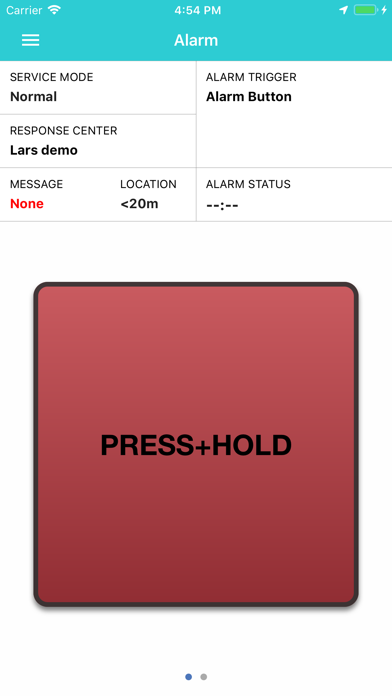
An alarm can be activated either through using the external wireless alarm button where you can activate the alarm without having the phone in your hand or directly on the phone by using the app on the screen. The wireless alarm button can be purchased separately and connects easily over the air to your iPhone, once connected you can trigger an alarm as long as the phone is within range. When activating the alarm from the screen you can either hold down the on-screen button for 2 seconds to activate the alarm or via using the “Dead-man feature” alarm button, which allows you to press the screen until you trigger the alarm or deactivate the alarm when you are safe again.
When an alarm is activated, a phone call is connected to the predefined receiver at the same time as the application transmit the exact location, user information and other status information from the phone to the response centre. The user information is combined with the pre-entered instructions on system so that the operator receives an as accurate and distinctive picture as possible about the measures that are needed to be done.
On the contrary to most other applications that send alarms to friends, L&T Safety can send the alarm to a response centre. The connection to the response centre goes through servers, and today L&T Safety can connect to almost all professional response.
To be able to use L&T Safety, the user needs to have a subscription where the user has added their profile and the instructions that should be performed when an alarm is triggered. Contact L&T for more information or purchase of subscriptions.
This app uses the GPS in the background when there is an active alarm. Continued use of GPS running in the background can dramatically decrease battery life.