

Lang Shadow: English Shadowing
Lang Shadow: English Shadowing is made and published by Thanh Nguyen Van. AppBrain is an independent app data site and isn't affiliated with Thanh Nguyen Van. The app name, icon, screenshots and description belong to Thanh Nguyen Van and are shown as published on the App Store.
AppBrain's verdict
- Rating on App Store
- 5.00
- 1 ratings
- Last updated
- October 5, 2026
It doesn't have enough ratings yet to judge what users think.
Rankings
App Store top chartsApp Store Rankings for Lang Shadow: English Shadowing
Competitors
Similar apps and more from Thanh Nguyen VanAlternatives to Lang Shadow: English Shadowing



More from Thanh Nguyen Van

Also available on Google Play

Releases
Updates seen on the App Store- Version
- 1.1.18
- Launched
- October 2025
No changelog data
User feedback
Ratings and reviews on the App StoreComments on Lang Shadow: English Shadowing for iOS
We don't have enough comments to show example comments. Please check back later.
Technology
Found in the app by AppBrain- Price
- Free
- App size
- 98.6 MB
- Content rating
- Everyone
Technologies used by Lang Shadow: English Shadowing
About the app and developer
About Lang Shadow: English Shadowing
Lang Shadow: English Shadowing is an education app developed by Thanh Nguyen Van.
User Ratings
Lang Shadow: English Shadowing is rated 5.00 out of 5 stars. The rating is based on one rating ratings.
App Information
Lang Shadow: English Shadowing is freely available from the App Store. The app size is 98.58 MB. The latest version available is 1.1.18. The last update was on October 5, 2026.
Technical Requirements
The app has a content rating of Everyone. The app has been available on the App Store since October 2025.
Developer information for Thanh Nguyen Van
Address:
Frequently asked questions about Lang Shadow: English Shadowing
Is Lang Shadow: English Shadowing free?
Yes. Lang Shadow: English Shadowing is free on the App Store.
Is Lang Shadow: English Shadowing still available?
Yes. Lang Shadow: English Shadowing is on the App Store, and the last update we saw was on October 5, 2026.
How large is Lang Shadow: English Shadowing?
Lang Shadow: English Shadowing is 98.58 MB.
Is Lang Shadow: English Shadowing suitable for children?
App Store rates the content of Lang Shadow: English Shadowing as suitable for everyone.
How do people rate Lang Shadow: English Shadowing?
Lang Shadow: English Shadowing has one rating of 5.00 stars on the App Store.
Who made Lang Shadow: English Shadowing?
Lang Shadow: English Shadowing was developed by Thanh Nguyen Van. It is listed in the education category on the App Store.
What are the best alternatives to Lang Shadow: English Shadowing?
People looking at Lang Shadow: English Shadowing also look at these education apps: Easy Shadowing, Shadowing Master, SpeakFlow AI Shadowing, LingoCard: Phrases & Sentences, Amogh Piping.
Store listing
By Thanh Nguyen Van, from the App Store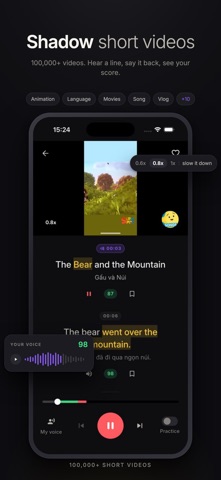



Description by Thanh Nguyen Van Written by the developer, not by AppBrain. Click to read.
You hear a real line of English, say it back out loud, and see straight away how close you got. Every check feeds one map of your sounds, so the app always knows which sound to fix next. Five minutes a day is enough.
ONE TAP TO CHECK
• The Check button sits in the middle of every screen
• It hands you one line to say: one you saved, one for your weakest sound, or one at your level
• Score 80 and that line is done. Miss it and it comes back tomorrow
SHADOW SHORTS
• Real short videos, subtitled in English and your own language at the same time
• Tap any line to hear it, count in 3-2-1, say it back, and see your score
• Too fast? Drop it to 0.8x or 0.6x and let your mouth catch up
• Dub the whole clip in your own voice, then watch it back and hear yourself in it
• When a Short ends, practice its words right there
• Follow a channel, browse a category, or pick from what's hot this week
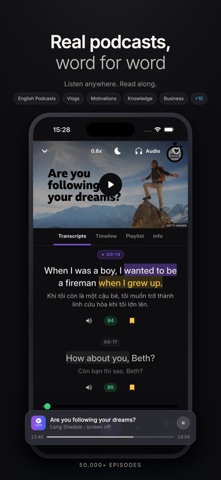
PODCASTS
• Real episodes, every word written out so you can follow along
• Watch the video, or put the screen away and just listen
• Keeps playing while you cook, walk or commute, with a sleep timer
• Shadow any sentence from the transcript, and pick up from the line you stopped on
CHECK YOUR PRONUNCIATION
• Every line gets scores for accuracy, fluency and how much of it you got out
• Every word gets its own color, so the one that let you down is obvious at a glance
• Tap that word to hear it said properly next to your own take
• Missing or extra pauses are marked too, not only the sounds
• Choose the accent you're scored against: American, British or Australian
FIX IT
• Tap a red word and Fix it trains exactly the sound you missed
• Hear it, tell it apart, say it again, then go straight back to your line
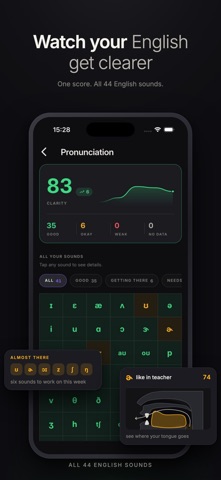
YOUR SOUNDS
• All 41 sounds of English on one screen, colored by how you actually say them
• Open any sound: where the tongue and lips go, a clean example, and your own takes
• Your sound path picks the five sounds holding you back and walks you up five levels each
• Every week you get a recap, and a card of your sounds to share
PRACTICE GAMES
• Four quick games on the same four words: Hear, Smash, Forge and Echo
• Hear trains your ear, Smash and Forge build the word and the sentence, Echo makes you say it
• Start Practice from any Short, sound, or line in your Library
• Daily Rush: one short round a day, over before you know it
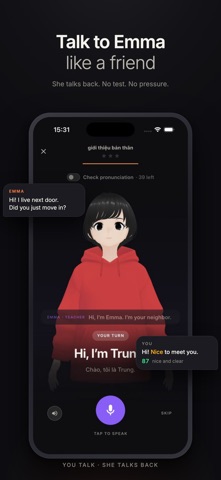
ROLE PLAY
• Order the coffee, meet the client, take the phone call, get through the interview
• Emma plays the other side, answers you back and keeps the scene moving
• Pick one of the replies you're offered, or say something of your own
• Turn on "my voice" and the finished scene plays back with your lines in your voice
HOW TO TALK
• Say or type what you need to say, in your own language
• It comes back in English, in the tone you choose, from casual to professional to IELTS
• Read it out loud line by line, and the score comes in as you go
• Film yourself saying it and keep the video
YOUR LIBRARY
• Pronunciation, Notebook, Shorts, Podcasts and Channels, all in one tab
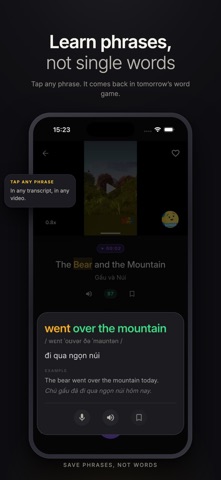
• Tap any word or phrase in a transcript to see how to say it, what it means and an example
• One gold bookmark saves it to your Notebook, with the translation beside it
• Saved lines come back for review after 1, 3, 7, 14 and 30 days
MADE FOR YOU
• Set your language once and every line arrives with a translation beside it
• Tell us your level, what you do and what you're into, and your practice leans that way
• A gentle reminder in the evening so the day doesn't slip by
STREAK AND LEADERBOARD
• Practice anything, even one line, and your streak is safe for the day
• Every Monday everyone is back at zero, so it's never too late to climb
• Daily missions, a reward just for turning up, and badges along the way
START FREE
Every feature is open to try, every day, for free. Plus lifts the daily limits and gives every line a Pro Voice.
Terms of use (EULA): https://www.apple.com/legal/internet-services/itunes/dev/stdeula/