

Larmi Watch is made and published by 会桂 罗. AppBrain is an independent app data site and isn't affiliated with 会桂 罗. The app name, icon, screenshots and description belong to 会桂 罗 and are shown as published on the App Store.
AppBrain's verdict
- Last updated
- January 13, 2026
- Size
- 429.4 MB
User feedback
Ratings and reviews on the App StoreComments on Larmi Watch for iOS
We don't have enough comments to show example comments. Please check back later.
Store listing
By 会桂 罗, from the App Store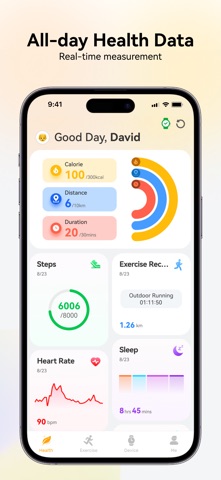


Description by 会桂 罗 Written by the developer, not by AppBrain. Click to read.
1. One of the app's main functions is to push incoming calls and SMS/MMS messages from your phone to your connected smartwatch, allowing you to answer and view SMS/MMS messages on your watch. If you reject a call on your watch, you can quickly reply, and the app will send a pre-configured message to the caller. Please note that the app requires "SMS and Call Log permissions" to enable these functions; without these permissions, the app will not function.
2. It records heart rate data collected by the smartwatch and displays it in line and bar graphs.
3. It records exercise data collected by the smartwatch, including steps, cadence, and distance, and displays it in line and bar graphs.
4. It records sleep data collected by the smartwatch and displays it in line and bar graphs.
5. Use your watch to start exercise or fitness activities.
6. Set reminders and alarms for your smartwatch.
The data on the app is for reference only and should not be used as a basis for diagnosis or treatment.
Safety and technology
Found in the app by AppBrain- Price
- Free
- App size
- 429.4 MB
- Content rating
- Everyone
Technologies used by Larmi Watch
Releases
Updates seen on the App Store- Version
- 1.0.6
- Launched
- November 2025
No changelog data
Alternatives
Similar apps and more from 会桂 罗




Rankings
App Store top chartsApp Store Rankings for Larmi Watch
About the app and developer
About Larmi Watch
Larmi Watch is a health & fitness app developed by 会桂 罗.
User Ratings
The app has no ratings yet.
App Information
Larmi Watch is freely available from the App Store. The app size is 429.37 MB. The latest version available is 1.0.6. The last update was on January 13, 2026.
Technical Requirements
The app has a content rating of Everyone. The app has been available on the App Store since November 2025.
Developer information for 会桂 罗
Address: