




AppBrain's verdict
- Last updated
- October 14, 2026
- Size
- 8.88 MB
User feedback
Ratings and reviews on the App StoreComments on Learn to Draw Daily - Contour for iOS
We don't have enough comments to show example comments. Please check back later.
Store listing
By Karol Jaworski, from the App StoreDescription by Karol Jaworski Written by the developer, not by AppBrain. Click to read.
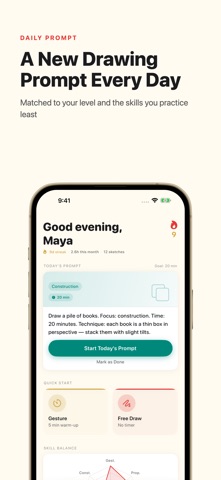
Every day you get a fresh drawing prompt. You have a gesture timer ready to go. You have a structured curriculum that takes you from shaky lines to confident figure drawing. And you have a sketchbook that remembers every session, every sketch, every step forward.
Whether you're a complete beginner or someone returning to drawing after years away, Contour gives you the structure to build a real daily practice.
DAILY PROMPTS
A new drawing challenge every day. Subjects rotate across figures, objects, environments, and concepts - keeping your practice varied and your eye sharp. Prompts are matched to your skill level and weighted toward the skills you have been neglecting.
GESTURE DRAWING TIMER
Time-based drawing sessions that train your hand to capture form quickly. Choose from 7 preset sessions - from 30-second warm-up poses to 20-minute extended studies. Free includes Warm-up and Quick Study. Pro unlocks all 7 presets plus custom intervals, where you set your own pose length and pose count.
FOCUSED EXERCISES
Targeted drills for specific skills: Line Confidence, Shape Construction, Blind Contour, Negative Space, and more. Free includes 3 exercise types. Pro unlocks all 10.
STRUCTURED CURRICULUM
A 6-level, 26-unit drawing curriculum built for self-taught artists. Every unit is a full lesson - the concept explained, a warm-up, a core exercise, and self-assessment questions to check your own work. Start with foundations - line quality, proportion, basic forms. Progress through depth and perspective, value and shading, composition, and subject mastery. Free includes Level 1 (Foundations, Weeks 1-4). Pro unlocks the full curriculum.
SKILL BALANCE RADAR
See exactly where you're strong and where you need work. The radar chart tracks 7 core skills - updated after every session so you always know what to practice next.
PERSONAL SKETCHBOOK
Log every practice session with notes and photos of your work. Build a visual record of your progress. Free shows your 30 most recent sessions. Pro shows your whole history, so nothing gets left out.
DAILY REMINDERS
Set a reminder time and Contour nudges you once a day. Small sessions, done consistently, are the whole point.
CONTOUR PRO
Unlock every feature with a monthly or annual subscription. The price for your country is shown in the app before you subscribe. Cancel anytime.
- All 7 gesture presets + custom intervals
- All 10 focused exercise types
- Full 6-level curriculum (Levels 2-6)
- Your full sketchbook history
THE PHILOSOPHY
Most people who want to draw never start - or start and stop after a week. Contour is designed around one idea: small daily sessions compound into real skill. Twenty minutes today. Twenty minutes tomorrow. A year from now, you won't recognize your own drawings.
Pick up your pencil. Let's draw something good.
Terms of Use (EULA): https://www.apple.com/legal/internet-services/itunes/dev/stdeula/
Safety and technology
Found in the app by AppBrain- Price
- Free
- App size
- 8.88 MB
- Content rating
- Everyone
Technologies used by Learn to Draw Daily - Contour
Releases
Updates seen on the App Store- Version
- 1.1.2
- Launched
- March 2026
No changelog data
Alternatives
Similar apps and more from Karol JaworskiAlternatives to Learn to Draw Daily - Contour





More from Karol Jaworski


Rankings
App Store top chartsApp Store Rankings for Learn to Draw Daily - Contour
About the app and developer
About Learn to Draw Daily - Contour
Learn to Draw Daily - Contour is an education app developed by Karol Jaworski.
User Ratings
The app has no ratings yet.
App Information
Learn to Draw Daily - Contour is freely available from the App Store. The app size is 8.88 MB. The latest version available is 1.1.2. The last update was on October 14, 2026.
Technical Requirements
The app has a content rating of Everyone. The app has been available on the App Store since March 2026.
Learn to Draw Daily - Contour is made and published by Karol Jaworski. AppBrain is an independent app data site and isn't affiliated with Karol Jaworski. The app name, icon, screenshots and description belong to Karol Jaworski and are shown as published on the App Store.
Developer information for Karol Jaworski
Address:
Frequently asked questions about Learn to Draw Daily - Contour
Is Learn to Draw Daily - Contour free?
Yes. Learn to Draw Daily - Contour is free on the App Store.
Is Learn to Draw Daily - Contour still available?
Yes. Learn to Draw Daily - Contour is on the App Store, and the last update we saw was on October 14, 2026.
How large is Learn to Draw Daily - Contour?
Learn to Draw Daily - Contour is 8.88 MB.
Is Learn to Draw Daily - Contour suitable for children?
App Store rates the content of Learn to Draw Daily - Contour as suitable for everyone.
Who made Learn to Draw Daily - Contour?
Learn to Draw Daily - Contour was developed by Karol Jaworski. It is listed in the education category on the App Store.
What are the best alternatives to Learn to Draw Daily - Contour?
People looking at Learn to Draw Daily - Contour also look at these education apps: おだんご -勉強記録SNS-, Learn to draw with Grifoli, Vangu: Learn to Draw, Sticker Lab: Photo Stickers, Zawierzenie 33 dni.