AppBrain
AppBrain
  • Apps
  • Apps being viewed right now Trending apps today Most popular apps All-time most installed apps Top rated apps iPhone and iPad apps
  • Intelligence ▾
    Intelligence overview → Track any Android app or your whole market
    Track & analyze
    Keyword Tracker & OptimizerTrack & improve Play rankings App Performance ReportOne-off PDF for any app StatisticsFree Android & Play market stats
    Promote your app
    Featured Apps App Links
  • Intelligence
  • Pricing
  • Dashboard
  • Sign up
  • Log in
App Store Apps > Education > Vangu: Learn to Draw
Vangu: Learn to Draw icon

Vangu: Learn to Draw

by Jesse Deng · Education · Free
On the App Store since April 2026 · Data updated 2026-10-30
App Store

Vangu: Learn to Draw is made and published by Jesse Deng. AppBrain is an independent app data site and isn't affiliated with Jesse Deng. The app name, icon, screenshots and description belong to Jesse Deng and are shown as published on the App Store.

AppBrain's verdict

Rating on App Store
4.53
43 ratings
Last updated
September 8, 2026

It doesn't have enough ratings yet to judge what users think.

Rankings

App Store top charts

App Store Rankings for Vangu: Learn to Draw

This app is not ranked

Competitors

Similar apps and more from Jesse Deng

Alternatives to Vangu: Learn to Draw

MangaMentor: How to Draw Manga icon MangaMentor: How to Draw Manga
Sierra Chica Software SL
2.5
Free
2 ratings
Learn to Draw Daily - Contour icon Learn to Draw Daily - Contour
Karol Jaworski
0.0
Free
Bluent: Learn German & Speak icon Bluent: Learn German & Speak
OpenTide GmbH
0.0
Free
Słownik Ortograficzny polski icon Słownik Ortograficzny polski
Dariusz Konieczko
2.0
$1.99
4 ratings
Lurai AI: Learn, Recall, Apply icon Lurai AI: Learn, Recall, Apply
LangChill, LLC
5.0
Free
1 ratings
How To Draw: With Matt Busch! icon How To Draw: With Matt Busch!
Digital Wave Creative
1.7
$1.99
23 ratings
How to draw Weapons by Steps icon How to draw Weapons by Steps
Maciej Fras
0.0
Free
Learn to draw with Grifoli icon Learn to draw with Grifoli
Ismael Martin Demiddel
3.0
Free
2 ratings

More from Jesse Deng

Polylingo: Language Reader icon Polylingo: Language Reader
Jesse Deng
4.8
Free
4 ratings
Kirie: Manga & Comic Maker icon Kirie: Manga & Comic Maker
Jesse Deng
2.3
Free
3 ratings
Face Swap & Lipsync - Mimik AI icon Face Swap & Lipsync - Mimik AI
Jesse Deng
5.0
Free
1 ratings
Zenith: AI Journal & Mentor icon Zenith: AI Journal & Mentor
Jesse Deng
5.0
Free
1 ratings
Clear Scan: Food Toxin Scanner icon Clear Scan: Food Toxin Scanner
Jesse Deng
5.0
Free
1 ratings
Hypnolux: Learn to lucid dream icon Hypnolux: Learn to lucid dream
Jesse Deng
0.0
Free
Learn Italian - SpeakWiz icon Learn Italian - SpeakWiz
Jesse Deng
0.0
Free
Speakwiz: Learn Spanish Fast icon Speakwiz: Learn Spanish Fast
Jesse Deng
0.0
Free

Releases

Updates seen on the App Store
Version
1.1.7
Launched
April 2026

No changelog data

User feedback

Ratings and reviews on the App Store

Comments on Vangu: Learn to Draw for iOS

We don't have enough comments to show example comments. Please check back later.

Technology

Found in the app by AppBrain
Price
Free
App size
98.1 MB
Content rating
Everyone

Technologies used by Vangu: Learn to Draw

About the app and developer

About Vangu: Learn to Draw

Vangu: Learn to Draw is an education app developed by Jesse Deng.

User Ratings

Vangu: Learn to Draw is rated 4.53 out of 5 stars. The rating is based on 43 ratings.

App Information

Vangu: Learn to Draw is freely available from the App Store. The app size is 98.13 MB. The latest version available is 1.1.7. The last update was on September 8, 2026.

Technical Requirements

The app has a content rating of Everyone. The app has been available on the App Store since April 2026.

Developer information for Jesse Deng

Jesse Deng

Address:

Frequently asked questions about Vangu: Learn to Draw

Is Vangu: Learn to Draw free?

Yes. Vangu: Learn to Draw is free on the App Store.

Is Vangu: Learn to Draw still available?

Yes. Vangu: Learn to Draw is on the App Store, and the last update we saw was on September 8, 2026.

How large is Vangu: Learn to Draw?

Vangu: Learn to Draw is 98.13 MB.

Is Vangu: Learn to Draw suitable for children?

App Store rates the content of Vangu: Learn to Draw as suitable for everyone.

How do people rate Vangu: Learn to Draw?

Vangu: Learn to Draw scores 4.53 out of 5 stars, from 43 ratings on the App Store.

Who made Vangu: Learn to Draw?

Vangu: Learn to Draw was developed by Jesse Deng. It is listed in the education category on the App Store.

What are the best alternatives to Vangu: Learn to Draw?

People looking at Vangu: Learn to Draw also look at these education apps: MangaMentor: How to Draw Manga, Learn to Draw Daily - Contour, Bluent: Learn German & Speak, Słownik Ortograficzny polski, Lurai AI: Learn, Recall, Apply.

Share Vangu: Learn to Draw

Store listing

By Jesse Deng, from the App Store
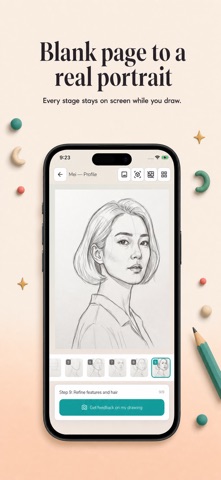
Vangu: Learn to Draw Screenshot 1 of 6
Vangu: Learn to Draw Screenshot 2 of 6
Vangu: Learn to Draw Screenshot 3 of 6
Vangu: Learn to Draw Screenshot 4 of 6
Vangu: Learn to Draw Screenshot 5 of 6
Vangu: Learn to Draw Screenshot 6 of 6
Screenshots by Jesse Deng, from the the App Store listing
Description by Jesse Deng Written by the developer, not by AppBrain. Click to read.
Learn to draw anything — starting with any photo from your camera roll.

Pick a photo. Pick a style. In moments, you get a 9-step sketch tutorial laid out panel by panel, just like the structured exercises real artists use. Follow along on paper, on a tablet, or anywhere you can hold a pencil.

HOW IT WORKS

1. Upload any photo — a portrait, a pet, a flower, a building, a landscape.
2. Choose your medium — pencil, black ink, or ink & watercolor.
3. Get 9 progressive panels showing exactly how the drawing is built up, from the first light construction lines to the final rendered piece.
4. Swipe panel by panel and sketch each step at your own pace.

BUILT ON REAL ARTIST TECHNIQUES

Every tutorial follows the same construction methods professional artists teach — the Loomis head method for portraits, gesture-first figure construction, silhouette-before-detail for animals, perspective grids for architecture. You're not tracing. You're learning the thinking behind the drawing.

THREE STYLES, ONE PRACTICE

• Pencil Sketch — graphite fundamentals, shading, proportion
• Black Ink — confident line work, cross-hatching, high contrast
• Ink & Watercolor — loose gestural lines with color washes

DRAW ANY SUBJECT

Portraits. Figures. Animals. Landscapes. Still life. Architecture. Bring your own reference photo or start with the curated examples inside the app.

GET FEEDBACK ON YOUR WORK

Snap a photo of your finished sketch and get a focused critique — what's working, what to tighten next time, and the one fix that will level you up the fastest.

PERFECT FOR

• Complete beginners who've always wanted to draw
• Hobbyists looking for structured daily practice
• Artists learning a new medium
• Anyone who learns best by doing

Every new user gets free credits to try it out. No subscription required to start.

Designed for phone and tablet. Dark mode supported. Screen stays awake while you sketch.
Uses Apple's EULA: https://www.apple.com/legal/internet-services/itunes/dev/stdeula/
Official page on the App Store
Popular Education Apps Top new apps Price drops on Google Play Today's trending apps Apps other people are watching
MangaMentor: How to Draw Manga icon MangaMentor: How to Draw Manga
Learn to Draw Daily - Contour icon Learn to Draw Daily - Contour
Bluent: Learn German & Speak icon Bluent: Learn German & Speak
Słownik Ortograficzny polski icon Słownik Ortograficzny polski
Lurai AI: Learn, Recall, Apply icon Lurai AI: Learn, Recall, Apply
How To Draw: With Matt Busch! icon How To Draw: With Matt Busch!
How to draw Weapons by Steps icon How to draw Weapons by Steps
Learn to draw with Grifoli icon Learn to draw with Grifoli
Overview Alternatives Reviews Rankings Technology
AppBrain Intelligence premium content

Subscribe now to get full and unlimited access to AppBrain Intelligence. You'll have access to:

  • App Intelligence dashboard (performance timeline, competitor comparison, country rankings, insight cards)
  • Detailed ranking data per app
  • Full timeline per developer
  • Device market shares data per country
  • Unlimited keyword tracking
1 Month

$75/mo
(billed every month)

SAVE 0%
Subscribe
3 Months

$65/mo
($195 billed every 3 months)

SAVE 13%
Subscribe
1 Year

$57.50/mo
($690 billed every year)

SAVE 23%
Subscribe
Each subscription will automatically renew 3 days before the expiration date for the same time period. Subscriptions can be cancelled at any time before the renewal.

AppBrain is an app data site, we track rankings, ratings, installs for all apps and games on Google Play and the App Store. AppBrain doesn't host app files or APKs, all install links go directly to the official store. All trademarks are owned by their respective owners.

More apps

  • Top Android apps being viewed
  • Speak and Translate Languages
  • View TapCook: Budget Meal Plans
  • Health100

App statistics

  • Android statistics
  • Google Play Developer stats
  • Trending Android Apps
  • Trending iOS apps
  • Top popular Apps
  • Buy the best Android phone
  • Buy & sell app businesses

About AppBrain

  • Contact
  • Privacy
  • Documentation
  • DMCA takedowns
  • Blog
  • Android App Marketing: Learn how to better market your Android app
© 2010-2026 - AppBrain