

Ledge – Clipboard & Snippets
Ledge – Clipboard & Snippets is made and published by Gaurav Kukreja. AppBrain is an independent app data site and isn't affiliated with Gaurav Kukreja. The app name, icon, screenshots and description belong to Gaurav Kukreja and are shown as published on the App Store.
AppBrain's verdict
- Last updated
- September 30, 2026
Rankings
App Store top chartsApp Store Rankings for Ledge – Clipboard & Snippets
Competitors
Similar apps and more from Gaurav KukrejaAlternatives to Ledge – Clipboard & Snippets


More from Gaurav Kukreja

Releases
Updates seen on the App Store- Version
- 1.0
- Launched
- September 2026
No changelog data
User feedback
Ratings and reviews on the App StoreComments on Ledge – Clipboard & Snippets for iOS
We don't have enough comments to show example comments. Please check back later.
Technology
Found in the app by AppBrain- Price
- Free
- App size
- 18.9 MB
- Content rating
- Everyone
Technologies used by Ledge – Clipboard & Snippets
About the app and developer
About Ledge – Clipboard & Snippets
Ledge – Clipboard & Snippets is a productivity app developed by Gaurav Kukreja.
User Ratings
The app has no ratings yet.
App Information
Ledge – Clipboard & Snippets is freely available from the App Store. The app size is 18.93 MB. The latest version available is 1.0. The last update was on September 30, 2026.
Technical Requirements
The app has a content rating of Everyone. The app has been available on the App Store since September 2026.
Developer information for Gaurav Kukreja
Address:
Store listing
By Gaurav Kukreja, from the App Store



Description by Gaurav Kukreja Written by the developer, not by AppBrain. Click to read.
Save from any app with the Share Sheet, paste what you've copied in one tap, or snap a photo of a whiteboard and search its text later. Everything you save is organised, searchable and one tap from being copied again.
SAVE FROM ANYWHERE
• Share Sheet from any app, with tags, a note and a pin
• Paste from the clipboard in one tap
• Photos and screenshots, with their text made searchable
• Files and whole folders
• Quick notes, from the app, a widget, Control Center or Shortcuts
FIND IT IN SECONDS
• Typo-tolerant search across everything you've saved
• Search the text inside photos and screenshots
• Your own tags, with colours and icons
• Pin favourites so they're always on top
• Sort by recent, most used or kind
SNIPPETS THAT FILL THEMSELVES IN
• Reusable text with today's date, the time and the clipboard
• Fill-in fields and choices for names, amounts and replies
• See the template and the finished text side by side, then copy
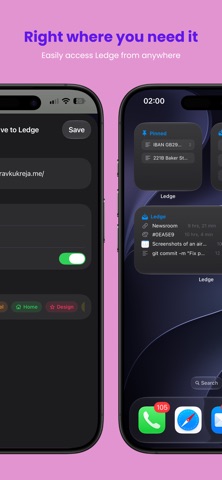
RIGHT WHERE YOU NEED IT
• Home Screen and Lock Screen widgets for pinned items and quick actions
• Control Center buttons for a quick note or a pinned item
• Shortcuts actions to save, search and copy
WORKS WITH YOUR MAC
With Ledge for Mac, everything you copy on your Mac is on your iPhone too. Turn on iCloud sync once and both devices share one library. Sync uses your own iCloud account, never a server of ours.
PRIVATE BY DESIGN
Everything stays on your devices. No accounts, no ads, no tracking.
LEDGE PRO
Ledge is useful for free. Ledge Pro adds unlimited history and snippets, text recognition on every image, search by meaning, smart collections and iCloud sync. Choose monthly, yearly (with a 3-day free trial) or a one-time Lifetime purchase. One purchase unlocks Ledge on both iPhone and Mac.
Subscriptions renew automatically unless cancelled at least 24 hours before the end of the current period. Manage or cancel any time in your App Store account settings.
Terms of Use: https://www.apple.com/legal/internet-services/itunes/dev/stdeula/
Privacy Policy: https://sites.google.com/view/ledgeprivacypolicy/home