

Amber: Snippets, Images, Docs
Amber: Snippets, Images, Docs is made and published by Chinmay Pingale. AppBrain is an independent app data site and isn't affiliated with Chinmay Pingale. The app name, icon, screenshots and description belong to Chinmay Pingale and are shown as published on the App Store.
AppBrain's verdict
- Last updated
- October 11, 2026
- Size
- 51.1 MB
User feedback
Ratings and reviews on the App StoreComments on Amber: Snippets, Images, Docs for iOS
We don't have enough comments to show example comments. Please check back later.
Store listing
By Chinmay Pingale, from the App Store


Description by Chinmay Pingale Written by the developer, not by AppBrain. Click to read.
Keep a snippet, an image, a file or a document once — then reach for it in a tap, from your iPhone, your iPad or your Mac.
FOR THE REPLY YOU RETYPE EVERY WEEK
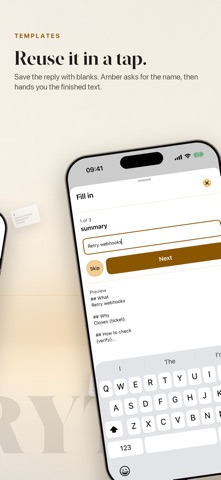
Save it as a template with blanks, and Amber asks for the name and the project and hands you the finished text.
FOR THE DOCUMENTS YOU SHOW CLIENTS
Group them in a project, then present them page by page in Show Mode — and hand over the real file, not its filename.
FOR THE TWENTIETH FORM ASKING FOR YOUR ADDRESS
Fill a form lines up your own details in the order forms ask for them, one tap to copy each, and it keeps your place.
ORGANISE IT THE WAY YOU THINK
Projects hold shelves, and shelves nest inside them. Smart shelves are saved searches that stay live — "PDFs used this month" keeps itself up to date. Drag a card onto a shelf to move it; drop a file straight onto one to keep it there.
AUTOMATIONS
Turn any of that into a named routine you run with one tap.
IT FINDS THINGS BY WHAT THEY SAY
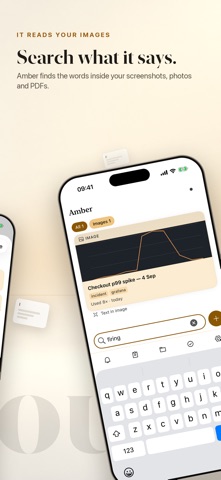
Amber reads the words inside your images and documents, so a screenshot of a receipt is findable by what is written on it.
BRING YOUR SNIPPETS WITH YOU
Import snippets from Raycast, Alfred, Text Replacements, CSV or plain text.
YOUR IPHONE CAN DRIVE YOUR MAC
Show a document on the big screen from your pocket, or beam a card to another of your own devices — no pairing, no cable.
BUILT FOR THE KEYBOARD
⌘/ lists every shortcut Amber has. Widgets, Shortcuts, Spotlight and a menu bar item keep your cards close without opening the app.
YOUR CONTENT STAYS YOURS
There is no Amber account and no Amber server. Everything lives on your device and syncs through your own iCloud. No analytics, no tracking, no ads.
Amber is free to use. Amber Pro is a one-off purchase — not a subscription — that lifts the card limit and unlocks the Pro features. If it ever lapses, your cards stay readable and copyable. Nothing is held hostage.
Safety and technology
Found in the app by AppBrain- Price
- Free
- App size
- 51.1 MB
- Content rating
- Everyone
Technologies used by Amber: Snippets, Images, Docs
Releases
Updates seen on the App Store- Version
- 1.3.0
- Launched
- August 2026
No changelog data
Alternatives
Similar apps and more from Chinmay PingaleAlternatives to Amber: Snippets, Images, Docs


More from Chinmay Pingale

Rankings
App Store top chartsApp Store Rankings for Amber: Snippets, Images, Docs
About the app and developer
About Amber: Snippets, Images, Docs
Amber: Snippets, Images, Docs is a productivity app developed by Chinmay Pingale.
User Ratings
The app has no ratings yet.
App Information
Amber: Snippets, Images, Docs is freely available from the App Store. The app size is 51.10 MB. The latest version available is 1.3.0. The last update was on October 11, 2026.
Technical Requirements
The app has a content rating of Everyone. The app has been available on the App Store since August 2026.
Developer information for Chinmay Pingale
Address:
Frequently asked questions about Amber: Snippets, Images, Docs
Is Amber: Snippets, Images, Docs free?
Yes. Amber: Snippets, Images, Docs is free on the App Store.
Is Amber: Snippets, Images, Docs still available?
Yes. Amber: Snippets, Images, Docs is on the App Store, and the last update we saw was on October 11, 2026.
How large is Amber: Snippets, Images, Docs?
Amber: Snippets, Images, Docs is 51.10 MB.
Is Amber: Snippets, Images, Docs suitable for children?
App Store rates the content of Amber: Snippets, Images, Docs as suitable for everyone.
Who made Amber: Snippets, Images, Docs?
Amber: Snippets, Images, Docs was developed by Chinmay Pingale. It is listed in the productivity category on the App Store.
What are the best alternatives to Amber: Snippets, Images, Docs?
People looking at Amber: Snippets, Images, Docs also look at these productivity apps: Found: Private Library, Stash: Save & Reuse, Ledge – Clipboard & Snippets, SaveCross: Clipboard Library, Assorta.