



AppBrain's verdict
- Last updated
- July 26, 2026
- Size
- 4.14 MB
User feedback
Ratings and reviews on the App StoreComments on Ledger Clip for iOS
We don't have enough comments to show example comments. Please check back later.
Store listing
By 瑞丰 宫, from the App StoreDescription by 瑞丰 宫 Written by the developer, not by AppBrain. Click to read.
It is built for people who want to keep their accounts clear without using complicated accounting software. Record income and expenses, attach receipts and contracts, organize project files, and export reports when you need to reconcile, submit, or archive your records.
Key Features:
Fast Bookkeeping
Record income, expenses, transfers, and reimbursements. Each entry can include amount, category, contact, purpose, invoice status, notes, custom fields, and attachments.
Voice Entry
When typing is inconvenient, speak one sentence to create a draft entry. Ledger Clip can help identify the amount, type, category, contact, and invoice status, and you can edit everything before saving.
Multiple Ledgers
Create separate ledgers for projects, job sites, clients, stores, family accounts, or daily business. Each ledger shows total income, total expenses, current balance, profit rate, and detailed records.
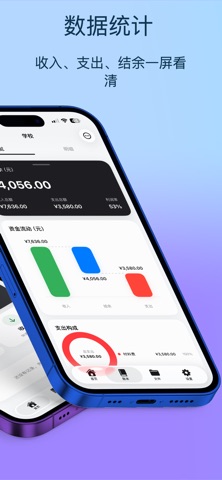
Clear Statistics
View cash flow, expense breakdowns, income and expense trends, file counts, and transaction details to understand where the money came from and where it went.
File Library
Store invoices, receipts, contracts, screenshots, PDFs, Excel files, Word documents, and other important files in one place. Files can also be linked to specific entries, so every record can keep its proof together.
Import and Scan
Upload files, save photos, scan documents with the camera, or import files shared from other apps such as WeChat.
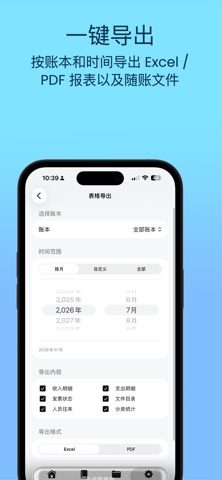
Export Reports
Export data packages by ledger and date range. Reports can include income details, expense details, invoice status, file catalog, people summary, and category statistics. Exported packages can include both tables and related attachments.
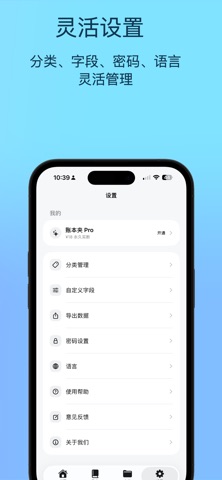
Custom Fields
Add fields that match your workflow, such as payment method, project number, payee, vehicle plate, requester, or any other information you need to track.
Local-First Privacy
Ledger Clip focuses on local data storage and does not actively upload your ledgers, vouchers, or files. You can also set a local passcode to protect your records.
Ledger Clip is useful for job site bookkeeping, project accounting, small business records, contractor expenses, material costs, labor payments, family budgets, reimbursements, invoice tracking, receipt management, and report export.
Record the transaction, keep the proof, and export the report when it is time to settle.
Safety and technology
Found in the app by AppBrain- Price
- Free
- App size
- 4.14 MB
- Content rating
- Everyone
Technologies used by Ledger Clip
Releases
Updates seen on the App Store- Version
- 1.1
- Launched
- July 2026
No changelog data
Alternatives
Similar apps and more from 瑞丰 宫Alternatives to Ledger Clip



More from 瑞丰 宫

Rankings
App Store top chartsApp Store Rankings for Ledger Clip
About the app and developer
About Ledger Clip
Ledger Clip is an utilities app developed by 瑞丰 宫.
User Ratings
The app has no ratings yet.
App Information
Ledger Clip is freely available from the App Store. The app size is 4.14 MB. The latest version available is 1.1. The last update was on July 26, 2026.
Technical Requirements
The app has a content rating of Everyone. The app has been available on the App Store since July 2026.
Ledger Clip is made and published by 瑞丰 宫. AppBrain is an independent app data site and isn't affiliated with 瑞丰 宫. The app name, icon, screenshots and description belong to 瑞丰 宫 and are shown as published on the App Store.
Developer information for 瑞丰 宫
Address:
Frequently asked questions about Ledger Clip
Is Ledger Clip free?
Yes. Ledger Clip is free on the App Store.
Is Ledger Clip still available?
Yes. Ledger Clip is on the App Store, and the last update we saw was on July 26, 2026.
How large is Ledger Clip?
Ledger Clip is 4.14 MB.
Is Ledger Clip suitable for children?
App Store rates the content of Ledger Clip as suitable for everyone.
Who made Ledger Clip?
Ledger Clip was developed by 瑞丰 宫. It is listed in the utilities category on the App Store.
What are the best alternatives to Ledger Clip?
People looking at Ledger Clip also look at these utilities apps: Notta, CBCTHub, 比扬云网络连接终端, 橙子发票查重, 数据运营中台-用友畅捷通.