Download Android Apps and Games
AppBrain
  • Apps
  • Apps being viewed right now Trending apps today Most popular apps All-time most downloaded apps Top rated apps
  • Intelligence ▾
    Intelligence overview → Track any Android app or your whole market
    Track & analyze
    Keyword Tracker & OptimizerTrack & improve Play rankings App Performance ReportOne-off PDF for any app StatisticsFree Android & Play market stats
    Promote your app
    Featured Apps App Links
  • Intelligence
  • Pricing
  • Dashboard
  • Sign up
  • Log in
Last updated on: 2026-06-24
App Store Apps > Utilities > Level: Sound Level Meter
Level: Sound Level Meter icon

Level: Sound Level Meter

1.0
CARL JOSEPH SIEBER
0.00
0 reviews
Free

Level: Sound Level Meter Screenshot 1 of 5
Level: Sound Level Meter Screenshot 2 of 5
Level: Sound Level Meter Screenshot 3 of 5
Level: Sound Level Meter Screenshot 4 of 5
Level: Sound Level Meter Screenshot 5 of 5
Download from the App Store

About Level: Sound Level Meter

Level: Sound Level Meter is an overall app developed by CARL JOSEPH SIEBER.

Download Statistics

User Ratings

The app has no ratings yet.

App Information

Level: Sound Level Meter is FREE to download. The APK download size is 553.00 kB. The latest version available is 1.0. The last update was on June 23, 2026.

Technical Requirements

The app has a content rating of Everyone. The app has been available on Google Play 2 days ago.

Description
Level pairs a live sound-level meter with a built-in pink-noise generator, so you can set speaker levels, match channels, and verify system balance — without switching between tools. One focused app for dialing in a system by ear or by the number, not a busy measurement suite.

FEATURES
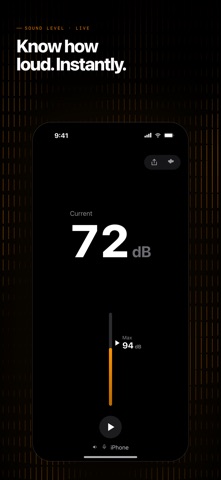
• A big, calm decibel reading you can see from the listening seat — set a level, match a speaker, or confirm a system is balanced at a glance
• Built-in pink-noise generator — play a consistent, full-spectrum reference out any output (iPhone speaker, AirPlay, Bluetooth, or a USB interface) while the meter keeps reading, to match levels and set gains
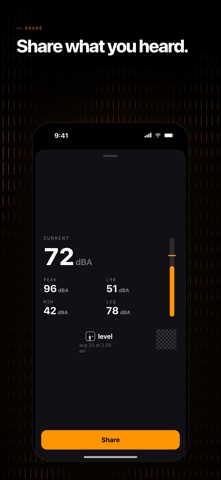
• Peak-hold "Max" — a marker floats to the loudest moment and holds it, so you can confirm a peak or compare one speaker against another; reset with a tap
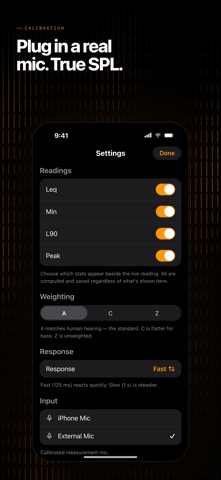
• A, C & Z frequency weighting — A for how your ears hear (the default), C for full-range and bass-heavy systems, Z unweighted; Fast (125 ms) or Slow (1 s) response
• A manual calibration offset to trim readings against a known reference
• Five color themes
• No account, no analytics, no third-party SDKs, no in-app purchases — and no network connections at all

HOW IT WORKS
Measure, play, set — the same three steps every time. Allow the microphone and read a speaker's output live, right from the listening position (audio is measured only; nothing is recorded). Tap play to send pink noise out the output you choose — tap the output name to pick any speaker, AirPlay device, Bluetooth, or USB interface — so every speaker has the same reference to level against. Then match each speaker to your target, balance the channels, set a listening level, and confirm the system is even, by the number or by ear.

A note on accuracy: the iPhone's built-in microphone isn't a calibrated instrument, so absolute readings are approximate. Level is an honest, well-behaved relative meter — exactly what level-matching needs — and a manual offset trims it against a known reference.

GREAT FOR
• DIY speaker builders dialing in a new pair
• Car-audio setups — matching components and balancing left and right
• Home and hi-fi systems — setting listening levels and matching speakers
• Live-sound hobbyists setting levels against a reference, not guesswork
• Anyone who wants to set and match levels quickly, without a pro measurement suite

PRIVACY
Audio is measured in real time only — never recorded, written to disk, or transmitted. The reference noise is generated on-device. Level collects no data, has no accounts or analytics, and makes no network connections at all.

No account. No signup. No analytics. No in-app purchases. No network connection.

QUICK START
1. Open Level and allow the microphone
2. Point it at a speaker and read the live level; the floating Max holds the loudest moment
3. Tap play to send pink noise to any output, and match each speaker against the reading
4. In Settings (gear): choose A/C/Z weighting, Fast/Slow response, a calibration offset, and a color theme
IMPORTANT
Level is built for setting and matching levels — by the number and by ear — not certified measurement. The built-in microphone isn't a calibrated instrument, so absolute readings are approximate; use the manual offset to trim against a known reference. Don't rely on it where a certified Type 1/Type 2 sound level meter is required.
Show more Show less

More data about Level: Sound Level Meter

Price Free to download
Rating No ratings
Ranking Highly ranked
Version 1.0
App download size 553.0 KB
Suitable for Everyone

Changelog of Level: Sound Level Meter

No changelog data

Developer information for CARL JOSEPH SIEBER

CARL JOSEPH SIEBER

Address:

Share Level: Sound Level Meter

Comments on Level: Sound Level Meter for iOS

We don't have enough comments to show example comments. Please check back later.

App Store Rankings for Level: Sound Level Meter

Top rankings

Rank Country Category List
36 United Kingdom Books New Apps
36 United Kingdom Business New Apps
36 United Kingdom Education New Apps
36 United Kingdom Entertainment New Apps
36 United Kingdom Finance New Apps
36 United Kingdom Food & Drink New Apps
36 United Kingdom Games New Apps
36 United Kingdom Action Games New Apps
36 United Kingdom Adventure Games New Apps
36 United Kingdom Arcade Games New Apps

Ranking history in United Kingdom

Ranking history
Subscribe to see full ranking history in this country
AppBrain offers valuable information about your app and those of your competitors. Join AppBrain for free and claim this app to view more ranking data, view history etc.
I'm the developer of this app

Technologies used by Level: Sound Level Meter

More hot apps 🔥

Back to top
AppBrain Intelligence premium content

Subscribe now to get full and unlimited access to AppBrain Intelligence. You'll have access to:

  • App Intelligence dashboard (performance timeline, competitor comparison, country rankings, insight cards)
  • Detailed ranking data per app
  • Full timeline per developer
  • Device market shares data per country
1 Month

$75/mo
(billed every month)

SAVE 0%
Subscribe
3 Months

$65/mo
($195 billed every 3 months)

SAVE 13%
Subscribe
1 Year

$57.50/mo
($690 billed every year)

SAVE 23%
Subscribe
Each subscription will automatically renew 3 days before the expiration date for the same time period. Subscriptions can be cancelled at any time before the renewal.

AppBrain is a directory focused on discovering great apps and games. We give statistics, rankings and search options that Google Play and the App Store don't have. All trademarks are owned by their respective owners. AppBrain doesn't offer APKs or binaries, and always lets users install the official version from Google Play or the App Store.

More apps

  • Top Android apps being viewed
  • Geometry Calculator Android App
  • Media Gallery
  • Bazam Bazi

Android Statistics

  • Android statistics
  • Google Play Developer stats
  • Trending Android Apps
  • Top popular Apps
  • Buy the best Android phone

About AppBrain

  • Contact
  • Privacy
  • Documentation
  • DMCA takedowns
  • Articles
  • Blog
  • How to improve the earnings of your ad units
© 2010-2026 - AppBrain