Download Android Apps and Games
AppBrain
  • Apps
  • Apps being viewed right now Trending apps today Most popular apps All-time most downloaded apps Top rated apps iPhone and iPad apps
  • Intelligence ▾
    Intelligence overview → Track any Android app or your whole market
    Track & analyze
    Keyword Tracker & OptimizerTrack & improve Play rankings App Performance ReportOne-off PDF for any app StatisticsFree Android & Play market stats
    Promote your app
    Featured Apps App Links
  • Intelligence
  • Pricing
  • Dashboard
  • Sign up
  • Log in
Last updated on: 2026-09-23
App Store Apps > Utilities > Grip: G-Force & Cornering
Grip: G-Force & Cornering icon

Grip: G-Force & Cornering

1.3.1
Carl Sieber
5.00
1 reviews
Free

Grip: G-Force & Cornering Screenshot 1 of 8
Grip: G-Force & Cornering Screenshot 2 of 8
Grip: G-Force & Cornering Screenshot 3 of 8
Grip: G-Force & Cornering Screenshot 4 of 8
Grip: G-Force & Cornering Screenshot 5 of 8
Grip: G-Force & Cornering Screenshot 6 of 8
Grip: G-Force & Cornering Screenshot 7 of 8
Grip: G-Force & Cornering Screenshot 8 of 8
5.00 · 1 reviews
Download from the App Store

About Grip: G-Force & Cornering

Grip: G-Force & Cornering is an utilities app developed by Carl Sieber.

What is the rating of Grip: G-Force & Cornering?

Grip: G-Force & Cornering is rated 5.00 out of 5 stars, based on one rating ratings.

Is Grip: G-Force & Cornering free?

Grip: G-Force & Cornering is free to download. The download size is 1.65 MB. The latest version available is 1.3.1. The last update was on July 18, 2026.

What are the requirements for Grip: G-Force & Cornering?

The app has a content rating of Everyone. The app has been available on App Store June 2026.

Description
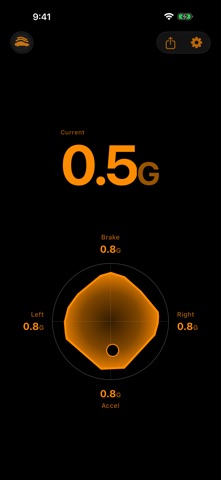
Grip turns your iPhone into a live vehicle dynamics display. As you accelerate, brake, and corner, it shows how your car uses the grip available to it — turning something you can only feel into something you can see.

Every drive leaves a shape. Each time you accelerate, brake, or turn, your car draws on the grip between its tires and the road, and Grip gathers all of it into one continuous picture. At a glance you can see how hard the car is working, how smooth your inputs are, and how much grip is still in reserve.

Inspired by the performance telemetry displays in modern sports cars, Grip is for drivers who want to understand how their car behaves — not just feel it.

LIVE GRIP ENVELOPE A circular display shows acceleration, braking, and cornering at once. A live marker tracks what the car is doing right now, while a grip envelope grows to show how much of the available grip you've used in each direction — the closer it reaches the edge, the closer you are to the limit. Four labels keep your session's peak forces in view.

REAL-TIME VEHICLE DYNAMICS Acceleration, braking, and cornering, read live from your iPhone's motion sensors — the kind of insight once found only on a performance car's dashboard.

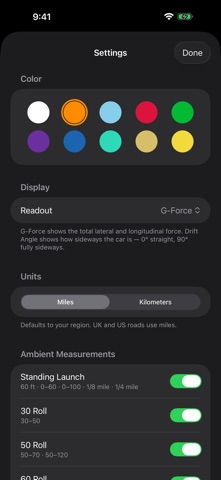
DRIFT ANGLE, WHEN YOU WANT IT Switch the readout to drift angle for a live read on slip — how far the car's heading has stepped out from its direction of travel. 0° is straight tracking; the angle grows as the car begins to rotate beyond its line. No calibration, no setup.

AUTO-SCALING Grip starts at a 1G reference and steps out smoothly to 1.5G, 2.0G, and beyond as you explore your car's limits — automatically, with no manual adjustment.

ANY MOUNT, ANY ANGLE Dashboard mount, vent clip, or charging pad. Grip combines your iPhone's motion sensors with your direction of travel to align itself to the car — no calibration step, no fixed position. The moment you pull away, it's reading how your car uses grip.

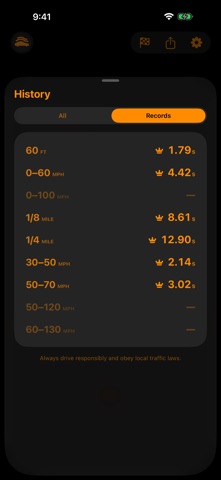
RUNS — YOUR QUARTER-MILE, CAUGHT AUTOMATICALLY Grip watches in the background while you drive. Set a roll or stage a standing launch, floor it, and it banks your 60-foot, 0–60, and quarter-mile — timed from the instant you rolled into it. No button, no countdown — you decide it was a run after the run. Every banked run lands in History with the car that set it, and a Records board tracks your all-time bests across every measure.

GARAGE Keep more than one car in the Garage — each with its own name and note — and switch which one is active in a tap. Runs are tagged with whichever car was active when you banked them, so History and Records stay sorted by vehicle automatically.

TEN COLORWAYS Choose from White, Amber, Ice Blue, Red, Green, Purple, Blue, Teal, Gold, and Yellow to match your interior or ambient light.

PRIVATE BY DEFAULT Everything is processed on your device. Location is used only to sense your direction of travel — in real time, never stored, never transmitted. No account, no sign-up, no cloud.

Drive responsibly. Grip is a vehicle dynamics display, not a distraction. Always mount your phone safely and keep your eyes on the road.
Show more Show less

More data about Grip: G-Force & Cornering

Price Free to download
Rating 5.00 based on a single rating
Ranking Not ranked
Version 1.3.1
App download size 1.65 MB
Suitable for Everyone

More from Carl Sieber

Sweep: Speaker Tuning icon Sweep: Speaker Tuning
Carl Sieber
4.0
Free
2 ratings
Level: Sound Level Meter icon Level: Sound Level Meter
Carl Sieber
5.0
Free
1 ratings
Lean: Inclinometer icon Lean: Inclinometer
Carl Sieber
5.0
Free
1 ratings

Changelog of Grip: G-Force & Cornering

No changelog data

Developer information for Carl Sieber

Carl Sieber

Address:

Share Grip: G-Force & Cornering

Comments on Grip: G-Force & Cornering for iOS

We don't have enough comments to show example comments. Please check back later.

App Store Rankings for Grip: G-Force & Cornering

This app is not ranked

Technologies used by Grip: G-Force & Cornering

Frequently asked questions about Grip: G-Force & Cornering

Is Grip: G-Force & Cornering free?

Yes. Grip: G-Force & Cornering is free to download from App Store.

Is Grip: G-Force & Cornering still available?

Yes. Grip: G-Force & Cornering is on App Store, and the last update we saw was on July 18, 2026.

How large is the Grip: G-Force & Cornering download?

Grip: G-Force & Cornering is 1.65 MB to download.

Is Grip: G-Force & Cornering suitable for children?

App Store rates the content of Grip: G-Force & Cornering as suitable for everyone.

How do people rate Grip: G-Force & Cornering?

Grip: G-Force & Cornering has one rating of 5.00 stars on App Store.

Who made Grip: G-Force & Cornering?

Grip: G-Force & Cornering was developed by Carl Sieber. It is listed in the utilities category on App Store.

Top new apps Apps other people are watching Today's trending apps Apps on sale Popular Utilities Apps
More hot apps 🔥

Back to top
AppBrain Intelligence premium content

Subscribe now to get full and unlimited access to AppBrain Intelligence. You'll have access to:

  • App Intelligence dashboard (performance timeline, competitor comparison, country rankings, insight cards)
  • Detailed ranking data per app
  • Full timeline per developer
  • Device market shares data per country
  • Unlimited keyword tracking
1 Month

$75/mo
(billed every month)

SAVE 0%
Subscribe
3 Months

$65/mo
($195 billed every 3 months)

SAVE 13%
Subscribe
1 Year

$57.50/mo
($690 billed every year)

SAVE 23%
Subscribe
Each subscription will automatically renew 3 days before the expiration date for the same time period. Subscriptions can be cancelled at any time before the renewal.

AppBrain is a directory focused on discovering great apps and games. We give statistics, rankings and search options that Google Play and the App Store don't have. All trademarks are owned by their respective owners. AppBrain doesn't offer APKs or binaries, and always lets users install the official version from Google Play or the App Store.

More apps

  • Top Android apps being viewed
  • App manager - cache (cleaner)
  • LWell Android App
  • Smart Box File for Android

App statistics

  • Android statistics
  • Google Play Developer stats
  • Trending Android Apps
  • Trending iOS apps
  • Top popular Apps
  • Buy the best Android phone

About AppBrain

  • Contact
  • Privacy
  • Documentation
  • DMCA takedowns
  • Articles
  • Blog
  • Tips to improve your Android promotional campaign
© 2010-2026 - AppBrain