

LifeOps Assistant
LifeOps Assistant is made and published by Jonnatan Lebron. AppBrain is an independent app data site and isn't affiliated with Jonnatan Lebron. The app name, icon, screenshots and description belong to Jonnatan Lebron and are shown as published on the App Store.
AppBrain's verdict
- Last updated
- September 5, 2026
Rankings
App Store top chartsApp Store Rankings for LifeOps Assistant
Competitors
Similar apps and more from Jonnatan LebronAlternatives to LifeOps Assistant


Releases
Updates seen on the App Store- Version
- 1.1.0
- Launched
- September 2026
No changelog data
User feedback
Ratings and reviews on the App StoreComments on LifeOps Assistant for iOS
We don't have enough comments to show example comments. Please check back later.
Technology
Found in the app by AppBrain- Price
- Free
- App size
- 45.3 MB
- Content rating
- Medium
Technologies used by LifeOps Assistant
About the app and developer
About LifeOps Assistant
LifeOps Assistant is a productivity app developed by Jonnatan Lebron.
User Ratings
The app has no ratings yet.
App Information
LifeOps Assistant is freely available from the App Store. The app size is 45.30 MB. The latest version available is 1.1.0. The last update was on September 5, 2026.
Technical Requirements
The app has a content rating of Medium Maturity. The app has been available on the App Store since September 2026.
Developer information for Jonnatan Lebron
Address:
Store listing
By Jonnatan Lebron, from the App Store


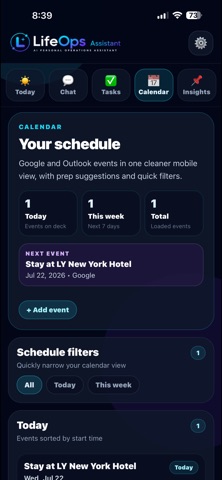
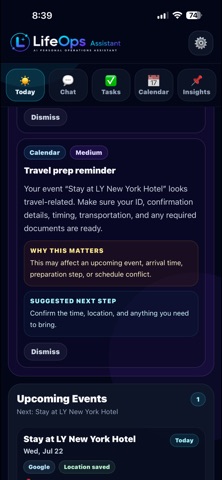
Description by Jonnatan Lebron Written by the developer, not by AppBrain. Click to read.
Bring your everyday priorities into one intelligent workspace. LifeOps helps you manage tasks and reminders, understand important email signals, stay aware of upcoming calendar events, analyze files and images, and get personalized guidance throughout your day.
KEY FEATURES
• AI Personal Assistant
Chat naturally with LifeOps to get help planning your day, organizing responsibilities, answering questions, and deciding what to focus on next.
• Daily Briefing
Start your day with a clear overview of your priorities, alerts, upcoming obligations, and recommended next steps.
• Email Intelligence
Connect supported Gmail and Outlook accounts to surface useful signals such as bills, deadlines, appointments, orders, travel updates, account notices, and other items that may need your attention.
• Calendar Awareness
Connect Google Calendar and Microsoft Calendar to view upcoming events and organize your schedule. Create and update supported calendar events directly from LifeOps.
• Tasks & Reminders
Create, manage, complete, and track tasks and reminders so important responsibilities do not slip through the cracks.
• Smart Recommendations
LifeOps can turn useful information from your connected services and activity into practical recommendations and suggested actions.
• File & Image Analysis
Upload supported documents, screenshots, and images to summarize information, extract important details, identify deadlines, and determine useful next steps.
• Live Information
Ask questions that need current information and LifeOps can perform live web searches when needed.
• Proactive Notifications
Receive enabled reminders, Daily Briefings, calendar preparation alerts, and Smart Recommendation notifications.
PRIVACY & CONTROL
Connecting Google or Microsoft is optional. You control your connected services and can delete your LifeOps account directly from the app.
LifeOps uses AI-generated information, which may occasionally be incomplete or inaccurate. Always verify important information before making significant decisions.
Your life has a lot of moving parts. LifeOps helps bring them together.
Terms of Use: https://www.apple.com/legal/internet-services/itunes/dev/stdeula/