

Lift Assist – Training Log
Lift Assist – Training Log is made and published by Fresh Take Designs. AppBrain is an independent app data site and isn't affiliated with Fresh Take Designs. The app name, icon, screenshots and description belong to Fresh Take Designs and are shown as published on the App Store.
AppBrain's verdict
- Rating on App Store
- 5.00
- 1 ratings
- Last updated
- June 23, 2025
- Size
- 13.4 MB
It doesn't have enough ratings yet to judge what users think.
User feedback
Ratings and reviews on the App StoreComments on Lift Assist – Training Log for iOS
We don't have enough comments to show example comments. Please check back later.
Store listing
By Fresh Take Designs, from the App Store



Description by Fresh Take Designs Written by the developer, not by AppBrain. Click to read.
FEATURES
– Fast and flexible training log
– Scale work sets
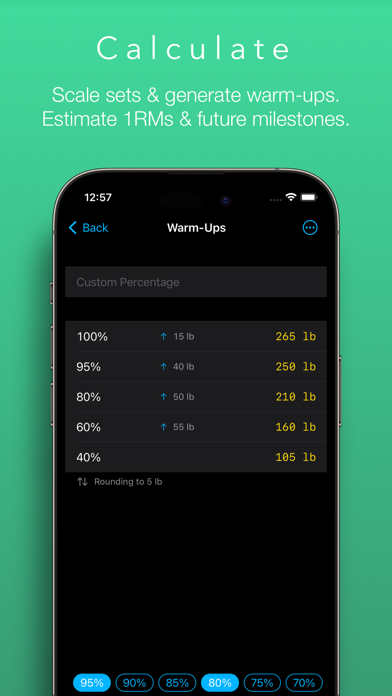
– Generate warm-ups on the fly
– Estimate 1RMs
– Forecast future milestones
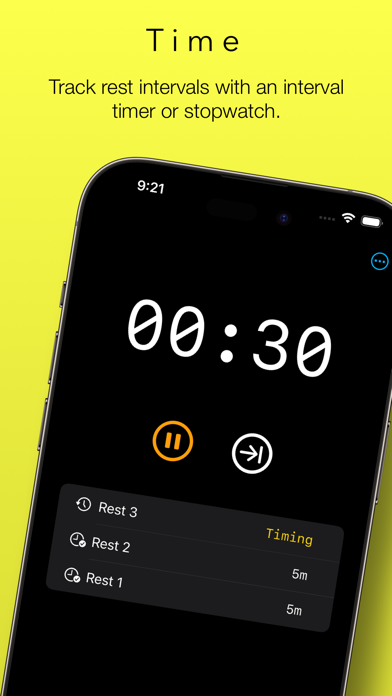
– Rest timer with interval or stopwatch operation
– Charts for PRs, volume and progress timelines
– Metric and imperial units
– Share sheet for exporting top sets
– Cloud storage
– Light and dark modes
TRAINING LOG
Lift Assist has been designed with speed and flexibility in mind. There’s no need to waste time creating a user account or building and maintaining complex workout plans. Simply add a folder for the lift you wish to track and start logging immediately.
(Hint: Hit the Repeat button to record sets across in a flash.)
Want to dig deeper? For each set, you can add a category (e.g. warm-up or back-off) and a Rate of Perceived Effort (RPE). For each record, you can add notes and a URL (e.g. a link to a video). There are even options to include an estimated 1RM and bodyweight ratio calculated from your top set.
(Hint: Long-press the + button to quickly select a category for the set.)
CHARTS
The Progress chart provides a sleek timeline of progress made for each lift. This chart emphasises the trend over time. Reviewing the last three months? You’ll see your heaviest lifts for each week. Reviewing the last year? You’ll see your heaviest lift for each month. Reviewing the last five years? The trend will still be clear.
Sometimes you can get a better picture of your progress by comparing estimated 1RMs. You can do that too. This is great when following programs that vary rep ranges and intensities over long periods of time.
The Heaviest chart displays PRs for the selected timeframe, either as logged sets or estimated 1RMs.
The Volume chart displays the volume of each lift for the selected timeframe, either by reps or weight. This can provide valuable insight when assessing your workout program.
CALCULATORS
The principal calculator provides a convenient way to scale an input weight by a selected percentage, increment/decrement by small plates and round the output to a selected value. This is ideal for calculating top sets based on previous PRs, but it’s also great for calculating back-off sets and de-loads on the fly.
Once you’ve calculated your top set, it’s a cinch to produce a list of warm-ups by selecting from a list of common percentages. Lift Assist displays the weight increments between each warm-up set to help you optimise your routine for your condition on the day.
Want to get really precise? You can enter your own custom percentages, too.
(Hint: Can’t find any small plates? Swipe the warm-up rows to round up or down to the nearest 5 kg / 10 lb.)
The 1RM calculator contains seven different formulas, rounding options and will even provide an estimated body weight ratio if provided with a body weight.
(Hint: You can use the output of the 1RM calculator to scale weights based on an estimated 1RM, which is great for programs such as 5/3/1.)
The Milestone Calculator helps you to plan for your next PR. Input the number of expected increments between two dates, and it will show you the expected weight you’ll be lifting. Enter in your target weight, and it will display the approximate date of your next PR attempt.
REST TIMER
Lift Assist’s rest timer helps you time and count rests between lifts. You can use this as an interval timer or stopwatch, or switch between the two.
Ever lost count of which set you were on? Let the rest timer keep you on track.
FEEDBACK
For support and feedback, drop us a line at feedback@freshtake.design. And don’t hesitate to send any requests for new features – this is only version 1.0!
Safety and technology
Found in the app by AppBrain- Price
- $2.99
- App size
- 13.4 MB
- Content rating
- Everyone
Technologies used by Lift Assist – Training Log
Releases
Updates seen on the App Store- Version
- 1.1.1
- Launched
- April 2023
No changelog data
Alternatives
Similar apps and more from Fresh Take DesignsAlternatives to Lift Assist – Training Log








Rankings
App Store top chartsApp Store Rankings for Lift Assist – Training Log
About the app and developer
About Lift Assist – Training Log
Lift Assist – Training Log is a health & fitness app developed by Fresh Take Designs.
What is the rating of Lift Assist – Training Log?
Lift Assist – Training Log is rated 5.00 out of 5 stars, based on one rating ratings.
Is Lift Assist – Training Log free?
Lift Assist – Training Log costs $2.99. The app size is 13.39 MB. The latest version available is 1.1.1. The last update was on June 23, 2025.
What are the requirements for Lift Assist – Training Log?
The app has a content rating of Everyone. The app has been available on the App Store since April 2023.
Developer information for Fresh Take Designs
Address: