AppBrain
AppBrain
  • Apps
  • Apps being viewed right now Trending apps today Most popular apps All-time most installed apps Top rated apps iPhone and iPad apps
  • Intelligence ▾
    Intelligence overview → Track any Android app or your whole market
    Track & analyze
    Keyword Tracker & OptimizerTrack & improve Play rankings App Performance ReportOne-off PDF for any app StatisticsFree Android & Play market stats
    Promote your app
    Featured Apps App Links
  • Intelligence
  • Pricing
  • Dashboard
  • Sign up
  • Log in
App Store Apps > Utilities > Lineal: Precise Screen Ruler
Lineal: Precise Screen Ruler icon

Lineal: Precise Screen Ruler

1.0
Yan Soisson
0.00
0 reviews
Free

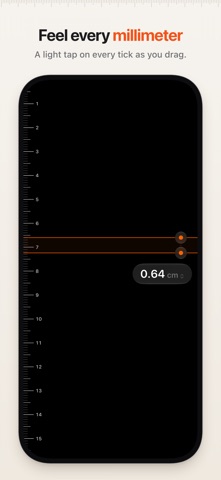
Lineal: Precise Screen Ruler Screenshot 1 of 5
Lineal: Precise Screen Ruler Screenshot 2 of 5
Lineal: Precise Screen Ruler Screenshot 3 of 5
Lineal: Precise Screen Ruler Screenshot 4 of 5
Lineal: Precise Screen Ruler Screenshot 5 of 5
Screenshots by Yan Soisson, from the the App Store listing
View on the App Store

About Lineal: Precise Screen Ruler

Lineal: Precise Screen Ruler is an utilities app developed by Yan Soisson.

What is the rating of Lineal: Precise Screen Ruler?

Lineal: Precise Screen Ruler has no ratings yet.

Is Lineal: Precise Screen Ruler free?

Lineal: Precise Screen Ruler is free. The app size is 717.00 kB. The latest version available is 1.0. The last update was on November 2, 2026.

What are the requirements for Lineal: Precise Screen Ruler?

The app has a content rating of Everyone. The app has been available on the App Store since November 2026.

Lineal: Precise Screen Ruler is made and published by Yan Soisson. AppBrain is an independent app data site and isn't affiliated with Yan Soisson. The app name, icon, screenshots and description belong to Yan Soisson and are shown as published on the App Store.

Description by Yan Soisson (from the App Store)
Lineal turns your iPhone or iPad into a ruler that’s as precise as its display allows. Two markers, one distance, nothing else. It measures anything that fits on your display.

Lineal identifies your exact model and the display it’s running on, uses that panel’s physical pixel density, and snaps every tick and both markers to the pixel grid. The distance between the markers is shown with two decimals, in centimeters or inches.

MADE FOR MEASURING
• Drag a marker, or drag anywhere: the nearest marker follows your finger, so your finger never covers the line.
• Drag both markers at once, one finger on each.
• Fine-tune with one finger: while dragging, slide sideways to slow the marker to half, a quarter, or a tenth of its speed.
• Feel the scale: a light tap on every millimeter or 1/16 inch, a firmer one on every whole centimeter or inch, and a stop at the edge of the screen.
• On iPad with Apple Pencil Pro, you feel every tick in the pencil.
• On iPad with a keyboard, the arrow keys move a marker by one pixel, Shift-arrow by one tick, and Space switches markers.
• Works in portrait and landscape. The markers stay in place when you rotate, fold iPhone Duo, or resize an iPad window.
• The screen stays awake while you measure.

CALIBRATED FOR YOUR DISPLAY
• A built-in table holds the pixel density of every supported iPhone and iPad.
• Lineal calculates pixels per point for each axis, so scaled displays and Display Zoom stay exact.
• Published pixel densities are rounded, so a small uncertainty remains: about ±0.1% on iPhone, up to ±0.2% on iPad.
• On iPhone Duo, both the outer and the inner display are calibrated. The inner display measures when it’s fully unfolded.
• On a model Lineal doesn’t know yet, it uses the pixel density of a matching known display; if there is none, it estimates the pixel density and the reading shows ≈.
• Lineal measures on the built-in display only, not on an external display.

ONE SETTING
• Centimeters or inches. Tap the reading to choose.

PRIVATE BY DESIGN
• No ads, no account, no tracking. Lineal collects no data.
• No network access, no camera, no AR, no LiDAR.

FOR EVERYONE
• VoiceOver: the markers are adjustable and speak the distance.
• Dynamic Type, Reduce Motion, and Increase Contrast.
• Light and dark appearance.
• In English, German, French, Spanish, and Portuguese (Brazil and Portugal).
Show more Show less

More data about Lineal: Precise Screen Ruler

Price Free
Rating No ratings
Ranking Not ranked
Version 1.0
App size 717.0 KB
Suitable for Everyone

Alternatives to Lineal: Precise Screen Ruler

TrueRuler: Pocket Ruler icon TrueRuler: Pocket Ruler
玥 熊
0.0
Free
OpenCCTV: Camera Viewer & NVR icon OpenCCTV: Camera Viewer & NVR
Codext GmbH
0.0
Free
Sinodonto Acre icon Sinodonto Acre
I & B Tecnologia LTDA
0.0
Free
Ring Sizer: Size Measure icon Ring Sizer: Size Measure
Abdeljalil Bouchfar
0.0
Free
Ruler: Measure, Level & Tools icon Ruler: Measure, Level & Tools
MOODLR DESENVOLVIMENTO DIGITAL LTDA
0.0
Free
ADDA Rental Manager icon ADDA Rental Manager
3Five8 Technologies Private Limited
0.0
Free
Physics Labs icon Physics Labs
Huseyin Aykut Uludag
0.0
Free
Surfie-Parent icon Surfie-Parent
PURESIGHT TECHNOLOGIES LTD
2.9
Free
9 ratings

More from Yan Soisson

Blip Notes icon Blip Notes
Yan Soisson
0.0
Free
Sniplyst icon Sniplyst
Yan Soisson
0.0
Free

Changelog of Lineal: Precise Screen Ruler

No changelog data

Developer information for Yan Soisson

Yan Soisson

Address:

Share Lineal: Precise Screen Ruler

Comments on Lineal: Precise Screen Ruler for iOS

We don't have enough comments to show example comments. Please check back later.

App Store Rankings for Lineal: Precise Screen Ruler

This app is not ranked

Technologies used by Lineal: Precise Screen Ruler

Price drops on Google Play Top new apps Popular Utilities Apps Today's trending apps Apps other people are watching
TrueRuler: Pocket Ruler icon TrueRuler: Pocket Ruler
OpenCCTV: Camera Viewer & NVR icon OpenCCTV: Camera Viewer & NVR
Sinodonto Acre icon Sinodonto Acre
Ring Sizer: Size Measure icon Ring Sizer: Size Measure
Ruler: Measure, Level & Tools icon Ruler: Measure, Level & Tools
ADDA Rental Manager icon ADDA Rental Manager
Physics Labs icon Physics Labs
Surfie-Parent icon Surfie-Parent
AppBrain Intelligence premium content

Subscribe now to get full and unlimited access to AppBrain Intelligence. You'll have access to:

  • App Intelligence dashboard (performance timeline, competitor comparison, country rankings, insight cards)
  • Detailed ranking data per app
  • Full timeline per developer
  • Device market shares data per country
  • Unlimited keyword tracking
1 Month

$75/mo
(billed every month)

SAVE 0%
Subscribe
3 Months

$65/mo
($195 billed every 3 months)

SAVE 13%
Subscribe
1 Year

$57.50/mo
($690 billed every year)

SAVE 23%
Subscribe
Each subscription will automatically renew 3 days before the expiration date for the same time period. Subscriptions can be cancelled at any time before the renewal.

AppBrain is an app data site, we track rankings, ratings, installs for all apps and games on Google Play and the App Store. AppBrain doesn't host app files or APKs, all install links go directly to the official store. All trademarks are owned by their respective owners.

More apps

  • Top Android apps being viewed
  • Tipsy: Live Your Story
  • Click Wood for Android
  • MiniSeries TV:DramaShort&Reels

App statistics

  • Android statistics
  • Google Play Developer stats
  • Trending Android Apps
  • Trending iOS apps
  • Top popular Apps
  • Buy the best Android phone
  • Buy & sell app businesses

About AppBrain

  • Contact
  • Privacy
  • Documentation
  • DMCA takedowns
  • Blog
  • Free webpage for your Android app
© 2010-2026 - AppBrain