

LinknLink
LinknLink is made and published by Hangzhou LinkLink Technology Co., Ltd. AppBrain is an independent app data site and isn't affiliated with Hangzhou LinkLink Technology Co., Ltd. The app name, icon, screenshots and description belong to Hangzhou LinkLink Technology Co., Ltd. and are shown as published on the App Store.
AppBrain's verdict
- Rating on App Store
- 3.14
- 49 ratings
- Last updated
- September 18, 2026
- Size
- 286.3 MB
It doesn't have enough ratings yet to judge what users think.
User feedback
Ratings and reviews on the App StoreComments on LinknLink for iOS
We don't have enough comments to show example comments. Please check back later.
Store listing
By Hangzhou LinkLink Technology Co., Ltd., from the App Store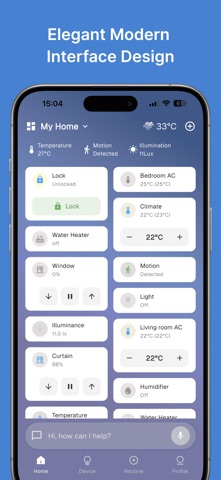

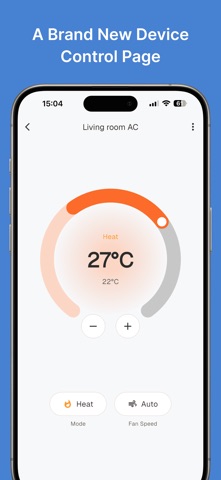


Description by Hangzhou LinkLink Technology Co., Ltd. Written by the developer, not by AppBrain. Click to read.
Control devices, create automations, manage your home, and get help using natural language. LinknLink works with Alexa, Google Home, Apple Home, Matter, SmartThings, and other major smart home platforms.
KEY FEATURES
1. Control 1,500+ Device Brands
Manage lights, air conditioners, curtains, locks, sensors, cameras, and more across different brands, protocols, and ecosystems — all from one app.
• 20+ popular brands can be added directly without an extra gateway
• More third-party brands can be connected through HomeClaw
• No Home Assistant knowledge is required
2. Built-in AI Agent
Simply tell LinknLink what you want to do. The built-in AI Agent can help you:
• Control devices
• Create scenes and automations
• Schedule tasks
• Answer setup and usage questions
• Diagnose device and system issues
• Assist with general everyday tasks
No separate AI service or complicated setup is required.
3. Create Automations with Natural Language
Forget complex rule builders. Just say:
“Turn off the living room lights and lower the AC at 10 PM every night.”
LinknLink understands your intent and creates the corresponding scene, schedule, or automation automatically.
4. Fast Local Control and Free Remote Access
Connected devices can be controlled locally for faster and more reliable response. You can also access and manage your home remotely without an additional subscription.
• Third-party devices require HomeClaw for free remote access
5. A Home That Learns Your Routine
LinknLink can gradually understand your habits, preferences, and daily routines, then suggest useful automations to make your home more comfortable, efficient, and responsive.
6. Clean and Customizable Interface
The modern card-based interface makes devices, rooms, and functions easy to understand and control. Customize card layouts and room styles to create an experience that fits your home.
7. Native Home Assistant Integration
Connect LinknLink to your Home Assistant instance and import existing devices without adding them again. Home Assistant users can enjoy simpler mobile control, remote access, and AI Agent features.
• Devices in Home Assistant on HomeClaw can support free remote access after being imported into LinknLink
8. Bridge Devices Across Platforms
Bridge connected devices, including devices imported from Home Assistant, to Matter, Apple Home, or Samsung SmartThings. Continue controlling and automating them in the ecosystem you already use.
9. More Than Smart Home Control
LinknLink also supports useful lifestyle services, including sports updates, radio, shopping lists, and more. It is not only a smart home app, but an AI assistant designed around everyday home life.
10. Built for the Connected Future
Future support for CarPlay will help connect your car, phone, and home. Prepare lights, curtains, and air conditioning before you arrive, making every return home more comfortable.
Bring your devices, automations, platforms, and everyday services together with LinknLink — one app for a smarter, simpler, and more connected home.
11.Terms of Use (EULA):https://www.apple.com/legal/internet-services/itunes/dev/stdeula/
12. Service Agreement: https://app-service-chn-566c4736.linklinkiot.com/appfront/v1/webui/app-h5-subscribe_agreement_linklink-1036/
Privacy Policy:https://app-service-chn-566c4736.linklinkiot.com/appfront/v1/webui/app-h5-privacy_policy_linklink-1675/
Safety and technology
Found in the app by AppBrain- Price
- Free
- App size
- 286.3 MB
- Content rating
- Low
Technologies used by LinknLink
Releases
Updates seen on the App Store- Version
- 2.1.21
- Launched
- May 2022
No changelog data
Alternatives
Similar apps and more from Hangzhou LinkLink Technology Co., Ltd.Alternatives to LinknLink







More from Hangzhou LinkLink Technology Co., Ltd.

Also available on Google Play

Rankings
App Store top chartsApp Store Rankings for LinknLink
About the app and developer
About LinknLink
LinknLink is an utilities app developed by Hangzhou LinkLink Technology Co., Ltd.
What is the rating of LinknLink?
LinknLink is rated 3.14 out of 5 stars, based on 49 ratings.
Is LinknLink free?
LinknLink is free. The app size is 286.28 MB. The latest version available is 2.1.21. The last update was on September 18, 2026.
What are the requirements for LinknLink?
The app has a content rating of Low Maturity. The app has been available on the App Store since May 2022.