

Loanest is made and published by Robert Corbin. AppBrain is an independent app data site and isn't affiliated with Robert Corbin. The app name, icon, screenshots and description belong to Robert Corbin and are shown as published on the App Store.
AppBrain's verdict
- Last updated
- September 15, 2026
Rankings
App Store top chartsApp Store Rankings for Loanest
This app is not ranked
Competitors
Similar apps and more from Robert CorbinAlternatives to Loanest


More from Robert Corbin


Releases
Updates seen on the App Store- Version
- 3.0
- Launched
- June 2026
No changelog data
User feedback
Ratings and reviews on the App StoreComments on Loanest for iOS
We don't have enough comments to show example comments. Please check back later.
Technology
Found in the app by AppBrain- Price
- $0.99
- App size
- 37.8 MB
- Content rating
- Everyone
Technologies used by Loanest
About the app and developer
About Loanest
Loanest is a productivity app developed by Robert Corbin.
User Ratings
The app has no ratings yet.
App Information
Loanest costs $0.99. The app size is 37.76 MB. The latest version available is 3.0. The last update was on September 15, 2026.
Technical Requirements
The app has a content rating of Everyone. The app has been available on the App Store since June 2026.
Developer information for Robert Corbin
Address:
Store listing
By Robert Corbin, from the App Store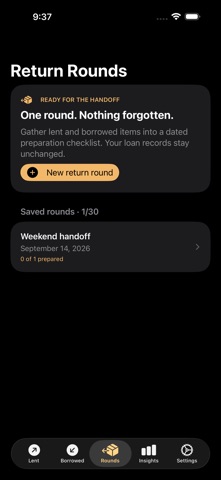


Screenshots by Robert Corbin, from the the App Store listing
Description by Robert Corbin Written by the developer, not by AppBrain. Click to read.
Build a dated preparation checklist from your real lent and borrowed items, keep meeting notes together, and reopen the round when it is time to leave.
HOW IT WORKS
1. Add physical-item loans under Lent or Borrowed. Open Rounds and choose New return round.
2. Name the round, choose its day and items, add an optional meeting note, and save.
3. Open the saved checklist, mark items prepared, and share the list. Confirm actual handoffs in the original loan records.
Lent and borrowed records, repayment tracking, reminders and exports remain available. Find Statistics and the Payback Board under Insights.
WHAT TO KNOW
Preparation is a saved snapshot. Checking an item does not mark it returned, move money, send a message or create a reminder. Money loans are excluded. Up to 100 physical items per round and 30 saved rounds. Deleted or returned underlying loans remain explicitly identified.
iPhone and iPad.
HOW IT WORKS
1. Add physical-item loans under Lent or Borrowed. Open Rounds and choose New return round.
2. Name the round, choose its day and items, add an optional meeting note, and save.
3. Open the saved checklist, mark items prepared, and share the list. Confirm actual handoffs in the original loan records.
Lent and borrowed records, repayment tracking, reminders and exports remain available. Find Statistics and the Payback Board under Insights.
WHAT TO KNOW
Preparation is a saved snapshot. Checking an item does not mark it returned, move money, send a message or create a reminder. Money loans are excluded. Up to 100 physical items per round and 30 saved rounds. Deleted or returned underlying loans remain explicitly identified.
iPhone and iPad.