

Lock Screen Studio
Lock Screen Studio is made and published by Arinitsolutions. AppBrain is an independent app data site and isn't affiliated with Arinitsolutions. The app name, icon, screenshots and description belong to Arinitsolutions and are shown as published on the App Store.
AppBrain's verdict
- Last updated
- September 24, 2026
- Size
- 7.21 MB
User feedback
Ratings and reviews on the App StoreComments on Lock Screen Studio for iOS
We don't have enough comments to show example comments. Please check back later.
Store listing
By Arinitsolutions, from the App Store



Description by Arinitsolutions Written by the developer, not by AppBrain. Click to read.
Lock Screen Studio generates custom wallpaper images with your daily agenda, priorities, to-dos, countdowns, and more - all beautifully arranged on your Lock Screen.
HOW IT WORKS
1. Choose from 14 built-in templates or create your own
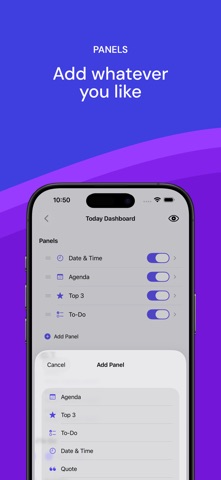
2. Customize panels, themes, colors, and backgrounds
3. Generate - the wallpaper is saved to your Photos, ready to apply as your Lock Screen
FEATURES
• Calendar integration - see today's events at a glance
• To-do lists - track tasks right on your Lock Screen, or sync them from Apple Reminders (pick a list, filter by today or the next 7 days)
• Top 3 priorities - stay focused on what matters
• Interactive Home Screen widget - tap to mark todos done without opening the app
• Lock Screen widgets - today's progress above the clock, without unlocking
• Consistency panel - your streak as a heatmap, counted from your completed todos or your Apple Health step count
• Year in Pixels - a full-page widget showing your whole year at a glance (iOS 27)
• Todo history with streak stats and a 13-week completion heatmap
• Daily quote packs - hand-picked Stoic, Focus, Calm, and Motivation collections that rotate a fresh quote each day, or write your own
• Share templates with friends - export as a file, import via AirDrop or Files
• Countdown timers - count days to important events
• Monthly calendar grid - see the full month
• Custom notes
• Photo backgrounds with blur and dim controls - or add up to 10 photos and get a different one each day
• Dark, light, and gradient themes
• 9 font color options for perfect readability
• Adjustable font size and vertical text position
• Export for any iPhone model (12 through 18 series)
AUTOMATION
Pair with Apple Shortcuts and your iPhone will generate a fresh wallpaper for you on a schedule - every morning at 7 AM, after your alarm, when Focus turns on, when you arrive at work, or at sunset. The app ships 5 ready-made recipes with clear, step-by-step setup instructions, written separately for iOS 26 and iOS 27.
The new wallpaper is applied to your Lock Screen automatically - no tapping, no confirmation. A notification sums up your day: how many events and open to-dos you have.
PRO
Unlock all templates, unlimited exports, premium gradients, photo backgrounds, quote packs, custom panel creation, and advanced Shortcuts automation. The yearly plan starts with a 7-day free trial.
No accounts, no ads, no third-party tracking. Your data never leaves your device. Health data is read only - never written back, never sent anywhere.
Terms of Use (EULA): https://www.apple.com/legal/internet-services/itunes/dev/stdeula/
Privacy Policy: https://www.lockscreenstudio.com/privacy
Safety and technology
Found in the app by AppBrain- Price
- Free
- App size
- 7.21 MB
- Content rating
- Everyone
Technologies used by Lock Screen Studio
Releases
Updates seen on the App Store- Version
- 1.14.0
- Launched
- March 2026
No changelog data
Alternatives
Similar apps and more from ArinitsolutionsAlternatives to Lock Screen Studio


More from Arinitsolutions


Rankings
App Store top chartsApp Store Rankings for Lock Screen Studio
About the app and developer
About Lock Screen Studio
Lock Screen Studio is a productivity app developed by Arinitsolutions.
What is the rating of Lock Screen Studio?
Lock Screen Studio has no ratings yet.
Is Lock Screen Studio free?
Lock Screen Studio is free. The app size is 7.21 MB. The latest version available is 1.14.0. The last update was on September 24, 2026.
What are the requirements for Lock Screen Studio?
The app has a content rating of Everyone. The app has been available on the App Store since March 2026.
Developer information for Arinitsolutions
Address:
Frequently asked questions about Lock Screen Studio
Is Lock Screen Studio free?
Yes. Lock Screen Studio is free on the App Store.
Is Lock Screen Studio still available?
Yes. Lock Screen Studio is on the App Store, and the last update we saw was on September 24, 2026.
How large is Lock Screen Studio?
Lock Screen Studio is 7.21 MB.
Is Lock Screen Studio suitable for children?
App Store rates the content of Lock Screen Studio as suitable for everyone.
Who made Lock Screen Studio?
Lock Screen Studio was developed by Arinitsolutions. It is listed in the productivity category on the App Store.
What are the best alternatives to Lock Screen Studio?
People looking at Lock Screen Studio also look at these productivity apps: Back Burner - Simple To-Do App, Monét - Startup Plan Builder, Habit Tracker - HabitFox, ASI:One, Quicken LifeHub Life Organizer.