

LockIn: Focus & Pomodoro Timer
LockIn: Focus & Pomodoro Timer is made and published by Sunny Radadiya. AppBrain is an independent app data site and isn't affiliated with Sunny Radadiya. The app name, icon, screenshots and description belong to Sunny Radadiya and are shown as published on the App Store.
AppBrain's verdict
- Last updated
- August 24, 2026
- Size
- 13.3 MB
User feedback
Ratings and reviews on the App StoreComments on LockIn: Focus & Pomodoro Timer for iOS
We don't have enough comments to show example comments. Please check back later.
Store listing
By Sunny Radadiya, from the App Store



Description by Sunny Radadiya Written by the developer, not by AppBrain. Click to read.
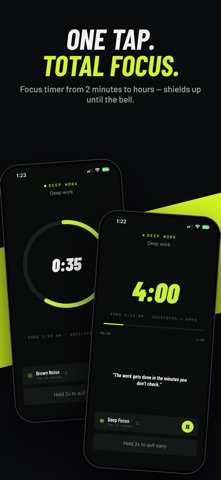
Choose the apps, categories, and websites that pull your attention, start a Focus Timer or Pomodoro, and LockIn uses Apple’s Screen Time technology to shield them for the duration of your session.
Blocking continues if you leave LockIn or lock your phone. When the timer ends, everything unlocks automatically.
BLOCK DISTRACTIONS WITH A TIMER
• Select apps, complete categories, or specific websites using Apple’s private activity picker
• Set a custom session lasting anywhere from 2 minutes to several hours
• Keep blocking active while using other apps or while your phone is locked
• See a clean Screen Time shield when you try opening a selected app
• Automatically remove every shield when your session finishes
• Use Strict Mode to help prevent ending a session early
THREE WAYS TO LOCK IN
FOCUS TIMER
Start one protected deep-work session. Choose your duration, block your distractions, and remain focused until the countdown ends.
POMODORO
Work and rest in structured rounds. Begin with the classic 25-minute focus and 5-minute break routine, or customize the intervals to suit your workflow.
Your selected apps and websites remain shielded throughout the routine, including its breaks.
MEDITATE
Choose 5, 10, or 15 minutes, or create your own duration. Play calming ambient sound, breathe, reset, and return sharper.
Meditate mode does not block apps, so you can use it as a simple calming timer.
MAKE IT YOURS
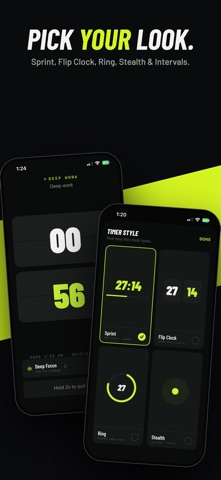
Visit the Styles gallery to explore and preview different timer experiences before choosing your favorite.
Available timer styles include:
• Sprint
• Flip Clock
• Ring
• Stealth
• Intervals
STAY IN THE ZONE
• Play a deep-focus pad, brown noise, rain, ocean, or soft rhythm
• Continue listening while using another app or while your screen is locked
• Control playback from the Lock Screen, Control Center, or in-app mini-player
• Follow the countdown through a Lock Screen and Dynamic Island Live Activity
WATCH YOUR FOCUS COMPOUND
Your Training Log helps you understand your progress with:
• Total focus time
• Daily streaks
• Weekly totals
• Personal best sessions
• Your strongest focus window
• Focus and meditation history
PRIVATE BY DESIGN
LockIn uses Apple’s Screen Time framework and works with opaque activity tokens. It does not identify or collect a list of the apps installed on your device.
Your selected restrictions, focus sessions, meditation activity, and training history are stored on your device. No account is required.
LOCKIN PRO
A LockIn Pro subscription is required to access the app. Pro includes unlimited sessions, Focus Timer, Pomodoro, Meditate mode, every timer style, Strict Mode, presets, ambient sounds, and your complete Training Log.
Subscriptions automatically renew unless cancelled at least 24 hours before the end of the current subscription period. You can manage or cancel your subscription from your Apple Account settings.
Focus is a skill. Train it.
Terms:
https://sunnyrk.github.io/LockIn-Website/terms.html
Privacy:
https://sunnyrk.github.io/LockIn-Website/privacy.html
Safety and technology
Found in the app by AppBrain- Price
- Free
- App size
- 13.3 MB
- Content rating
- Everyone
Technologies used by LockIn: Focus & Pomodoro Timer
Releases
Updates seen on the App Store- Version
- 1.0
- Launched
- August 2026
No changelog data
Alternatives
Similar apps and more from Sunny RadadiyaAlternatives to LockIn: Focus & Pomodoro Timer


More from Sunny Radadiya


Rankings
App Store top chartsApp Store Rankings for LockIn: Focus & Pomodoro Timer
About the app and developer
About LockIn: Focus & Pomodoro Timer
LockIn: Focus & Pomodoro Timer is a productivity app developed by Sunny Radadiya.
What is the rating of LockIn: Focus & Pomodoro Timer?
LockIn: Focus & Pomodoro Timer has no ratings yet.
Is LockIn: Focus & Pomodoro Timer free?
LockIn: Focus & Pomodoro Timer is free. The app size is 13.31 MB. The latest version available is 1.0. The last update was on August 24, 2026.
What are the requirements for LockIn: Focus & Pomodoro Timer?
The app has a content rating of Everyone. The app has been available on the App Store since August 2026.
Developer information for Sunny Radadiya
Address:
Frequently asked questions about LockIn: Focus & Pomodoro Timer
Is LockIn: Focus & Pomodoro Timer free?
Yes. LockIn: Focus & Pomodoro Timer is free on the App Store.
Is LockIn: Focus & Pomodoro Timer still available?
Yes. LockIn: Focus & Pomodoro Timer is on the App Store, and the last update we saw was on August 24, 2026.
How large is LockIn: Focus & Pomodoro Timer?
LockIn: Focus & Pomodoro Timer is 13.31 MB.
Is LockIn: Focus & Pomodoro Timer suitable for children?
App Store rates the content of LockIn: Focus & Pomodoro Timer as suitable for everyone.
Who made LockIn: Focus & Pomodoro Timer?
LockIn: Focus & Pomodoro Timer was developed by Sunny Radadiya. It is listed in the productivity category on the App Store.
What are the best alternatives to LockIn: Focus & Pomodoro Timer?
People looking at LockIn: Focus & Pomodoro Timer also look at these productivity apps: CROO Notes, DominusDomi: nanny hours, ScrollMint: Earn Screen Time, Waqt: Prayer Day Planner, LockedIn - Focus Timer.