

Loop - Interval & Multi Timer
Loop - Interval & Multi Timer is made and published by Leon Boettger. AppBrain is an independent app data site and isn't affiliated with Leon Boettger. The app name, icon, screenshots and description belong to Leon Boettger and are shown as published on the App Store.
AppBrain's verdict
Established- Rating on App Store
- 4.44
- 68 ratings
- Last updated
- September 27, 2026
- Size
- 82.1 MB
It doesn't have enough ratings yet to judge what users think.
User feedback
Ratings and reviews on the App StoreComments on Loop - Interval & Multi Timer for iOS
We don't have enough comments to show example comments. Please check back later.
Store listing
By Leon Boettger, from the App Store



Description by Leon Boettger Written by the developer, not by AppBrain. Click to read.
- Easy Start:
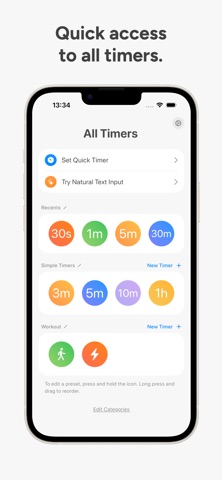
The start screen shows the most recently started timers and your favorites. One tap is enough to start a timer. You can also create a new quick timer with natural-language input: Simply type something like "1h Work, 30m Break" to create a timer with two intervals. Any number of timers can be started in parallel. The first timers will be displayed as nested rings.
- Automatic Reset:
After a timer expires, the app plays a sound and the timer automatically resets, so you can start it again immediately. Alternatively, you can configure a timer to play the sound like an alarm until you disable it. Loop supports AlarmKit so the alarm is also shown on your Apple Watch (requires at least iOS or iPadOS 26).
- Presets:
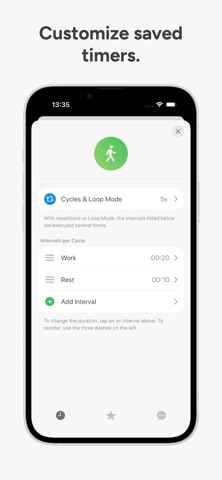
You can save your favorite timers as presets, which can be started with a tap. You can use text or an icon for your presets, and also change the color as you like. You can create multiple categories for your presets, with each category able to customize the app’s default settings.
- Interval Timers:
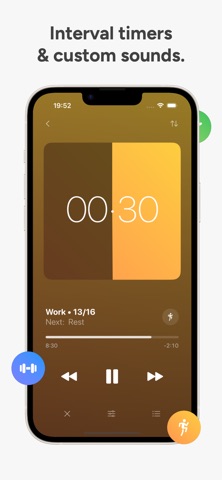
You can create interval timers and save them as Presets. The app plays a sound for each elapsed interval and displays it as a small dash on the ring. Additionally, you can name each of them, select repetitions for the intervals, or make the timer repeat automatically.
- Choose Sounds:
In addition to many included sounds, you can also import your own sound files from the Files app. Start, pause, finish, reset, interval, and background sounds can be selected separately.
- Meditation Sounds:
You can activate a background sound such as ocean waves or white noise in the settings, which will then be played when a timer is running. It is also possible to switch off the screen in order to concentrate fully on your meditation.
- iCloud Sync:
Your timers, settings, and sounds sync with your iPhone, iPad, Apple Watch, and Mac.
- Push Notifications & Live Activities:
Loop will send you a push notification when the app is closed if a timer or interval has expired. The sounds selected in the app will also be used for the notification. In addition, a live activity is displayed when timers are running.
- And More:
Custom app icons, Apple Watch integration, HealthKit support, configure when the screen should stay awake, and countless further options.
This application is governed by Apple’s standard Licensed Application End User License Agreement (EULA), available at https://www.apple.com/legal/internet-services/itunes/dev/stdeula/
Safety and technology
Found in the app by AppBrain- Price
- Free
- App size
- 82.1 MB
- Content rating
- Everyone
Technologies used by Loop - Interval & Multi Timer
Releases
Updates seen on the App Store- Version
- 7.6.1
- Launched
- November 2020
No changelog data
Alternatives
Similar apps and more from Leon BoettgerAlternatives to Loop - Interval & Multi Timer







More from Leon Boettger


Rankings
App Store top chartsApp Store Rankings for Loop - Interval & Multi Timer
About the app and developer
About Loop - Interval & Multi Timer
Loop - Interval & Multi Timer is an utilities app developed by Leon Boettger.
User Ratings
Loop - Interval & Multi Timer is rated 4.44 out of 5 stars. The rating is based on 68 ratings.
App Information
Loop - Interval & Multi Timer is freely available from the App Store. The app size is 82.10 MB. The latest version available is 7.6.1. The last update was on September 27, 2026.
Technical Requirements
The app has a content rating of Everyone. The app has been available on the App Store since November 2020.
Developer information for Leon Boettger
Address:
Frequently asked questions about Loop - Interval & Multi Timer
Is Loop - Interval & Multi Timer free?
Yes. Loop - Interval & Multi Timer is free on the App Store.
Is Loop - Interval & Multi Timer still available?
Yes. Loop - Interval & Multi Timer is on the App Store, and the last update we saw was on September 27, 2026.
How large is Loop - Interval & Multi Timer?
Loop - Interval & Multi Timer is 82.10 MB.
Is Loop - Interval & Multi Timer suitable for children?
App Store rates the content of Loop - Interval & Multi Timer as suitable for everyone.
How do people rate Loop - Interval & Multi Timer?
Loop - Interval & Multi Timer scores 4.44 out of 5 stars, from 68 ratings on the App Store.
Who made Loop - Interval & Multi Timer?
Loop - Interval & Multi Timer was developed by Leon Boettger. It is listed in the utilities category on the App Store.
What are the best alternatives to Loop - Interval & Multi Timer?
People looking at Loop - Interval & Multi Timer also look at these utilities apps: Timer Loops, SimpleMultiTimer, Multi Timer - Visual Timer, Focus Mate: ADHD Habit Tracker, Timer for Workouts - Repeat.