It doesn't have enough ratings yet to judge what users think.
LSI Pool and Spa Calculator is made and published by
Verosocial Studio.
AppBrain is an independent app data site and isn't affiliated with Verosocial Studio.
The app name, icon, screenshots and description belong to Verosocial Studio and are shown as
published on the App Store.
About LSI Pool and Spa Calculator
LSI Pool and Spa Calculator is an utilities app developed by Verosocial Studio.
What is the rating of LSI Pool and Spa Calculator?
LSI Pool and Spa Calculator is rated 5.00 out of 5 stars, based on one rating ratings.
Is LSI Pool and Spa Calculator free?
LSI Pool and Spa Calculator is free. The app size is 7.00 MB. The latest version available is 9.6. The last update was on October 7, 2026.
What are the requirements for LSI Pool and Spa Calculator?
The app has a content rating of Everyone. The app has been available on the App Store since May 2010.
Description by Verosocial Studio(from the App Store)
You take pride in caring for pools and spas, and your attention to each reading matters. Thank you for using LSI Pool and Spa Calculator to keep water balance checks, customer details, and service records together.
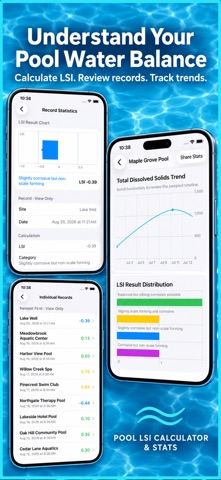
Maintain a pool route, look after a commercial property, or care for your own spa with a water chemistry app that calculates the Langelier Saturation Index and keeps your visit history. Check a result, save the visit, and review the details before your next test.
CHECK WATER BALANCE
- Calculate LSI using pH, water temperature, calcium hardness, total alkalinity, and total dissolved solids. - See LSI, predicted saturation pH, and a result category. - Review whether your readings indicate a tendency toward scale or corrosion. - Enter temperature in Fahrenheit or Celsius. - Switch units with automatic temperature conversion. - Use the built-in guide to understand the calculation and its inputs.
KEEP A SERVICE HISTORY
- Save readings under reusable pool, spa, or property names. - Add visit dates and notes about treatments, observations, or follow-up work. - Search records by site, date, notes, or result category. - Sort history to find recent visits or review earlier readings. - Edit saved measurements and recalculate after a correction. - Duplicate a previous record for repeat visits. - Review the selected reading beside your records list on iPad.
ORGANIZE CUSTOMERS AND PROPERTIES
- Store customer names, companies, phone numbers, email addresses, and notes. - Add contacts manually or choose people to import from device Contacts. - Link several properties to one customer. - Keep a separate address and notes for each site. - Search customer details when you need a phone number or service context. - Edit local customer copies without changing device Contacts. - Keep sites and readings when you remove a customer.
FIND SITES ON THE MAP
- Open Site Map from Stats to see properties with resolved addresses. - Use the site's address or its linked customer's address. - Tap a pin to open customer details and linked sites. - Find all saved sites in the searchable list, including those awaiting an address. - Add or correct an address and retry its lookup.
REVIEW YOUR WATER CHEMISTRY
- Compare minimum, maximum, and average readings by site. - View charts for LSI, pH, temperature, calcium hardness, alkalinity, and TDS. - Filter saved readings by result category. - Open a complete reading from Stats when you need the details. - Use sortable spreadsheet review to compare service history.
MAKE QUICK CHECKS BETWEEN VISITS
- Use Quick Calc without adding a reading to site history. - Keep recent calculator inputs and the latest result on this device. - Reuse values when testing similar water. - Reset the calculator for a fresh check.
REPORTS AND BACKUPS
- Share a calculation as text or a PDF report. - Export readings, sites, or contacts as CSV files for spreadsheets. - Create PDF reports for your chosen information. - Save a readings backup or a complete backup with customers and site links. - Import a JSON backup while skipping exact duplicates. - Share files through the iPhone and iPad share sheet.
Choose Light, Dark, or system appearance and set your preferred temperature units. Habits & Progress lets you set testing goals and review milestones inside the app.
Start with up to five saved records in the free version. LSI Pro unlocks a larger record allowance, spreadsheet review, backup import, individual report sharing, and printing. Monthly and lifetime purchase options are available.
Use LSI alongside reliable water tests and equipment guidance. Keep measurements, property details, and notes ready for your next service day.
Monthly Pro is a 1-month auto-renewable subscription. Terms of Use (EULA): https://www.apple.com/legal/internet-services/itunes/dev/stdeula/
Each subscription will automatically renew 3 days before the expiration date for
the same time period. Subscriptions can be cancelled at any time before the renewal.