

Lutron RadioRA 2 + HWQS App
Lutron RadioRA 2 + HWQS App is made and published by Lutron Electronics co., Inc. AppBrain is an independent app data site and isn't affiliated with Lutron Electronics co., Inc. The app name, icon, screenshots and description belong to Lutron Electronics co., Inc. and are shown as published on the App Store.
AppBrain's verdict
EstablishedPoorly rated- Rating on App Store
- 2.29
- 170 ratings
- Last updated
- May 27, 2026
- Size
- 91.3 MB
Users are critical: 2.3 stars from 170 ratings.
User feedback
Ratings and reviews on the App StoreComments on Lutron RadioRA 2 + HWQS App for iOS
We don't have enough comments to show example comments. Please check back later.
Store listing
By Lutron Electronics co., Inc., from the App Store

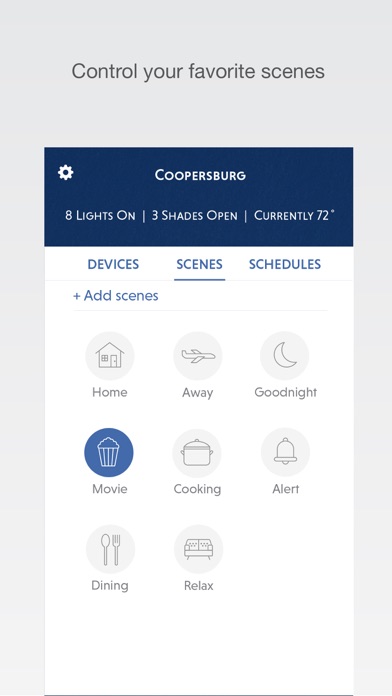

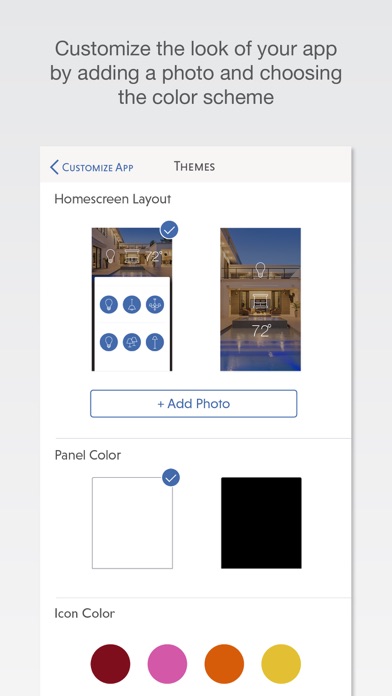
Description by Lutron Electronics co., Inc. Written by the developer, not by AppBrain. Click to read.
This app requires a Lutron total home control system (RadioRA® 2 or HomeWorks® QS) programmed using the appropriate version of design and programming software along with the Lutron Connect Bridge.*
Features:
Control from anywhere
Control lights, shades, temperature, keypads, and more in the comfort of your home or from anywhere in the world – the office, the airport, the beach – set your home to a comfortable temperature when returning from a trip, ensure lights aren't left on and shades aren't left open while you're away.
Personalize your keypad buttons
Add, edit, and remove button settings on your own. Make temporary adjustments for special occasions, or permanent changes to match your preferences.
Right on schedule
Schedule scenes to happen automatically at set times of day, or based on sunrise and sunset. Turn on your porch light at dusk, turn it off at dawn, or open your shades in the morning to wake up with the sun.
Geofencing (iPhone only)
Receive a notification if you’ve left the lights on after leaving home, then turn them off right from your Today Widget.
Ketra
Adjust the brightness, color (warm/cool color temperature as well as full color) and Vibrancy with a quick and simple interface. Ketra lighting can transform your home by changing the mood from warm and relaxing to bright and energizing, enhance the details of your home decor, and add color to accent the environment and create a dramatic or festive mood.
Today Widget
Set your favorite scenes from your home screen using the Today Widget. No need to launch the app.
Low Battery
Receive low battery indications for battery-powered shades, Pico wireless controls, and Radio Powr Savr sensors to know when it's time to replace their batteries.
World Class Support
Lutron remains committed to providing you with world class quality and service.
Contact us at our 24/7 hotline (800.523.9466).
*Design and programming software is available only to qualified installers and is required for initial setup of this application. This application is only compatible with RadioRA 2 (10.0+) and HomeWorks QS (10.0+) and requires the Lutron Connect Bridge. Contact your Lutron dealer for more information.
***Continued use of GPS running in the background can dramatically decrease battery life.***
Safety and technology
Found in the app by AppBrain- Price
- Free
- App size
- 91.3 MB
- Content rating
- Everyone
Technologies used by Lutron RadioRA 2 + HWQS App
Releases
Updates seen on the App Store- Version
- 26.0.0
- Launched
- April 2016
No changelog data
Alternatives
Similar apps and more from Lutron Electronics co., Inc.Alternatives to Lutron RadioRA 2 + HWQS App





More from Lutron Electronics co., Inc.



Also available on Google Play

Rankings
App Store top chartsApp Store Rankings for Lutron RadioRA 2 + HWQS App
About the app and developer
About Lutron RadioRA 2 + HWQS App
Lutron RadioRA 2 + HWQS App is a lifestyle app developed by Lutron Electronics co., Inc.
What is the rating of Lutron RadioRA 2 + HWQS App?
Lutron RadioRA 2 + HWQS App is rated 2.29 out of 5 stars, based on 170 ratings.
Is Lutron RadioRA 2 + HWQS App free?
Lutron RadioRA 2 + HWQS App is free. The app size is 91.26 MB. The latest version available is 26.0.0. The last update was on May 27, 2026.
What are the requirements for Lutron RadioRA 2 + HWQS App?
The app has a content rating of Everyone. The app has been available on the App Store since April 2016.
Developer information for Lutron Electronics co., Inc.
Address: