

M .K.Camera is made and published by Keiji Morita. AppBrain is an independent app data site and isn't affiliated with Keiji Morita. The app name, icon, screenshots and description belong to Keiji Morita and are shown as published on the App Store.
AppBrain's verdict
- Last updated
- May 27, 2026
Rankings
App Store top chartsApp Store Rankings for M .K.Camera
Competitors
Similar apps and more from Keiji MoritaAlternatives to M .K.Camera


More from Keiji Morita


Releases
Updates seen on the App Store- Version
- 1.2
- Launched
- May 2026
No changelog data
User feedback
Ratings and reviews on the App StoreComments on M .K.Camera for iOS
We don't have enough comments to show example comments. Please check back later.
Technology
Found in the app by AppBrain- Price
- Free
- App size
- 7.14 MB
- Content rating
- High
Technologies used by M .K.Camera
About the app and developer
About M .K.Camera
M .K.Camera is a photo & video app developed by Keiji Morita.
User Ratings
The app has no ratings yet.
App Information
M .K.Camera is freely available from the App Store. The app size is 7.14 MB. The latest version available is 1.2. The last update was on May 27, 2026.
Technical Requirements
The app has a content rating of High Maturity. The app has been available on the App Store since May 2026.
Developer information for Keiji Morita
Address:
Store listing
By Keiji Morita, from the App Store


Description by Keiji Morita Written by the developer, not by AppBrain. Click to read.
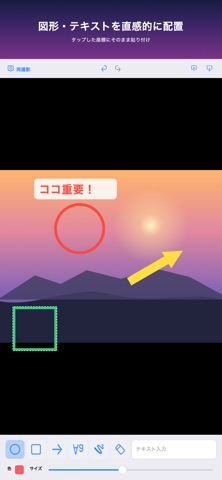
起動後すぐに撮影画面が立ち上がり、ピンチで自由にズームしてシャッターを切るだけ。撮影が完了した瞬間に、図形やテキスト、フリーハンドの線を写真に重ねる編集画面に切り替わります。
【主な機能】
- 起動即カメラ:縦・横どちらの向きにも対応。ピンチでズームイン/アウト。
- 撮影後の自動編集モード:撮ったその場で図形・テキストを配置できます。
- 図形:◯(円)、□(四角)、矢印(左右・両側に向き変更可)。
- テキスト:好きな文字をタップした座標に貼り付け、貼り付けた後もそのまま再編集できます。
- フリーハンド描画:太さと色を調整して、自然な書き心地で書き込めます。
- 消しゴム:タップひとつで不要なオブジェクトを削除。
- やり直し/戻る:ヘッダーの↶↷でいつでも操作をやり直し。
- ダブルタップで詳細編集:オブジェクトの色変更、矢印の向き、削除メニュー。
- 二本指ピンチで全体ズーム:写真と注釈が一緒にスケール。
- ワンタップ保存/共有:写真ライブラリに保存も、SNS や AirDrop 共有もすぐ。
【こんな方におすすめ】
- 仕事の現場写真にすばやく指示を書き込みたい
- 旅行の写真に手書きでメッセージを添えたい
- SNS 用の画像をその場で仕上げて投稿したい
シンプルで分かりやすいインターフェイス、配置したオブジェクトをスムーズに移動・拡縮できるジェスチャ、Undo/Redo まで揃った安心感。あなたの「伝えたい」を最短距離でカタチにします。