

MacCiv is made and published by GIACOMO STIRPE. AppBrain is an independent app data site and isn't affiliated with GIACOMO STIRPE. The app name, icon, screenshots and description belong to GIACOMO STIRPE and are shown as published on the App Store.
AppBrain's verdict
- Last updated
- July 1, 2026
Rankings
App Store top chartsApp Store Rankings for MacCiv
Competitors
Similar apps and more from GIACOMO STIRPEAlternatives to MacCiv


Releases
Updates seen on the App Store- Version
- 1.0.2
- Launched
- June 2026
No changelog data
User feedback
Ratings and reviews on the App StoreComments on MacCiv for iOS
We don't have enough comments to show example comments. Please check back later.
Technology
Found in the app by AppBrain- Price
- Free
- App size
- 7.90 MB
- Content rating
- Everyone
Technologies used by MacCiv
About the app and developer
About MacCiv
MacCiv is an utilities app developed by GIACOMO STIRPE.
User Ratings
The app has no ratings yet.
App Information
MacCiv is freely available from the App Store. The app size is 7.90 MB. The latest version available is 1.0.2. The last update was on July 1, 2026.
Technical Requirements
The app has a content rating of Everyone. The app has been available on the App Store since June 2026.
Developer information for GIACOMO STIRPE
Address:
Store listing
By GIACOMO STIRPE, from the App Store




Description by GIACOMO STIRPE Written by the developer, not by AppBrain. Click to read.
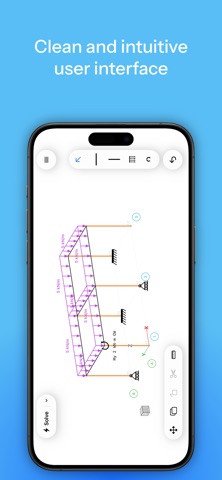
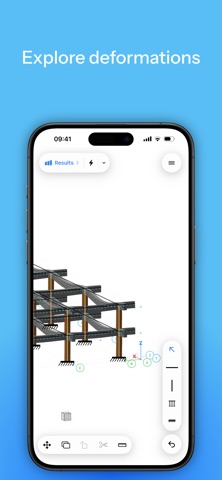
Build a structure, hit Solve, and instantly read the internal forces and deformations: axial, shear, bending-moment and torsion diagrams, support reactions and deflected shapes. No clunky desktop software, no steep learning curve — just a clean, intuitive interface designed for the way you think.
WHAT YOU CAN DO
• Draw beams and columns, place supports (fixed, pinned, roller, hinge) and apply loads (distributed, point, trapezoidal, moments)
• Solve full 3D frames with a real finite-element engine
• Read coloured N / shear / moment / torsion diagrams drawn on the tension side, plus reactions and displacements
• Switch between concrete, steel and wood members — each with proper material classes (EC2 / EC3 / EC5)
• View your model as a true 3D solid, with steel shown as I-beams
• See the seismic centre of mass and centre of stiffness for each structure
BUILT FOR STUDENTS
• Teaching mode: leave a load blank and MacCiv shows the answer as a formula (qL²/8, PL/4, …) instead of a number — perfect for learning statics
• Metric and imperial units
• Available in 9 languages
NATIVE EVERYWHERE
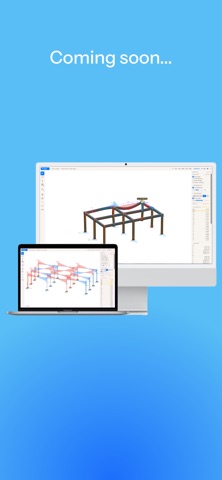
MacCiv is designed from the ground up for Apple platforms — it looks and feels right on macOS, iPhone and iPad, with full multitouch and a navigation cube for orbiting your model.
FREE, WITH AN OPTIONAL UPGRADE
MacCiv is free to use, supported by occasional ads. Prefer a clean, ad-free experience? Unlock MacCiv Pro with a single one-time purchase — it removes ads on all your devices, forever.
Questions or feedback? We'd love to hear from you:
maccivapp@gmail.com