We don't have enough comments to show example comments. Please check back later.
Store listing
By Eduardo Callado, from the App Store
Description by Eduardo CalladoWritten by the developer, not by AppBrain. Click to read.
Simple yet powerful, Macro Lens is an all-in-one camera app designed for macro photography enthusiasts.
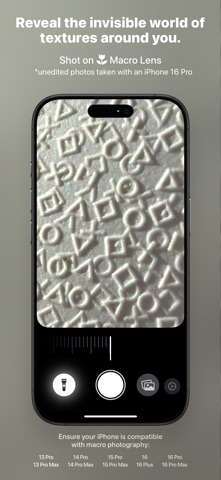
Macro Lens gives iPhone creators a focused macro workflow with real-time controls for focus, zoom, flash intensity, and brightness, plus quick switching between photo and video.
• Streamlined Interface: Keep your attention on the subject with dedicated adjustment panels and convenient shortcuts. Touch and hold a control to access its options. • Easy Setup: Get started with guided camera and photo library permissions. Location access is optional, and no account is required. • Manual and Auto Focus: Fine-tune focus with a dedicated slider, or enable continuous autofocus to let the camera adjust as you compose your shot. • Zoom and Pinch Control: Frame tiny subjects using the Zoom slider or a familiar pinch gesture directly on the camera preview. • Adjustable Lighting: Control continuous torch intensity to illuminate small subjects and balance light on dark or reflective surfaces. • Brightness Control: Adjust exposure to brighten or darken your image before capturing. • Photo and Video Modes: Switch directly on the camera screen to capture still images or motion. Record video at 60 fps when supported by your iPhone’s camera configuration. • Photo Viewfinder: Enable an optional overview with a framing guide to help you compose shots while zoomed in. Drag it to either upper corner—the app remembers your preferred position. • Camera Control Support: Take photos and start or stop video recording using the physical Camera Control button on compatible iPhones. • Lock Screen and Control Center Access: Add the Macro Lens control to quickly open the camera from your Lock Screen or Control Center. • Keep the Screen Awake: Take your time composing and capturing without interruptions from Auto-Lock while the app is active. • Save to Photos: Captured photos and videos are saved directly to your photo library. • Optional Location Tags: Add location information to your photos and videos to help you remember where each shot was taken.
Have an idea for Macro Lens? Submit a feature request directly from Settings or contact us by email for support.
Requires iOS 26 or later. Close-focus capability, torch availability, and video frame rates depend on your iPhone’s camera hardware.
Safety and technology
Found in the app by AppBrain
Price
$4.99
App size
16.4 MB
Content rating
Everyone
Technologies used by Macro Lens
Releases
Updates seen on the App Store
Version
1.11
Launched
September 2024
No changelog data
Rankings
App Store top charts
App Store Rankings for Macro Lens
This app is not ranked
About the app and developer
About Macro Lens
Macro Lens is a photo & video app developed by Eduardo Callado.
User Ratings
Macro Lens is rated 3.60 out of 5 stars. The rating is based on 5 ratings.
App Information
Macro Lens costs $4.99. The app size is 16.44 MB. The latest version available is 1.11. The last update was on October 4, 2026.
Technical Requirements
The app has a content rating of Everyone. The app has been available on the App Store since September 2024.
Macro Lens is made and published by
Eduardo Callado.
AppBrain is an independent app data site and isn't affiliated with Eduardo Callado.
The app name, icon, screenshots and description belong to Eduardo Callado and are shown as published on the App Store.
Each subscription will automatically renew 3 days before the expiration date for
the same time period. Subscriptions can be cancelled at any time before the renewal.