MailHub – Unified Email is made and published by
景城 何.
AppBrain is an independent app data site and isn't affiliated with 景城 何.
The app name, icon, screenshots and description belong to 景城 何 and are shown as
published on the App Store.
About MailHub – Unified Email
MailHub – Unified Email is a productivity app developed by 景城 何.
User Ratings
The app has no ratings yet.
App Information
MailHub – Unified Email is freely available from the App Store. The app size is 85.49 MB. The latest version available is 1.0.8. The last update was on October 19, 2026.
Technical Requirements
The app has a content rating of Everyone. The app has been available on the App Store since July 2026.
Description by 景城 何(from the App Store)
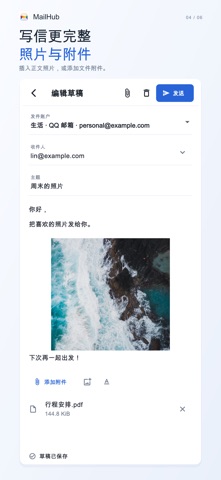
Bring work, personal and subscription email together. MailHub connects your existing accounts with a unified inbox, conversation view, a message composer and attachments.
YOUR ACCOUNTS, IN ONE PLACE Connect QQ Mail, 163 Mail, personal Outlook / Hotmail or compatible IMAP/SMTP accounts. Browse all inboxes together or focus on an account and folder.
READ AND REPLY Follow conversations, reply to everyone or forward a message. Insert photos into your email or add file attachments. Keep drafts on your device and return to them later.
LOCAL MODE Connect directly to providers. Credentials use system secure storage; messages are cached on your device. Read downloaded bodies and attachments offline. MailHub checks for new messages in the foreground and supports pull to refresh.
OPTIONAL PERSONAL SERVER Deploy your own MailHub server and connect your phone by QR code or connection link. Share server mailboxes or explicitly copy selected account settings and saved provider app passwords in either direction. Original accounts are retained; other accounts are not uploaded automatically. Message caches, drafts and pending-send queues are not copied. OAuth accounts require authorization on the destination. Shared server mode requires internet access. Your server stores and processes the selected credentials and mail cache, accessible to its administrator. MailHub offers no hosted mail cloud.
ACCOUNT REQUIREMENTS QQ and 163 require IMAP/SMTP and a provider app password. Setup instructions are available in the app. Personal Outlook / Hotmail accounts authorize through Microsoft and connect directly to Microsoft Graph on the device, without IMAP/SMTP or forwarding. Gmail is limited to approved accounts. Background checks depend on the operating system, network and permissions; immediate notifications are not guaranteed.
PRIVACY NOTES External images load automatically by default and can reveal your IP address to the image source. Disable automatic loading in reading settings if preferred. Local mail caches do not yet have application-level database encryption. Protect access to your device.
Each subscription will automatically renew 3 days before the expiration date for
the same time period. Subscriptions can be cancelled at any time before the renewal.