

MapAble: Route Mapper
MapAble: Route Mapper is made and published by CORTEXUS PTY LIMITED. AppBrain is an independent app data site and isn't affiliated with CORTEXUS PTY LIMITED. The app name, icon, screenshots and description belong to CORTEXUS PTY LIMITED and are shown as published on the App Store.
AppBrain's verdict
- Last updated
- August 22, 2023
Rankings
App Store top chartsApp Store Rankings for MapAble: Route Mapper
Competitors
Similar apps and more from CORTEXUS PTY LIMITEDAlternatives to MapAble: Route Mapper


Releases
Updates seen on the App Store- Version
- 3.8
- Launched
- August 2021
No changelog data
User feedback
Ratings and reviews on the App StoreComments on MapAble: Route Mapper for iOS
We don't have enough comments to show example comments. Please check back later.
Technology
Found in the app by AppBrain- Price
- Free
- App size
- 3.93 MB
- Content rating
- Everyone
Technologies used by MapAble: Route Mapper
About the app and developer
About MapAble: Route Mapper
MapAble: Route Mapper is a navigation app developed by CORTEXUS PTY LIMITED.
User Ratings
The app has no ratings yet.
App Information
MapAble: Route Mapper is freely available from the App Store. The app size is 3.93 MB. The latest version available is 3.8. The last update was on August 22, 2023.
Technical Requirements
The app has a content rating of Everyone. The app has been available on the App Store since August 2021.
Developer information for CORTEXUS PTY LIMITED
Address:
Frequently asked questions about MapAble: Route Mapper
Is MapAble: Route Mapper free?
Yes. MapAble: Route Mapper is free on the App Store.
Is MapAble: Route Mapper still available?
Yes. MapAble: Route Mapper is on the App Store, and the last update we saw was on August 22, 2023.
How large is MapAble: Route Mapper?
MapAble: Route Mapper is 3.93 MB.
Is MapAble: Route Mapper suitable for children?
App Store rates the content of MapAble: Route Mapper as suitable for everyone.
Who made MapAble: Route Mapper?
MapAble: Route Mapper was developed by CORTEXUS PTY LIMITED. It is listed in the navigation category on the App Store.
What are the best alternatives to MapAble: Route Mapper?
People looking at MapAble: Route Mapper also look at these navigation apps: Zeno Travel, Locate2u Route Planner, enRoute Delivery Route Planner, inRoute - Intelligent Routing, Route Planner, Delivery, MyWay.
Store listing
By CORTEXUS PTY LIMITED, from the App Store

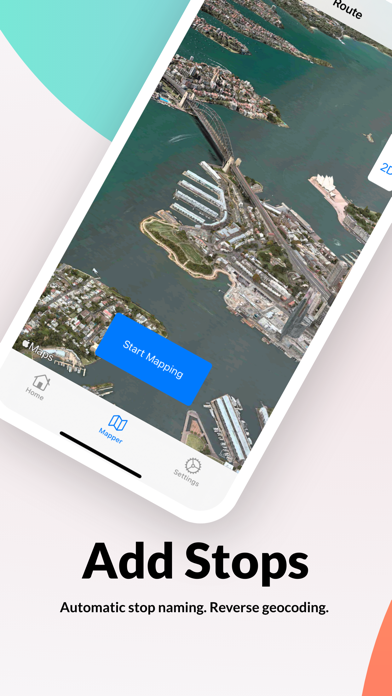


Description by CORTEXUS PTY LIMITED Written by the developer, not by AppBrain. Click to read.
Use Route Mapper to:
• Digitise your bus routes and bus stops
• Validate bus routes on a map
• Capture distance and passing times between bus stops
• Export GPX route data to any supported application
MAP BUS ROUTES
• Turn your phone into a GPS tracker and map your bus routes
• Route paths snap to roads where available
• Optimised waypoint mapping that adapts to the vehicle speed
• Pause / Resume route mapping
• Capture regular services with 3 types of directions (Inbound, Outbound, Loop)
• Capture school services with AM or PM service times
• Select 3 different mapping resolution settings to collect more or less waypoints
CAPTURE BUS STOP LOCATIONS
• Capture bus stop locations in longitude/latitude
• Capture passing times at each stop
• Automatic bus stop naming using reverse geocoding
• Add notes to bus stop locations
EASY TO USE
• Click Start, add stops, click finish. It's as easy as 1-2-3
• No messy user registration process. Just install and start mapping!
DETAILED MAPS
• Review mapped routes and stops with detailed maps
• Detailed satellite imagery in most metropolitan areas and regional cities
• 3D fly-over
• Map zoom and pan
SHARE & EXPORT
• Share routes via email, airdrop plus more.
• Routes files exported in GPS Exchange Format (GPX)
• Import your GPX routes files to any supported tool such as Google earth, ArcGIS
• Sync mapped routes across your apple devices via iCloud
• Automatically uploads routes to a linked Busable™ web account for scheduling and publishing of customer bus service timetables
WORKS OFFLINE
• No internet access required (except for uploading to iCloud or to the Route Mapper web application)
• View existing captured routes offline
==== DISCLAIMERS ====
• For safety reasons, do not use your phone whilst driving. Always obey all traffic laws. Refer to your local road authority for more information
• Continued use of gps in the background may dramatically reduce your battery life