

Mapense is made and published by RYUTARO MATSUMOTO. AppBrain is an independent app data site and isn't affiliated with RYUTARO MATSUMOTO. The app name, icon, screenshots and description belong to RYUTARO MATSUMOTO and are shown as published on the App Store.
AppBrain's verdict
- Rating on App Store
- 5.00
- 1 ratings
- Last updated
- October 22, 2026
It doesn't have enough ratings yet to judge what users think.
Rankings
App Store top chartsApp Store Rankings for Mapense
Competitors
Similar apps and more from RYUTARO MATSUMOTOAlternatives to Mapense


More from RYUTARO MATSUMOTO

Releases
Updates seen on the App Store- Version
- 1.10.0
- Launched
- March 2026
No changelog data
User feedback
Ratings and reviews on the App StoreComments on Mapense for iOS
We don't have enough comments to show example comments. Please check back later.
Technology
Found in the app by AppBrain- Price
- Free
- App size
- 8.36 MB
- Content rating
- Everyone
Technologies used by Mapense
About the app and developer
About Mapense
Mapense is a finance app developed by RYUTARO MATSUMOTO.
User Ratings
Mapense is rated 5.00 out of 5 stars. The rating is based on one rating ratings.
App Information
Mapense is freely available from the App Store. The app size is 8.36 MB. The latest version available is 1.10.0. The last update was on October 22, 2026.
Technical Requirements
The app has a content rating of Everyone. The app has been available on the App Store since March 2026.
Developer information for RYUTARO MATSUMOTO
Address:
Store listing
By RYUTARO MATSUMOTO, from the App Store


Description by RYUTARO MATSUMOTO Written by the developer, not by AppBrain. Click to read.
Most expense trackers can tell you what you spent money on and how much you spent, but they don't always show where and in what situations you're spending it.
By recording each expense with its location, you can discover patterns that are easy to miss when looking at amounts and categories alone — like eating out more often near work or frequently stopping by convenience stores on your way home.
But tracking more information shouldn't make managing your expenses a chore.
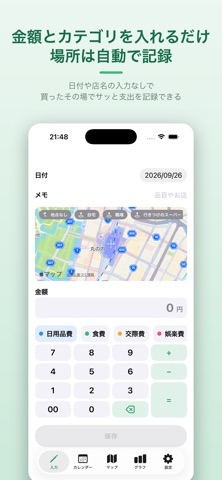
With Map Budget, just open the app, enter an amount, choose a category, and save. Your current location is added automatically, so there's no need to enter a store name or address every time.
Simple to record. Easy to review.
See not only what you spend your money on, but also where and how you spend it.
▼ Open, enter, and save
• Quickly record an expense by entering an amount and choosing a category
• Start entering an amount immediately with a dedicated numeric keypad
• Your current location is added automatically — no need to enter store names or addresses
• Quickly record expenses from your Apple Watch
▼ See where you spend on a map
• View your recorded expenses on a map
• Color-coded categories make it easy to see where you've been spending
• Move pins manually when you need to adjust an expense's location
• Look back on when, where, and how much you spent
▼ Review your spending with charts and a calendar
• See monthly spending with stacked bar charts by category
• Review your daily expenses from the calendar
• Automatically record recurring expenses such as rent and subscriptions
▼ Great for anyone who wants to
• Keep track of expenses quickly and simply
• Review everyday spending such as dining out and shopping
• See not only what they spend money on, but also where they spend it
• Manage expenses without connecting bank accounts or credit cards
▼ No account or bank connection required
Start using Map Budget right away without creating an account.
There's no need to connect a bank account or credit card.
Your data is stored locally on your iPhone and Apple Watch and is never sent to a server.