

Mapvia: Auto Timestamp GPS Cam
Mapvia: Auto Timestamp GPS Cam is made and published by nguyen hiep. AppBrain is an independent app data site and isn't affiliated with nguyen hiep. The app name, icon, screenshots and description belong to nguyen hiep and are shown as published on the App Store.
AppBrain's verdict
Well rated- Rating on App Store
- 4.31
- 585 ratings
- Last updated
- September 25, 2026
Users rate it well: 4.3 stars from 585 ratings.
Rankings
App Store top chartsApp Store Rankings for Mapvia: Auto Timestamp GPS Cam
Competitors
Similar apps and more from nguyen hiepMore from nguyen hiep




Releases
Updates seen on the App Store- Version
- 1.2.8
- Launched
- April 2025
No changelog data
User feedback
Ratings and reviews on the App StoreComments on Mapvia: Auto Timestamp GPS Cam for iOS
We don't have enough comments to show example comments. Please check back later.
Technology
Found in the app by AppBrain- Price
- Free
- App size
- 195.7 MB
- Content rating
- Everyone
Technologies used by Mapvia: Auto Timestamp GPS Cam
About the app and developer
About Mapvia: Auto Timestamp GPS Cam
Mapvia: Auto Timestamp GPS Cam is a photo & video app developed by nguyen hiep.
What is the rating of Mapvia: Auto Timestamp GPS Cam?
Mapvia: Auto Timestamp GPS Cam is rated 4.31 out of 5 stars, based on 590 ratings.
Is Mapvia: Auto Timestamp GPS Cam free?
Mapvia: Auto Timestamp GPS Cam is free. The app size is 195.74 MB. The latest version available is 1.2.8. The last update was on September 25, 2026.
What are the requirements for Mapvia: Auto Timestamp GPS Cam?
The app has a content rating of Everyone. The app has been available on the App Store since April 2025.
Developer information for nguyen hiep
Address:
Frequently asked questions about Mapvia: Auto Timestamp GPS Cam
Is Mapvia: Auto Timestamp GPS Cam free?
Yes. Mapvia: Auto Timestamp GPS Cam is free on the App Store.
Is Mapvia: Auto Timestamp GPS Cam still available?
Yes. Mapvia: Auto Timestamp GPS Cam is on the App Store, and the last update we saw was on September 25, 2026.
How large is Mapvia: Auto Timestamp GPS Cam?
Mapvia: Auto Timestamp GPS Cam is 195.74 MB.
Is Mapvia: Auto Timestamp GPS Cam suitable for children?
App Store rates the content of Mapvia: Auto Timestamp GPS Cam as suitable for everyone.
How do people rate Mapvia: Auto Timestamp GPS Cam?
Mapvia: Auto Timestamp GPS Cam scores 4.31 out of 5 stars, from 585 ratings on the App Store.
Who made Mapvia: Auto Timestamp GPS Cam?
Mapvia: Auto Timestamp GPS Cam was developed by nguyen hiep. It is listed in the photo & video category on the App Store.
Store listing
By nguyen hiep, from the App Store

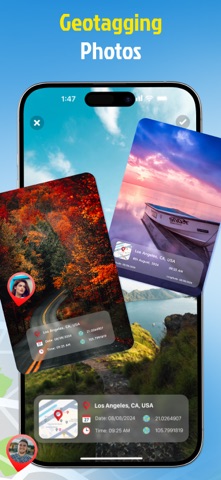


Description by nguyen hiep Written by the developer, not by AppBrain. Click to read.
▶ Features That Bring Memories to Life
• Shoot With GPS Details
Take photos and videos with real time location information shown on the screen. Add place name, date, time, and coordinates to make each memory more meaningful.
• See Your Memories on the Map
View your memories on a map and revisit places you have been. Browse saved locations through a visual map experience and explore your personal footprint over time.
• Explore Earth in Multiple Views
Discover the world from a global perspective. Explore places in 2D, 3D, satellite, terrain, and night map styles for a richer location experience.
• Import Photos and Add Places
Import existing photos from your device and add location tags afterward. This makes it easy to organize old memories even if they were not captured in the app.
• Customize Your Location Tags
Create your own location tag with flexible settings. Choose map view, date and time type, date and time format, background color, and text color to match your style.
• Choose Current or Manual Location
Use your current location instantly or add a location manually. This gives you more control when you want to attach a place to a photo or video.
• Keep Photos and Videos in One Library
Manage all saved content in one library. Switch between photo and video collections, review past memories, and quickly create new ones.
▶ Why Use Mapvia:
Mapvia is designed for people who want more than a basic camera. It helps preserve where and when a moment happened, making every photo or video easier to remember, organize, and share.
▶ Perfect for Travel, Family, and Daily Life
• Travel memories
• Daily moments
• Location based storytelling
• Personal memory collection
• Creative photo tagging
Mapvia - Memory Map is built for people who want to keep more than just an image. It helps preserve the full story behind every moment by combining visuals, location, time, and map based context in one simple experience. Whether you are documenting daily life, travel memories, or meaningful places, Memory Map turns ordinary captures into memories you can revisit with greater clarity and emotion.
Terms of Use: https://www.apple.com/legal/internet-services/itunes/dev/stdeula/