AppBrain
AppBrain
  • Apps
  • Apps being viewed right now Trending apps today Most popular apps All-time most installed apps Top rated apps iPhone and iPad apps
  • Intelligence ▾
    Intelligence overview → Track any Android app or your whole market
    Track & analyze
    Keyword Tracker & OptimizerTrack & improve Play rankings App Performance ReportOne-off PDF for any app StatisticsFree Android & Play market stats
    Promote your app
    Featured Apps App Links
  • Intelligence
  • Pricing
  • Dashboard
  • Sign up
  • Log in
App Store Apps > Productivity > Markdown Viewer: Copy for AI
Markdown Viewer: Copy for AI icon

Markdown Viewer: Copy for AI

by Yusuke Yamamoto · Productivity · Free
On the App Store since August 2026 · Data updated 2026-11-02

Markdown Viewer: Copy for AI is made and published by Yusuke Yamamoto. AppBrain is an independent app data site and isn't affiliated with Yusuke Yamamoto. The app name, icon, screenshots and description belong to Yusuke Yamamoto and are shown as published on the App Store.

AppBrain's verdict

Last updated
August 20, 2026
Size
1.46 MB
Official page on the App Store

User feedback

Ratings and reviews on the App Store

Comments on Markdown Viewer: Copy for AI for iOS

We don't have enough comments to show example comments. Please check back later.

Store listing

By Yusuke Yamamoto, from the App Store
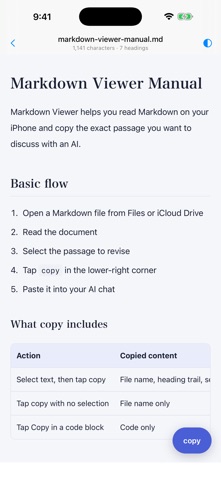
Markdown Viewer: Copy for AI Screenshot 1 of 4
Markdown Viewer: Copy for AI Screenshot 2 of 4
Markdown Viewer: Copy for AI Screenshot 3 of 4
Markdown Viewer: Copy for AI Screenshot 4 of 4
Screenshots by Yusuke Yamamoto, from the the App Store listing
Description by Yusuke Yamamoto Written by the developer, not by AppBrain. Click to read.
You spot a line worth fixing, but explaining which file and which section to an AI takes longer than the fix itself.
Markdown Viewer removes that step.

Select the text and tap copy. Then paste it into your AI chat.


Three steps

1. Open a Markdown file from Files or iCloud Drive
2. Long-press to select the text you want to change
3. Tap copy in the lower right, then paste into an AI chat


It copies more than the text

Your selection arrives with its file name and heading trail attached.
Here is what actually lands on your clipboard.

File name: docs/current/plan.md

Headings:
Chapter 3 > Setup steps

Selected text:
"""
An administrator handles the initial setup, and members join from an invite link.
"""

The AI sees which file, which section, and which sentence in a single paste. No more writing out where the text came from.


Set the path yourself

Tap the file name to enter any relative path. Something like docs/current/plan.md helps an AI pin down the target.


Features

• Markdown rendering with headings, tables, code blocks, and checklists
• Text selection with context-rich copy
• Open from Files, iCloud Drive, pasted text, or a sample document
• Copy a code block on its own
• Custom relative paths
• Light and dark themes
• Japanese and English, following your device language
• VoiceOver and Dynamic Type support


Good for

• Reading back specs and notes written with an AI while you are out
• Sending a fix to your AI the moment you notice it
• Lining up edits before you get back to your desk
• Reading Markdown from iCloud Drive in a clean layout


Not included

• Editing, saving, or exporting Markdown
• Writing back to the original file
• Automatic sending to an AI (it copies to your clipboard)
• Accounts, sync, or direct cloud service connections

Focused on reading and handing text to an AI. Light and simple.


Not saved

Your document, selections, copied text, and recent files are never stored. Everything runs on your device. No ads, no analytics.


Requirements

iPhone running iOS 17 or later.
Supports .md and .markdown files in UTF-8, up to 1 MB.
Official page on the App Store

Safety and technology

Found in the app by AppBrain
Price
Free
App size
1.46 MB
Content rating
Everyone

Technologies used by Markdown Viewer: Copy for AI

Releases

Updates seen on the App Store
Version
1.0.2
Launched
August 2026

No changelog data

Alternatives

Similar apps and more from Yusuke Yamamoto

Alternatives to Markdown Viewer: Copy for AI

MDViewer - Markdown Reader icon MDViewer - Markdown Reader
江林 任
0.0
Free
FastEver Snap 3 icon FastEver Snap 3
Rakko Inc.
5.0
$7.99
1 ratings
MarkDown Reader - MD Viewer icon MarkDown Reader - MD Viewer
Edward Juden
0.0
Free
md Viewer: Markdown & Mermaid icon md Viewer: Markdown & Mermaid
Patrick Ostertag
0.0
Free
Markdown Reader & Editor - MD icon Markdown Reader & Editor - MD
Sahana A S
0.0
Free
MarkUp - Word, Markdown, LaTeX icon MarkUp - Word, Markdown, LaTeX
Valentin Donchev
5.0
Free
4 ratings
Markdown Editor & Reader icon Markdown Editor & Reader
Dang Nam Nguyen
5.0
Free
1 ratings
Markdown Viewer Mobile icon Markdown Viewer Mobile
Cemil Ilik
5.0
Free
2 ratings

More from Yusuke Yamamoto

Jargon Japan icon Jargon Japan
Yusuke Yamamoto
0.0
Free

Rankings

App Store top charts

App Store Rankings for Markdown Viewer: Copy for AI

This app is not ranked

About the app and developer

About Markdown Viewer: Copy for AI

Markdown Viewer: Copy for AI is a productivity app developed by Yusuke Yamamoto.

User Ratings

The app has no ratings yet.

App Information

Markdown Viewer: Copy for AI is freely available from the App Store. The app size is 1.46 MB. The latest version available is 1.0.2. The last update was on August 20, 2026.

Technical Requirements

The app has a content rating of Everyone. The app has been available on the App Store since August 2026.

Developer information for Yusuke Yamamoto

Yusuke Yamamoto

Address:

Share Markdown Viewer: Copy for AI

Popular Productivity Apps Top new apps Today's trending apps Price drops on Google Play Apps other people are watching
MDViewer - Markdown Reader icon MDViewer - Markdown Reader
FastEver Snap 3 icon FastEver Snap 3
MarkDown Reader - MD Viewer icon MarkDown Reader - MD Viewer
md Viewer: Markdown & Mermaid icon md Viewer: Markdown & Mermaid
Markdown Reader & Editor - MD icon Markdown Reader & Editor - MD
MarkUp - Word, Markdown, LaTeX icon MarkUp - Word, Markdown, LaTeX
Markdown Editor & Reader icon Markdown Editor & Reader
Markdown Viewer Mobile icon Markdown Viewer Mobile
Overview Alternatives Reviews Rankings Technology
AppBrain Intelligence premium content

Subscribe now to get full and unlimited access to AppBrain Intelligence. You'll have access to:

  • App Intelligence dashboard (performance timeline, competitor comparison, country rankings, insight cards)
  • Detailed ranking data per app
  • Full timeline per developer
  • Device market shares data per country
  • Unlimited keyword tracking
1 Month

$75/mo
(billed every month)

SAVE 0%
Subscribe
3 Months

$65/mo
($195 billed every 3 months)

SAVE 13%
Subscribe
1 Year

$57.50/mo
($690 billed every year)

SAVE 23%
Subscribe
Each subscription will automatically renew 3 days before the expiration date for the same time period. Subscriptions can be cancelled at any time before the renewal.

AppBrain is an app data site, we track rankings, ratings, installs for all apps and games on Google Play and the App Store. AppBrain doesn't host app files or APKs, all install links go directly to the official store. All trademarks are owned by their respective owners.

More apps

  • Top Android apps being viewed
  • Harvest Tycoon: Cozy Farm Game
  • DuckDuckGo, optional Duck.ai
  • View ROUTE ELD

App statistics

  • Android statistics
  • Google Play Developer stats
  • Trending Android Apps
  • Trending iOS apps
  • Top popular Apps
  • Buy the best Android phone
  • Buy & sell app businesses

About AppBrain

  • Contact
  • Privacy
  • Documentation
  • DMCA takedowns
  • Blog
  • Free webpage for your Android app
© 2010-2026 - AppBrain