

MarkUp - Word, Markdown, LaTeX
MarkUp - Word, Markdown, LaTeX is made and published by Valentin Donchev. AppBrain is an independent app data site and isn't affiliated with Valentin Donchev. The app name, icon, screenshots and description belong to Valentin Donchev and are shown as published on the App Store.
AppBrain's verdict
- Rating on App Store
- 5.00
- 4 ratings
- Last updated
- October 27, 2026
It doesn't have enough ratings yet to judge what users think.
Rankings
App Store top chartsApp Store Rankings for MarkUp - Word, Markdown, LaTeX
Competitors
Similar apps and more from Valentin DonchevAlternatives to MarkUp - Word, Markdown, LaTeX





More from Valentin Donchev

Releases
Updates seen on the App Store- Version
- 1.6.2
- Launched
- April 2026
No changelog data
User feedback
Ratings and reviews on the App StoreComments on MarkUp - Word, Markdown, LaTeX for iOS
We don't have enough comments to show example comments. Please check back later.
Technology
Found in the app by AppBrain- Price
- Free
- App size
- 71.0 MB
- Content rating
- Everyone
Technologies used by MarkUp - Word, Markdown, LaTeX
About the app and developer
About MarkUp - Word, Markdown, LaTeX
MarkUp - Word, Markdown, LaTeX is a productivity app developed by Valentin Donchev.
User Ratings
MarkUp - Word, Markdown, LaTeX is rated 5.00 out of 5 stars. The rating is based on 4 ratings.
App Information
MarkUp - Word, Markdown, LaTeX is freely available from the App Store. The app size is 71.03 MB. The latest version available is 1.6.2. The last update was on October 27, 2026.
Technical Requirements
The app has a content rating of Everyone. The app has been available on the App Store since April 2026.
Developer information for Valentin Donchev
Address:
Store listing
By Valentin Donchev, from the App Store




Description by Valentin Donchev Written by the developer, not by AppBrain. Click to read.
Word (.docx) documents
• Fully formatted Word documents on real pages, with Home, Insert, References, and Review tabs
• Tables you can type straight into, with fonts, colors, shading, and bullets inside cells
• Charts with editable data, over 30 shapes, text boxes, and signatures you draw or type
• Photos and shapes with text wrap: in line, in columns, behind text, or in front of text
• Table of contents designs, captions, cross-references, and citations with a works-cited list
• Footnotes and endnotes, comments with replies, and tracked changes
• Custom styles, multilevel numbering, columns, section breaks, and page color
• LaTeX math inside Word documents (Pro)
LaTeX, offline (Pro)
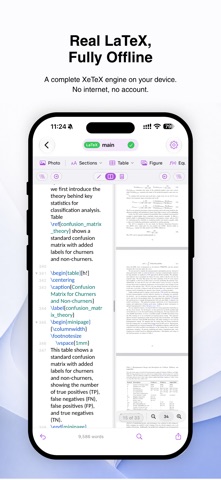
• A real XeTeX engine on your device: no internet, no account, nothing uploaded
• Tap the rendered page to jump to the line that made it, and back again (SyncTeX)
• Autocomplete for commands, citations, references, and file paths
• Errors and warnings in the margin, explained in plain English
• Math symbol palette, visual table builder, and multi-file projects with BibTeX
Markdown
• Live preview as you type, side by side or on its own
• LaTeX math and Mermaid diagrams
• Citations from a BibTeX file, with the bibliography written for you
• Edit any table in a simple grid
Data, web pages, and screenplays
• CSV opens as a grid you can type in, with rows and columns you can drag
• JSON and YAML are checked as you type and previewed as a tree
• HTML shows as a real web page and can run its JavaScript when you allow it
• Fountain screenplays get a formatted preview, a scene list, and character name suggestions; Final Draft files open too
Every language
• Chinese, Japanese, Korean, Arabic, Hebrew, Russian, Greek, and more, in every kind of file
• Right-to-left text, older text encodings, and word counts that work in every script
Files that work together
• Tables and charts made from a CSV, JSON, or YAML file update when the data changes
• Convert between Word, Markdown, LaTeX, HTML, RTF, plain text, data files, and screenplays, and keep converted copies up to date (Pro)
• Lock any file with a password; it stays locked on every device
One app, all your devices
• The same features on iPhone, iPad, and Mac, in one universal purchase
• Documents, templates, and settings sync through iCloud
Templates and version history
• Start from an article, thesis, problem set, CV, screenplay, web page, and more
• Save any document as a template (Pro)
• Earlier drafts kept as you edit; compare them side by side and restore one in a tap (Pro)
Files & workflow
• Works with docx, rtf, md, tex, bib, txt, rmd, fountain, fdx, csv, json, yaml, and html files
• Export to PDF or the document’s own format
• Open any folder from iCloud or your device, and find & replace across all of it
• Spell check that understands LaTeX, autosave, dark mode, and keyboard shortcuts
MarkUp is free to use. MarkUp Pro unlocks offline LaTeX typesetting, LaTeX math in Word documents, converting between formats, version history, your own templates, and unlimited file exports. Try Pro free for 14 days with the yearly subscription, or buy it once and keep it forever, on all your devices.
Privacy Policy: https://appsvaldonchevdeveloper.com/privacy/markup
Terms of Use: https://www.apple.com/legal/internet-services/itunes/dev/stdeula/