

Marked: Day by Day
Marked: Day by Day is made and published by mysteryfiles.nl. AppBrain is an independent app data site and isn't affiliated with mysteryfiles.nl. The app name, icon, screenshots and description belong to mysteryfiles.nl and are shown as published on the App Store.
AppBrain's verdict
- Last updated
- September 11, 2026
Rankings
App Store top chartsApp Store Rankings for Marked: Day by Day
Competitors
Similar apps and more from mysteryfiles.nlMore from mysteryfiles.nl








Releases
Updates seen on the App Store- Version
- 1.4.4
- Launched
- August 2024
No changelog data
User feedback
Ratings and reviews on the App StoreComments on Marked: Day by Day for iOS
We don't have enough comments to show example comments. Please check back later.
Technology
Found in the app by AppBrain- Price
- Free
- App size
- 8.61 MB
- Content rating
- Everyone
Technologies used by Marked: Day by Day
About the app and developer
About Marked: Day by Day
Marked: Day by Day is a lifestyle app developed by mysteryfiles.nl.
What is the rating of Marked: Day by Day?
Marked: Day by Day has no ratings yet.
Is Marked: Day by Day free?
Marked: Day by Day is free. The app size is 8.61 MB. The latest version available is 1.4.4. The last update was on September 11, 2026.
What are the requirements for Marked: Day by Day?
The app has a content rating of Everyone. The app has been available on the App Store since August 2024.
Developer information for mysteryfiles.nl
Address:
Store listing
By mysteryfiles.nl, from the App Store


Description by mysteryfiles.nl Written by the developer, not by AppBrain. Click to read.
Marked: Day by Day is a visual diary for days when you don’t have the words—or the energy—to write a full journal entry. Choose a marker, tap a date, and the day is done.
Start with a simple symbol or make each calendar your own with emoji, photos, clipboard content, custom colors, shapes, and Genmoji. Over time, your individual marks become a visual record of the days you showed up.
HOW IT WORKS
Choose the marker that feels right, then tap a date to mark it. Tap the date again if you want to remove the mark. Use the year overview to see your progress at a glance, or open Focus Mode for a closer look at the current month.
FEATURES
• Mark any day with a single tap
• View all 12 months in a year overview
• Move between years and revisit previous days
• Focus on one month in a clean, dedicated view
• Choose from symbols, emoji, photos, clipboard content, and Genmoji
• Personalize symbols and photo markers with colors and shapes
• Review your current week with Weekly Snippets
• Set a daily reminder at a time that works for you
• Mark today directly from supported notifications
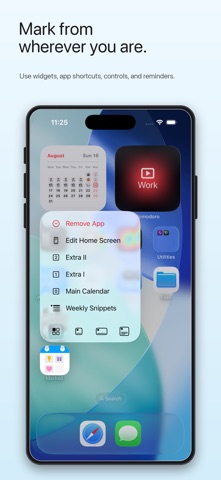
• Add Home Screen and Lock Screen widgets
• Use Shortcuts, app controls, and quick actions for faster access
• Sync your calendar data with iCloud
• Use Marked on iPhone and iPad
ONE CALENDAR, OR MORE
The Main Calendar gives you a simple space for marking everyday life. With Pro, you can unlock three additional calendars, give them custom names, and use a different marker for each one.
Use them to keep track of anything that matters to you: mood, habits, health, creativity, movement—or simply making it through the day.
No blank pages. No pressure to explain. No streaks demanding perfection.
Your days matter, even when you don’t have the words. Sometimes, one mark is enough.
Term of Use
https://www.apple.com/legal/internet-services/itunes/dev/stdeula/