MarkSheet: answer sheet
MarkSheet: answer sheet is made and published by enoiu. AppBrain is an independent app data site and isn't affiliated with enoiu. The app name, icon, screenshots and description belong to enoiu and are shown as published on the App Store.
AppBrain's verdict
- Rating on App Store
- 4.79
- 24 ratings
- Last updated
- August 20, 2026
- Size
- 40.1 MB
It doesn't have enough ratings yet to judge what users think.
User feedback
Ratings and reviews on the App StoreComments on MarkSheet: answer sheet for iOS
We don't have enough comments to show example comments. Please check back later.
Store listing
By enoiu, from the App StoreDescription by enoiu Written by the developer, not by AppBrain. Click to read.
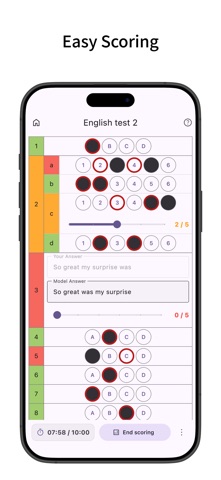
Easy scoring, supports multiple answers, sub-questions, and descriptive questions.
Since you can freely customize the number of questions and choices, you can create tailor-made answer sheets for any test format, from daily school quizzes and midterms to major exams like the SAT, ACT, AP Exams, GRE, GMAT, LSAT, MCAT, TOEFL, TOEIC, and IELTS, as well as professional licensing exams like the Bar Exam, NCLEX, CPA, and civil service exams.
Furthermore, once an answer sheet is created, you can use the "Duplicate" feature to reuse it as a template endlessly, making it perfect for practicing past papers by year or doing multiple passes of the same workbook or exam for repetitive learning.
Creating Answer Sheets
- Create bubble sheet style answer sheets.
- Configure the number of questions and choices. Choices are customizable, and bubble size (width, height, font size) can be adjusted. You can also save configured choices as presets.
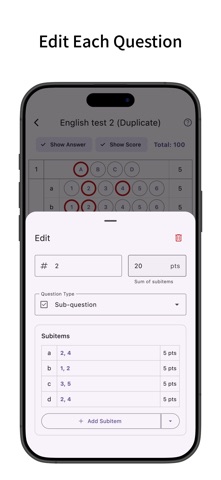
- Supports multiple answers, sub-questions, and descriptive questions. For descriptive questions, you can set character limits and model answers.
- Set timers and time limits.
- Pre-enter correct answers (you can also enter correct answers during scoring after answering).
- Set point allocation. You can input the total score and distribute points evenly across questions.
- Configure question numbers. You can renumber all questions based on the first question number.
Answering
- When using a timer, the time taken for each question is recorded and can be viewed in a graph after scoring.
- After finishing the test, it enters scoring mode where you can easily grade by just tapping the correct answer choices.
- Supports partial credit for multiple-choice and descriptive questions.
- After scoring, view percentage, score, and number of correct answers.
- Tap a main question number to see the total score and total time for sub-questions within that main question.
- Highlight rows (long press or checkbox).
Sharing Answer Sheets
- Share answer sheets to other devices using URL links, JSON text, dedicated files (.marksheet), and 2D barcodes.
- Simply open a shared URL link to automatically launch the app and import the data.
- Scan a 2D barcode with your device's standard camera app to quickly launch the app and import the data.
- We also publish the specifications of the data structure used for this sharing feature. By utilizing this, you can even use generative AI to automatically create custom answer sheets based on your study materials.
Mark Sheet Management
- Add labels to sheets for easy filtering. You can filter by multiple labels.
- Filter by status: answering, scoring, or scoring completed.
- Tap the search bar to search sheets by title.
- Sort sheets by title, creation date, or last viewed.
- Edit labels or duplicate sheets from the menu on the right of each sheet.
- Long press to select multiple sheets for bulk deletion or labeling.
- Supports backup and restore of app data via ZIP files.
Mark Sheet Settings
- Manage choice presets. You can also save bubble sizes.
- Set the default number of questions, choices, and timer for new sheets. Defaults to the previously used settings.
- Configure row highlighting behavior: long press, checkbox, or off. Opacity of the highlight can be changed.
- Change the opacity of the mark fill.
- Change the default bubble size (width, height, font size).
- Keep the screen on while answering.
Customization
- Supports Dark Mode.
- Change theme colors.
- Simple design compliant with Material Design.
Safety and technology
Found in the app by AppBrain- Price
- Free
- App size
- 40.1 MB
- Content rating
- Everyone
Technologies used by MarkSheet: answer sheet
Releases
Updates seen on the App Store- Version
- 5.1.1
- Launched
- December 2022
No changelog data
Alternatives
Similar apps and more from enoiuRankings
App Store top chartsApp Store Rankings for MarkSheet: answer sheet
About the app and developer
About MarkSheet: answer sheet
MarkSheet: answer sheet is an education app developed by enoiu.
User Ratings
MarkSheet: answer sheet is rated 4.79 out of 5 stars. The rating is based on 24 ratings.
App Information
MarkSheet: answer sheet is freely available from the App Store. The app size is 40.09 MB. The latest version available is 5.1.1. The last update was on August 20, 2026.
Technical Requirements
The app has a content rating of Everyone. The app has been available on the App Store since December 2022.
Developer information for enoiu
Address:
Frequently asked questions about MarkSheet: answer sheet
Is MarkSheet: answer sheet free?
Yes. MarkSheet: answer sheet is free on the App Store.
Is MarkSheet: answer sheet still available?
Yes. MarkSheet: answer sheet is on the App Store, and the last update we saw was on August 20, 2026.
How large is MarkSheet: answer sheet?
MarkSheet: answer sheet is 40.09 MB.
Is MarkSheet: answer sheet suitable for children?
App Store rates the content of MarkSheet: answer sheet as suitable for everyone.
How do people rate MarkSheet: answer sheet?
MarkSheet: answer sheet scores 4.79 out of 5 stars, from 24 ratings on the App Store.
Who made MarkSheet: answer sheet?
MarkSheet: answer sheet was developed by enoiu. It is listed in the education category on the App Store.
What are the best alternatives to MarkSheet: answer sheet?
People looking at MarkSheet: answer sheet also look at these education apps: AnsSheet Lite, Answer Sheet with Overview, Smart Bubble Sheet, TNMaker - Multiple Choice Test, Mark Sheet App "Smart Mark".