

MarkText - Markdown Editor
MarkText - Markdown Editor is made and published by 刘生 林. AppBrain is an independent app data site and isn't affiliated with 刘生 林. The app name, icon, screenshots and description belong to 刘生 林 and are shown as published on the App Store.
AppBrain's verdict
Established- Rating on App Store
- 3.00
- 3 ratings
- Last updated
- October 7, 2026
It doesn't have enough ratings yet to judge what users think.
Rankings
App Store top chartsApp Store Rankings for MarkText - Markdown Editor
Competitors
Similar apps and more from 刘生 林Alternatives to MarkText - Markdown Editor






More from 刘生 林


Releases
Updates seen on the App Store- Version
- 2.7.0
- Launched
- December 2014
No changelog data
User feedback
Ratings and reviews on the App StoreComments on MarkText - Markdown Editor for iOS
We don't have enough comments to show example comments. Please check back later.
Technology
Found in the app by AppBrain- Price
- $3.99
- App size
- 14.3 MB
- Content rating
- Everyone
Technologies used by MarkText - Markdown Editor
About the app and developer
About MarkText - Markdown Editor
MarkText - Markdown Editor is a productivity app developed by 刘生 林.
User Ratings
MarkText - Markdown Editor is rated 3.00 out of 5 stars. The rating is based on 3 ratings.
App Information
MarkText - Markdown Editor costs $3.99. The app size is 14.26 MB. The latest version available is 2.7.0. The last update was on October 7, 2026.
Technical Requirements
The app has a content rating of Everyone. The app has been available on the App Store since December 2014.
Developer information for 刘生 林
Address:
Frequently asked questions about MarkText - Markdown Editor
Is MarkText - Markdown Editor free?
No. MarkText - Markdown Editor costs $3.99 on the App Store.
Is MarkText - Markdown Editor still available?
Yes. MarkText - Markdown Editor is on the App Store, and the last update we saw was on October 7, 2026.
How large is MarkText - Markdown Editor?
MarkText - Markdown Editor is 14.26 MB.
Is MarkText - Markdown Editor suitable for children?
App Store rates the content of MarkText - Markdown Editor as suitable for everyone.
How do people rate MarkText - Markdown Editor?
MarkText - Markdown Editor scores 3.00 out of 5 stars, from 3 ratings on the App Store.
Who made MarkText - Markdown Editor?
MarkText - Markdown Editor was developed by 刘生 林. It is listed in the productivity category on the App Store.
What are the best alternatives to MarkText - Markdown Editor?
People looking at MarkText - Markdown Editor also look at these productivity apps: memoChica - Notes for ideas, Markcurial: Markdown Editor, EZ Outliner, One Markdown, # Type - Markdown Editor.
Store listing
By 刘生 林, from the App Store




Description by 刘生 林 Written by the developer, not by AppBrain. Click to read.
## Key Features
- Markdown syntax highlighting.
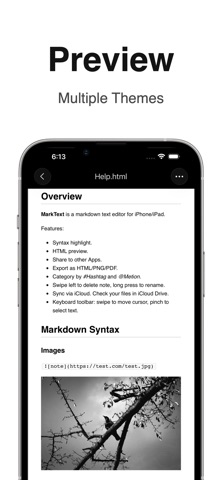
- Built‑in HTML previews with various styles.
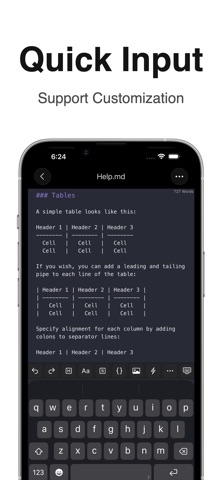
- Move cursor by sliding the toolbar above the keyboard;
- Simple import & export, edit files in Files app in place.
- One-tap conversion to long image, multi-images, PDF or HTML.
- Easily share to Dropbox, Email, or open with other apps.
- Full-text search, word count, regex find & replace;
- Sync between iPhone, iPad and Mac via iCloud Drive.
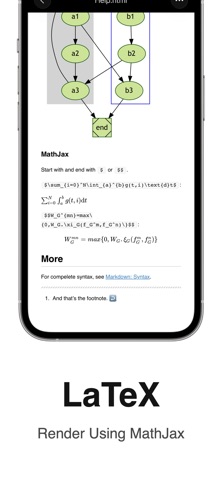
- Mermaid and Graphviz support for editing and previewing flowcharts & diagrams.
- MathJax support to edit and preview mathematical formulas.
## Import & Export
Multiple import and export methods available
- Directly manage file list via the Files app.
- Import / export files through iTunes.
- Upload and download files over WiFi.
- Share MD, HTML, PNG, PDF files to other apps.
## Keyboard Toolbar
- Tap buttons to quickly insert Tabs, headings, lists, code blocks, images, hyperlinks and more.
- Customize toolbar buttons and reorder them.
- Swipe toolbar left/right to move cursor fast.
- Pinch toolbar with two fingers for quick text selection.
- Custom quick input phrases and templates supported.
## Syntax Highlighting & HTML Preview
- Built-in preview themes for light and dark modes.
- Customizable preview style for code blocks.
- Supports multiple Markdown flavors: Standard Markdown, MultiMarkdown, GitHub Flavored Markdown.
### GMF (GitHub Flavored Markdown) Syntax
Supports extended syntax: strikethrough, tables, task lists, code blocks.
#### Task Lists
Lists starting with [ ] or [x] indicate incomplete or completed tasks.
Example:
- [ ] Incomplete
- [x] Completed
## iCloud Drive Sync
- Automatically sync and store all note files across your devices via iCloud Drive.
- View synced note files inside the iCloud Drive folder on Mac.
## Supported File Extensions
md, mmd, markdown, markdn, mdown, mkdn, markd, txt, text, etc.
## Other Features
- Swipe left on note item to delete; long press to rename.
- Add "#Hashtag" or "@Mention" inside notes to create tag categories, equivalent to folders.
- Deleted notes go to Trash and stay there until permanently removed.
## scheme
- Open App: marktext://x-url-callback/
- Open note: marktext://x-url-callback/open?name=xx
- New note: marktext://x-url-callback/new?content=xx
- New note from pasteboard: marktext://x-url-callback/new?pasteboard=1
If you have questions or suggestions, contact: xappbox+mt@gmail.com