

Mask My File: Remove Your Info
Mask My File: Remove Your Info is made and published by Guan Feng Lai. AppBrain is an independent app data site and isn't affiliated with Guan Feng Lai. The app name, icon, screenshots and description belong to Guan Feng Lai and are shown as published on the App Store.
AppBrain's verdict
- Last updated
- October 9, 2026
Rankings
App Store top chartsApp Store Rankings for Mask My File: Remove Your Info
Competitors
Similar apps and more from Guan Feng LaiAlternatives to Mask My File: Remove Your Info


More from Guan Feng Lai


Also available on Google Play

Releases
Updates seen on the App Store- Version
- 1.0.8
- Launched
- July 2026
No changelog data
User feedback
Ratings and reviews on the App StoreComments on Mask My File: Remove Your Info for iOS
We don't have enough comments to show example comments. Please check back later.
Technology
Found in the app by AppBrain- Price
- Free
- App size
- 22.6 MB
- Content rating
- Everyone
Technologies used by Mask My File: Remove Your Info
About the app and developer
About Mask My File: Remove Your Info
Mask My File: Remove Your Info is an utilities app developed by Guan Feng Lai.
User Ratings
The app has no ratings yet.
App Information
Mask My File: Remove Your Info is freely available from the App Store. The app size is 22.56 MB. The latest version available is 1.0.8. The last update was on October 9, 2026.
Technical Requirements
The app has a content rating of Everyone. The app has been available on the App Store since July 2026.
Developer information for Guan Feng Lai
Address:
Frequently asked questions about Mask My File: Remove Your Info
Is Mask My File: Remove Your Info free?
Yes. Mask My File: Remove Your Info is free on the App Store.
Is Mask My File: Remove Your Info still available?
Yes. Mask My File: Remove Your Info is on the App Store, and the last update we saw was on October 9, 2026.
How large is Mask My File: Remove Your Info?
Mask My File: Remove Your Info is 22.56 MB.
Is Mask My File: Remove Your Info suitable for children?
App Store rates the content of Mask My File: Remove Your Info as suitable for everyone.
Who made Mask My File: Remove Your Info?
Mask My File: Remove Your Info was developed by Guan Feng Lai. It is listed in the utilities category on the App Store.
What are the best alternatives to Mask My File: Remove Your Info?
People looking at Mask My File: Remove Your Info also look at these utilities apps: Domain Sniper: WHOIS & Drops, Fuseo — Japanese ID Redaction, 個人情報マスカー PDF黒塗り, foodmark, MSC Show Control.
Store listing
By Guan Feng Lai, from the App Store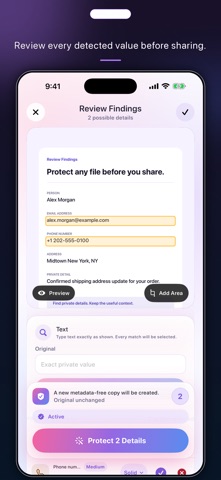


Description by Guan Feng Lai Written by the developer, not by AppBrain. Click to read.
WHAT YOU CAN DO
• Images and PDFs: full-width preview, up to 5× zoom, fluid drag, and precise manual selections.
• Visual files: permanent solid redaction or removal only. Face and barcode detection simply mark regions for your review.
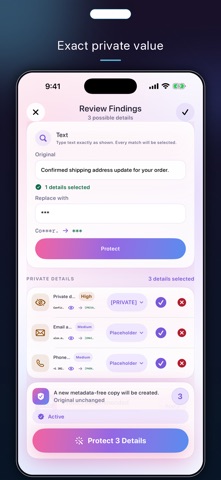
• Text, JSON, XML, HTML, CSV, TSV, and RTF: search every match, then apply a full mask, a partial mask, a placeholder, a pseudonym, or removal.
• Remove metadata where the format supports it. Work page by page in PDFs, or protect up to 100 files at once with individual previews, cross-file search, and per-file manual selections.
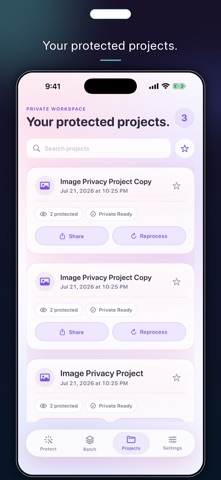
• Stay organized with Private Session, project workspaces, and Placeholder Vault.
USE IT WHEN IT MATTERS
Before you send a rental application, a medical record, a pay stub with a Social Security number, or a customer file to a coworker, keep the useful context while permanently hiding the details they do not need.
PRIVATE BY DESIGN
Everything is processed on your device. There is no account, advertising, tracking, analytics, or content upload. Apple Vision and the embedded Tesseract OCR engine run locally. Face detection creates regions only: it does not identify a person, build a template, share face data, or retain it. Apple handles purchases with StoreKit. Mask My File does not use a VPN, NetworkExtension, proxy, tunnel, DNS filter, or network routing. Originals are never overwritten; temporary workspace files, Private Session data, and projects stay on the device until you delete them.
BUY ONCE. USE IT FOR LIFE.
One purchase unlocks unlimited verified outputs and batch processing for good. No subscriptions. Restore your purchase anytime through the App Store.
Optimized for iPhone Duo.