

MC-Timer
MC-Timer is made and published by tredje design. AppBrain is an independent app data site and isn't affiliated with tredje design. The app name, icon, screenshots and description belong to tredje design and are shown as published on the App Store.
AppBrain's verdict
Established- Rating on App Store
- 1.00
- 1 ratings
- Last updated
- October 28, 2025
- Size
- 8.92 MB
It doesn't have enough ratings yet to judge what users think.
User feedback
Ratings and reviews on the App StoreComments on MC-Timer for iOS
We don't have enough comments to show example comments. Please check back later.
Store listing
By tredje design, from the App Store




Description by tredje design Written by the developer, not by AppBrain. Click to read.
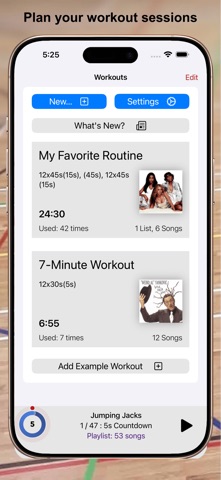
You can use this app to have some fun during workout sessions like Tabata, intervals, HIIT, or circuit training, where you have multiple, timed sets of exercise and rest phases. For more complex routines, the names of your exercises can be shown and randomized, optionally also audibly announced. MC-Timer will guide you through your planned workout by playing music during the high-effort exercise phases and by being quiet during the pauses.
No need to constantly look at your watch.
Just listen to the music.
Your music.
When the work phases are shorter than the typical duration of a song, then you can nicely play a new song for each set. Let yourself be surprised and allow MC-Timer to play a randomly chosen song for each set. And if you do not want to listen to mellow song intros, you can set MC-Timer to play a suitably long section from the "heart" of the song.
While the workout is playing, you can see your progress within each set and within the entire session by looking at the progress rings and the countdown timers. The progress rings are distinct and remain legible even from the other side of the room. To make this possible, the display will stay on while MC-Timer is playing your session.
MC-Timer synchronizes the workout definitions across your devices. If you like to use a bigger screen, play the workouts using MC-Timer on iPad or Apple TV.
The workout details are fully customizable. You can, but you don't have to:
- define any number of repeated sets of "music" and "pause" phases;
- insert special sets without music to create longer pauses;
- define one or more lists of exercise names to be shown or announced;
- choose all the songs that will be played;
- use the playlist or exercise lists as is or randomized;
- select whether you want to skip to the next song for each set;
- play tracks from the beginning or from the middle.
Alerts!!!
- optionally, use countdown beeps or just a single warning beep;
- pick a fun alert sound to play at the start or end of each music phase, or at the end of the session;
- select from 62 custom sounds: bells, horns, special effects, Science Fiction and cute animals;
A few geeky details:
- Each set consists of a "music" phase and a "pause" phase, optionally repeated multiple times.
- Music and pause times are entered in seconds.
- The start delay (or the default 5-second countdown) is not counted for the workout duration.
- A complete session always ends at its last music phase, i.e. the very last pause is skipped.
- When you have multiple exercise lists, you can assign which list to use for which set.
- You can define exercise pairs like "lunges, left/right" which can be split into "lunges, left" followed by "lunges, right".
- You can enable or randomize lead phrases like "Next up: " for the voice announcements or define your own.
- MC-Timer accurately times your workout; unlike other apps, there are no timing errors that accumulate as the session progresses.
- The counters/timers in the playback view can be tapped to toggle between counting up or down.
- The shuffle mode randomises the order in which the songs are played. That is to say: songs will not be repeated until all songs in the playlist have been played.
- You can override the default system-wide appearance and always use the app in its dark or light appearance.
Medical Advice
Please consult with a physician prior to engaging in a new exercise program; even more so if this is not something that you are used to.
MC-Timer on the Apple TV
You can easily playback your workout sessions directly on Apple TV by using the MC-Timer companion app for Apple TV. However, you cannot edit the sessions there; you need to do that on your iPhone or iPad and sync your changes via iCloud. Also note that since your (iTunes) media library is not available on Apple TV, you will need an Apple Music subscription in order to play music on Apple TV.
Safety and technology
Found in the app by AppBrain- Price
- $2.99
- App size
- 8.92 MB
- Content rating
- Everyone
Technologies used by MC-Timer
Releases
Updates seen on the App Store- Version
- 1.9.2
- Launched
- February 2021
No changelog data
Alternatives
Similar apps and more from tredje designAlternatives to MC-Timer




More from tredje design


Rankings
App Store top chartsApp Store Rankings for MC-Timer
About the app and developer
About MC-Timer
MC-Timer is a health & fitness app developed by tredje design.
User Ratings
MC-Timer is rated 1.00 out of 5 stars. The rating is based on one rating ratings.
App Information
MC-Timer costs $2.99. The app size is 8.92 MB. The latest version available is 1.9.2. The last update was on October 28, 2025.
Technical Requirements
The app has a content rating of Everyone. The app has been available on the App Store since February 2021.
Developer information for tredje design
Address:
Frequently asked questions about MC-Timer
Is MC-Timer free?
No. MC-Timer costs $2.99 on the App Store.
Is MC-Timer still available?
Yes. MC-Timer is on the App Store, and the last update we saw was on October 28, 2025.
How large is MC-Timer?
MC-Timer is 8.92 MB.
Is MC-Timer suitable for children?
App Store rates the content of MC-Timer as suitable for everyone.
How do people rate MC-Timer?
MC-Timer has one rating of 1.00 stars on the App Store.
Who made MC-Timer?
MC-Timer was developed by tredje design. It is listed in the health & fitness category on the App Store.
What are the best alternatives to MC-Timer?
People looking at MC-Timer also look at these health & fitness apps: Tabata HIIT Workouts timer app, BF Scale, Kinema Fitness - ClubOne OPOS, Cutting Edge Testing, myPrimalCoach.