

.md viewer & editor: NanoFile
.md viewer & editor: NanoFile is made and published by Digital Sandbox B.V. AppBrain is an independent app data site and isn't affiliated with Digital Sandbox B.V. The app name, icon, screenshots and description belong to Digital Sandbox B.V. and are shown as published on the App Store.
AppBrain's verdict
New- Rating on App Store
- 5.00
- 1 ratings
- Last updated
- September 10, 2026
- Size
- 8.33 MB
.md viewer & editor: NanoFile came out 66 days ago. It doesn't have enough ratings yet to judge what users think.
User feedback
Ratings and reviews on the App StoreComments on .md viewer & editor: NanoFile for iOS
We don't have enough comments to show example comments. Please check back later.
Store listing
By Digital Sandbox B.V., from the App Store



Description by Digital Sandbox B.V. Written by the developer, not by AppBrain. Click to read.
EVERY TEXT FILE, NOT JUST MARKDOWN
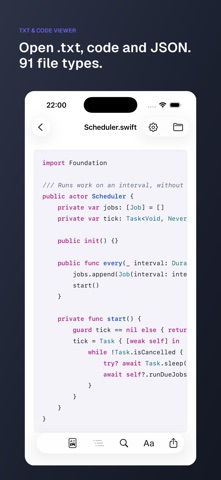
Markdown, plain text, code in 35 languages, JSON, YAML, CSV and HTML. 91 file types in all, each shown the way it should be: code is coloured, a spreadsheet becomes a table, an HTML file is read as a page rather than as tags.
READ IT, THEN CHANGE IT
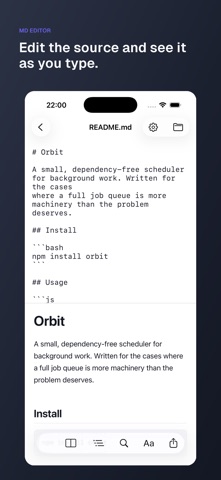
Three views of the same document. The page, the source, or both side by side updating as you type. What you save goes back into the same file, where the rest of your tools can see it.
OPENS WHAT IS ALREADY ON YOUR PHONE
Pick a file in Files and it opens where it lies. Nothing is imported and no copy is kept, so what you save goes back to the same file in the same place. From Mail or Messages, tap the attachment, then the share icon, then NanoFile. On an iPad the folder sits beside the document, and a keyboard works every shortcut.
CONVERTS, ON THE DEVICE
PDF, Word and spreadsheets become markdown. Markdown becomes HTML, Word, or a PDF through the print panel. Nothing is uploaded to do it.
READS A PUBLIC REPOSITORY
Paste a GitHub address and browse the tree. No account and no token. A folder of notes, an Obsidian vault or a checked-out repository opens the same way, without importing or copying anything.
NOTHING LEAVES YOUR DEVICE
No account. No sign-in. No analytics, no tracking, no identifier. The page the renderer runs on carries a content security policy that makes a network request impossible. The single feature that uses a network, opening a public repository, says so on the screen where it happens.
ALL OF IT, FOR NOTHING
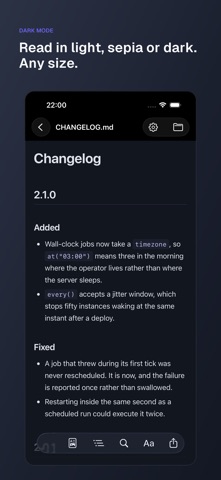
Every file type, editing, Quick Look, the default handler, mermaid diagrams, the reading themes, the converters, and the folder tools: convert a folder in one go, find and replace across it with a preview first and one undo for the lot, check every file, rename a file and move every link with it, and keep several folders open at once. No account, no subscription, no in-app purchase.
Safety and technology
Found in the app by AppBrain- Price
- Free
- App size
- 8.33 MB
- Content rating
- Everyone
Technologies used by .md viewer & editor: NanoFile
Releases
Updates seen on the App Store- Version
- 1.0
- Launched
- September 2026
No changelog data
Alternatives
Similar apps and more from Digital Sandbox B.V.Alternatives to .md viewer & editor: NanoFile


More from Digital Sandbox B.V.


Rankings
App Store top chartsApp Store Rankings for .md viewer & editor: NanoFile
About the app and developer
About .md viewer & editor: NanoFile
.md viewer & editor: NanoFile is an overall app developed by Digital Sandbox B.V.
User Ratings
.md viewer & editor: NanoFile is rated 5.00 out of 5 stars. The rating is based on one rating ratings.
App Information
.md viewer & editor: NanoFile is freely available from the App Store. The app size is 8.33 MB. The latest version available is 1.0. The last update was on September 10, 2026.
Technical Requirements
The app has a content rating of Everyone. The app has been available on the App Store since September 2026.
Developer information for Digital Sandbox B.V.
Address:
Frequently asked questions about .md viewer & editor: NanoFile
Is .md viewer & editor: NanoFile free?
Yes. .md viewer & editor: NanoFile is free on the App Store.
Is .md viewer & editor: NanoFile still available?
Yes. .md viewer & editor: NanoFile is on the App Store, and the last update we saw was on September 10, 2026.
How large is .md viewer & editor: NanoFile?
.md viewer & editor: NanoFile is 8.33 MB.
Is .md viewer & editor: NanoFile suitable for children?
App Store rates the content of .md viewer & editor: NanoFile as suitable for everyone.
How do people rate .md viewer & editor: NanoFile?
.md viewer & editor: NanoFile has one rating of 5.00 stars on the App Store.
Who made .md viewer & editor: NanoFile?
.md viewer & editor: NanoFile was developed by Digital Sandbox B.V. It is listed in the overall category on the App Store.
What are the best alternatives to .md viewer & editor: NanoFile?
People looking at .md viewer & editor: NanoFile also look at these overall apps: Liftoff Air, InMobi Exchange Test App, Clickfyre Ping, API Nauta, Coolidash - Coolify Manager.