

Meeting Rewind
Meeting Rewind is made and published by Darryl Reed. AppBrain is an independent app data site and isn't affiliated with Darryl Reed. The app name, icon, screenshots and description belong to Darryl Reed and are shown as published on the App Store.
AppBrain's verdict
- Last updated
- February 27, 2026
Rankings
App Store top chartsApp Store Rankings for Meeting Rewind
Competitors
Similar apps and more from Darryl ReedAlternatives to Meeting Rewind


More from Darryl Reed


Releases
Updates seen on the App Store- Version
- 1.0
- Launched
- February 2026
No changelog data
User feedback
Ratings and reviews on the App StoreComments on Meeting Rewind for iOS
We don't have enough comments to show example comments. Please check back later.
Technology
Found in the app by AppBrain- Price
- Free
- App size
- 9.15 MB
- Content rating
- Everyone
Technologies used by Meeting Rewind
About the app and developer
About Meeting Rewind
Meeting Rewind is a productivity app developed by Darryl Reed.
User Ratings
The app has no ratings yet.
App Information
Meeting Rewind is freely available from the App Store. The app size is 9.15 MB. The latest version available is 1.0. The last update was on February 27, 2026.
Technical Requirements
The app has a content rating of Everyone. The app has been available on the App Store since February 2026.
Developer information for Darryl Reed
Address:
Store listing
By Darryl Reed, from the App Store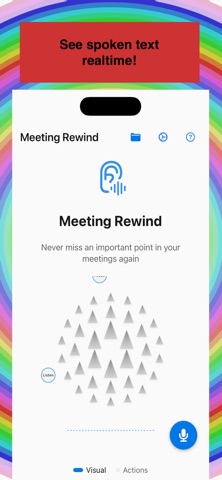


Description by Darryl Reed Written by the developer, not by AppBrain. Click to read.
What it does
- Record → Transcript → Save or Discard: Tap the floating button to start recording; tap again to stop. A transcript (on-device speech recognition) is shown; you can save the recording to the app’s library (Core Data) and share it, export to Notes, add to Reminders, or discard it.
- Instant rewind: The app continuously buffers the last 15 seconds to 3 minutes of audio (configurable). When you miss something, trigger replay to hear that segment again without saving. The buffer is overwritten in real time.
Use it anywhere
- Floating button — Draggable overlay: tap to start or stop recording (Step 1); after stop, transcript sheet (Step 2) with Save/Discard (Step 3). Long-press to expand menu (Settings, Accessibility) or to rewind when recording.
- Saved — Button on the main (Root) screen opens the saved recordings library: play, view transcript, share, export to Notes, add to Reminders, or delete.
- Widgets — Home screen widget (Start/Stop/Replay), Control Center widget, and Live Activity (iOS 18).
- Apple Watch (Wrist Rewind) — Start/stop buffering and trigger replay from your wrist via WatchConnectivity.
- Keyboard — Meeting Rewind keyboard: Rewind, Start/Stop, Open App.
- Share sheet — Start/stop buffering or replay from the system share menu.
- Siri / Shortcuts — “Hey Siri, start Meeting Rewind” or “Stop Meeting Rewind”; App Intents support optional buffer length per shortcut.
- Automation — In Settings, instructions to auto-start when Meeting focus is on or when a calendar event starts (via Shortcuts).