



AppBrain's verdict
- Rating on App Store
- 4.61
- 69 ratings
- Last updated
- June 19, 2026
- Size
- 200.3 MB
It doesn't have enough ratings yet to judge what users think.
User feedback
Ratings and reviews on the App StoreComments on MelodEar: Perfect Ear Training for iOS
We don't have enough comments to show example comments. Please check back later.
Store listing
By David Eskenazy, from the App StoreDescription by David Eskenazy Written by the developer, not by AppBrain. Click to read.
+ Experience different piano chords and scales
+ Watch music theory videos and practice daily with music reading exercises
+ Recognize music intervals and notes with ear training and understanding harmonic progression
Whether you want to understand and improve harmonic progressions and improvisation skills or want to create your own melodies then MelodEar has got you covered ! Here you learn how to sing along with instrumental music.
DAVID ESKENAZY VISION:
MelodEar is designed by David Eskenazy, a musician, singer, and a facilitator who spent 15 years in developing real-life teaching methods and music theory exercises focused on helping musicians and vocalists to understand and improve their harmonic progression and melodic skill.
Why and for Whom MelodEar is designed?
For Musicians: It is a tool that’s designed to help instrumentalists connect their fingers with inner ear. The only aim of the tool (specifically for musicians) is to help them sing with their music instruments to improve their ability of improvising and creating melodies.
For Singers: It allows singers to engage with jazz harmony and melodic modes in a more creative way. Improve pitch accuracy and melodic creativity. Improve your sight reading skills and engage in the vocal training to improve vocal agility and understand the flow within and between different harmonic structures.
+ Learn piano scales to improve understanding of scales and intervals
+ Enter the training mode to develop improvisation skills and increase
+ Learn piano chords and build strong connection between what you hear and what you play!
How does MelodEar work?
MelodEar provides an intuitive and easy-to-use interface to help musicians and singers understand and improve their musical skills. Following is step-by-step method of how it works:
+ Edit Window: Start creating and editing your song including selecting and modifying chords. Customize the structure of your music by choosing melodic modes that match the harmonic progression of the song.
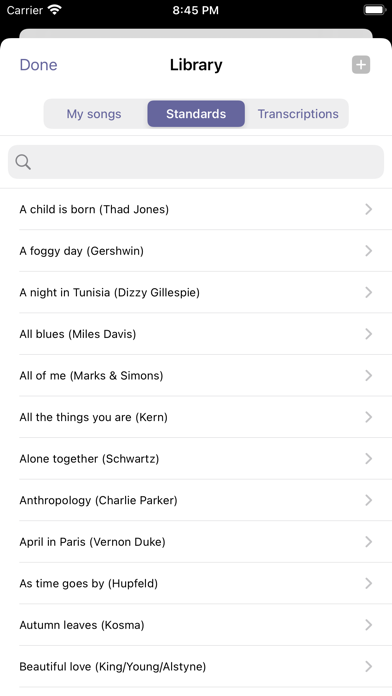
+ The Library: Once the song is created, it gets stored in the library which also contains pre-filled smooth jazz standards. You can access, modify, or use them as templates for learning purposes.
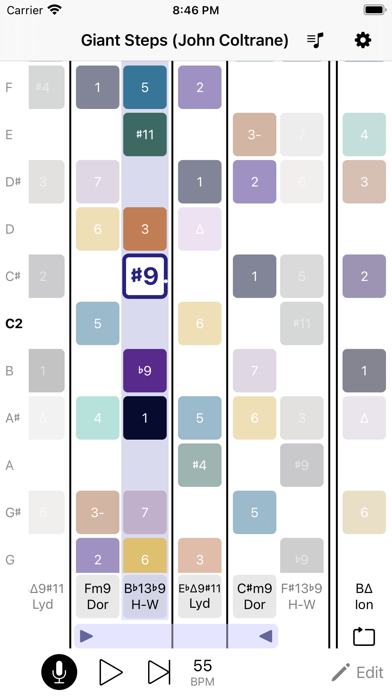
+ Session Window: It is the core of MelodEar where you start the real practice. Here you view the harmonic progression of a song with a visual display of the melodic modes that are connected to each chord.
See how notes and intervals relate to each other
Play with chords (jazz chords, guitar chords), scales, and melodies in real-time using the chord player and vocal keyboard which plays the piano notes of the chosen mode.
“Pitch recognition” feature allows you to highlight the notes you’re singing to hit the right pitch. You can also adjust the pitch with a “fine tuner” and focus on specific sections of song with a “looper” for repeated practice.
+ See It, Hear It, Sing It: See the musical structure visually, hear the melodic intervals, and sing. Get real-time feedback to check your accuracy.
+ Learning and Skill Building: Learn music notes from tutorials and get a guidance through music reading exercises to improve your pitch, ear training, and improvisational skills. Develop deep understanding of harmony and melodic patterns to improve your musical creativity.
+ MelodEar Tutorial Pack: Get detailed guidance and comprehensive learning resources to improve your musical skills. Get step-by-step instructions, skill-development exercises, improvisation training, understanding music theory, and improving musical creativity.
Terms of Use: https://vocal-improv.com/terms-of-use
Privacy Policy: https://vocal-improv.com/privacy-policy
Safety and technology
Found in the app by AppBrain- Price
- Free
- App size
- 200.3 MB
- Content rating
- Everyone
Technologies used by MelodEar: Perfect Ear Training
Releases
Updates seen on the App Store- Version
- 1.5
- Launched
- May 2022
No changelog data
Alternatives
Similar apps and more from David EskenazyAlternatives to MelodEar: Perfect Ear Training




Rankings
App Store top chartsApp Store Rankings for MelodEar: Perfect Ear Training
About the app and developer
About MelodEar: Perfect Ear Training
MelodEar: Perfect Ear Training is a music app developed by David Eskenazy.
What is the rating of MelodEar: Perfect Ear Training?
MelodEar: Perfect Ear Training is rated 4.61 out of 5 stars, based on 69 ratings.
Is MelodEar: Perfect Ear Training free?
MelodEar: Perfect Ear Training is free. The app size is 200.34 MB. The latest version available is 1.5. The last update was on June 19, 2026.
What are the requirements for MelodEar: Perfect Ear Training?
The app has a content rating of Everyone. The app has been available on the App Store since May 2022.
MelodEar: Perfect Ear Training is made and published by David Eskenazy. AppBrain is an independent app data site and isn't affiliated with David Eskenazy. The app name, icon, screenshots and description belong to David Eskenazy and are shown as published on the App Store.
Developer information for David Eskenazy
Address: