

MetaMoJi Share Viewer 6
MetaMoJi Share Viewer 6 is made and published by MetaMoJi Corporation. AppBrain is an independent app data site and isn't affiliated with MetaMoJi Corporation. The app name, icon, screenshots and description belong to MetaMoJi Corporation and are shown as published on the App Store.
AppBrain's verdict
- Last updated
- October 14, 2025
Rankings
App Store top chartsApp Store Rankings for MetaMoJi Share Viewer 6
Competitors
Similar apps and more from MetaMoJi CorporationAlternatives to MetaMoJi Share Viewer 6






More from MetaMoJi Corporation







Releases
Updates seen on the App Store- Version
- 6.12.7
- Launched
- July 2021
No changelog data
User feedback
Ratings and reviews on the App StoreComments on MetaMoJi Share Viewer 6 for iOS
We don't have enough comments to show example comments. Please check back later.
Technology
Found in the app by AppBrain- Price
- Free
- App size
- 265.9 MB
- Content rating
- High
Technologies used by MetaMoJi Share Viewer 6
About the app and developer
About MetaMoJi Share Viewer 6
MetaMoJi Share Viewer 6 is a business app developed by MetaMoJi Corporation.
User Ratings
The app has no ratings yet.
App Information
MetaMoJi Share Viewer 6 is freely available from the App Store. The app size is 265.92 MB. The latest version available is 6.12.7. The last update was on October 14, 2025.
Technical Requirements
The app has a content rating of High Maturity. The app has been available on the App Store since July 2021.
Developer information for MetaMoJi Corporation
Address:
Store listing
By MetaMoJi Corporation, from the App Store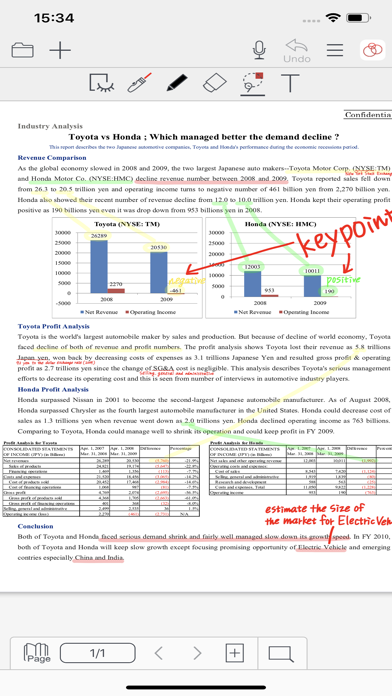
Description by MetaMoJi Corporation Written by the developer, not by AppBrain. Click to read.
MetaMoJi Share Viewer allows groups to collaborate on documents and virtual paper, in real-time. Bring together teams of meeting participants from anywhere in the world to share notes and to visually express their ideas in live interactive online meetings. The audio recording features ensure an accurate record of meeting minutes and offer an added boost to group productivity.
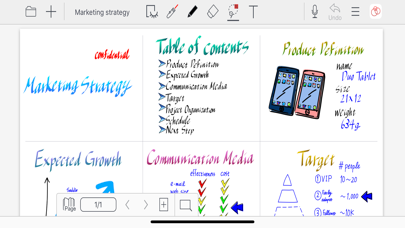
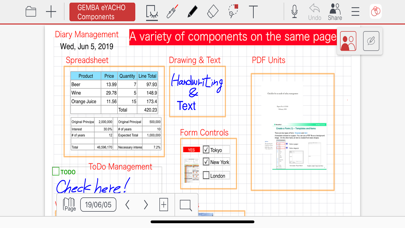
MetaMoJi Share Viewer provides a toolbox of rich creativity tools that can be used by authorized meeting participants, and whose resulting content is shared immediately to everyone’s devices using an optimized streaming technology. Mix work documents, PDF content, text, handwriting, sketching, diagrams, photographs, web page captures, and more in real-time. Meeting organizers can restrict individual participants to specific roles during the meeting, and can control exactly what each device connected to the meeting sees. It is also possible for each individual to work on different parts of the document at the same-time ? for example if preparing a document for a presentation.
Key Features:
●Up to 100 people working together in real-time, creating content comprising of text, handwriting, PDF, work documents, photos, and drawings.
●Meeting controls allowing the meeting facilitator to pass control of documents to other participants without dropping the session. Meetings can be “chaired”, forcing all participants to view the same page and zoomed area as the presenter.
●Capture video and audio quickly. Easily play within your note pages
●Interactive chat bar for all meeting participants allows questions and recording of comments
●Laser pointer tool allows meeting participants to highlight areas of a document
●Password protect documents for privacy
●Annotation of PDF documents and other work documents in real-time; co-signing a non-disclosure document has never been so easy!
●Flexible synchronization of files and folders to our cloud service, allowing you to back-up and manage your documents across multiple devices
●Auto save feature to track and save each participant’s input without manual intervention
●The Shared Drive capability allows co-editing and ownership of documents
●Change tracking helps monitor and audit who performed document content during meetings
●Flexible scaling means you can visualize each page of your document as a large whiteboard or as a small sticky note
●Enhanced Jump functions allow for you to assign visual points to easily navigate around complex compositions while you are presenting
●Shapes tool provides editable shapes
●Shape recognition converts your drawing to a basic shape
●Smart cropping tool vastly extends photo editing
●Notes can be exported and imported via an WebDAV server or Storage Provider
●InOutBox tool transfers files between the app and PC
●Share Coordinator is a web tool to start a meeting with PC
●User management tools facilitate sharing your device among different accounts
Some Ways Our App Is Being Used:
●Managers will find that MetaMoJi Share enables more efficient online meetings, encouraging participants to engage in visual interaction and brainstorming. This is also effective in sales, training, and instructional environments.
●Media Producers and Directors can use MetaMoJi Share to plan production schedules, order and manage resources and venues, coordinate and document staff and script meetings, and record and report progress.
●Engineers and Architects can share PDF CAD drawings, reports, and images to problem solve and plan work from any location
●Educators can deliver and present source materials to a group and encourage visual as well as verbal interaction with the course content.