



AppBrain's verdict
- Last updated
- September 12, 2026
- Size
- 61.6 MB
User feedback
Ratings and reviews on the App StoreComments on Method - AI Prompt Manager for iOS
We don't have enough comments to show example comments. Please check back later.
Store listing
By Yuji Ishibashi, from the App StoreDescription by Yuji Ishibashi Written by the developer, not by AppBrain. Click to read.
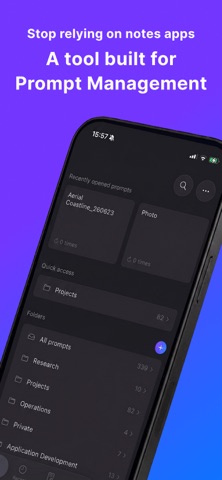
Method is a native iOS prompt manager designed to help you organize prompts used in Generative AI into structured assets and maximize their potential. Now that AI has become an everyday tool, it's no exaggeration to say that the quality and management of your prompts directly impact your daily productivity. Rather than a simple notepad, Method delivers an IDE-like (Integrated Development Environment) experience engineered to accelerate your prompt engineering.
【What Method Resolves】
• Eliminates the wasted time of typing the same instructions over and over.
• Perfect for scenarios where you want to reuse a prompt but change just a small part (like targets or numbers).
• No more digging through endless AI chat histories to find past prompts.
• Ideal for teams looking to share standardized, high-quality prompts.
【Key Use Cases】
Widely applicable across professional settings as well as personal life.
• Engineers: Template instructions for feature design, review requests, or test code generation.
• Writers: Centralize prompts for research, article drafting, and content proofreading.
• Marketers: Beautifully manage frameworks for ideation, strategy formulation, and data analysis.
• General Business: Access prompts for routine tasks—like meeting summaries, email replies, and translations—with just a single tap.
• Personal Use: Set up language learning roleplays, create travel itineraries, plan weekly meals, and more.
【Features】
• Seamless Library Management: Flexibly organize your AI prompts using folders and tags.
• Variables: Need to tweak a specific instruction per prompt? Use the variable feature to make portions of your prompt dynamic.
• Templates: Save prompts with multiple variables as templates. You won't have to rethink the required inputs every time—just pick from your options to complete the prompt.
• Image Attachments: Link reference images or output examples directly to your prompts for easy management.
• Version History: Automatically tracks edit history for each prompt. Since fine-tuning is key to great prompts, you can instantly revert to any past state.
• Prompt Gallery: Effortlessly replicate high-quality prompt templates available right out of the box.
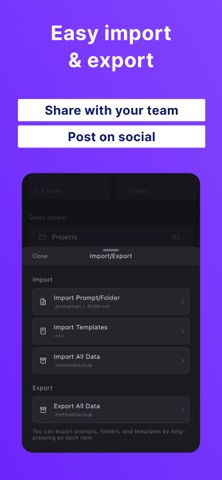
• Import/Export: Export your created "Methods" (prompt sets) as JSON files. Share them with team members to level up your entire organization's AI utilization.
• Instant Search: Quickly find the exact prompt you need by title or content.
• My Glossary: Keep track of specialized terminology, technical jargon, or specific assets for image generation that are easily forgotten but crucial for prompt quality.
• Processes [Premium]: Register a set of prompts used in a specific workflow as a single "Process". Arrange them as steps and call them up in order to move through your workflow.
• Launcher (Favorite Prompts) [Mac Only]: Easily call up your most-used prompts via shortcut keys, even when the app is running in the background.
• iCloud Sync: Automatically sync your data across different devices using the same Apple account.
• Image Compression: Compress attached images to keep your export file sizes lightweight.
【Native Experience Optimized for iPhone / iPad】
• Intuitive Touch Controls: A mobile-optimized UI ensures a smooth workflow, from entering variables to copying the final prompt.
【Seamless Mac Integration】
Method is also available for macOS. By sharing your exported files, you can seamlessly transition from working on your Mac at your desk to your iPhone while on the go.
【Plans & Pricing】
Method is free to download.
• Free Plan: Create up to 20 prompts.
• Premium Plan: Unlimited prompt creation, full access to your entire version history, and the Processes feature.
Transform your AI interactions from "fleeting thoughts" into "reproducible methods" with Method.
Terms of Service: https://method.u-i-apps.com/terms-of-service.html
Safety and technology
Found in the app by AppBrain- Price
- Free
- App size
- 61.6 MB
- Content rating
- Everyone
Technologies used by Method - AI Prompt Manager
Releases
Updates seen on the App Store- Version
- 1.96
- Launched
- November 2025
No changelog data
Alternatives
Similar apps and more from Yuji IshibashiAlternatives to Method - AI Prompt Manager


 Message Analyzer Pro for Chats


More from Yuji Ishibashi


Rankings
App Store top chartsApp Store Rankings for Method - AI Prompt Manager
About the app and developer
About Method - AI Prompt Manager
Method - AI Prompt Manager is a productivity app developed by Yuji Ishibashi.
User Ratings
The app has no ratings yet.
App Information
Method - AI Prompt Manager is freely available from the App Store. The app size is 61.65 MB. The latest version available is 1.96. The last update was on September 12, 2026.
Technical Requirements
The app has a content rating of Everyone. The app has been available on the App Store since November 2025.
Method - AI Prompt Manager is made and published by Yuji Ishibashi. AppBrain is an independent app data site and isn't affiliated with Yuji Ishibashi. The app name, icon, screenshots and description belong to Yuji Ishibashi and are shown as published on the App Store.
Developer information for Yuji Ishibashi
Address: