

microAI is made and published by genghong Xie. AppBrain is an independent app data site and isn't affiliated with genghong Xie. The app name, icon, screenshots and description belong to genghong Xie and are shown as published on the App Store.
AppBrain's verdict
- Rating on App Store
- 5.00
- 2 ratings
- Last updated
- September 29, 2026
- Size
- 234.3 MB
It doesn't have enough ratings yet to judge what users think.
User feedback
Ratings and reviews on the App StoreComments on microAI for iOS
We don't have enough comments to show example comments. Please check back later.
Store listing
By genghong Xie, from the App Store


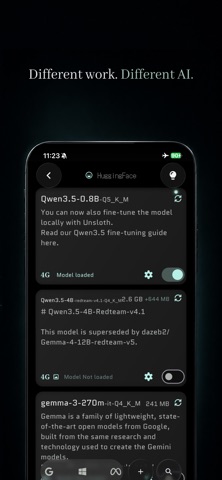


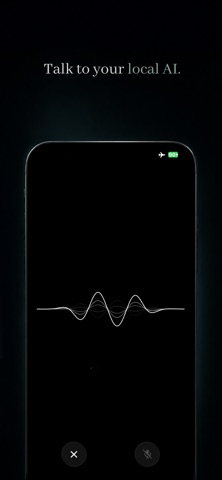


Description by genghong Xie Written by the developer, not by AppBrain. Click to read.
Run private AI directly on your phone.
Need more power? Connect your own computer and let it handle the heavy AI work while you keep using microAI from your phone.
No sign-up. No cloud AI account required.
Ask questions. Talk instead of type. Show AI a photo. Read a file. Work on a project. Save something for later.
microAI brings local AI, your devices, and your private context together in one workspace.
YOUR PHONE. YOUR COMPUTER. YOUR AI.
Your phone can run compatible local AI models on its own.
When you need more power, connect your own computer.
Scan a QR code and your approved Mac or browser can run the model while you continue using microAI from your phone.
That means you can move heavier AI work off your phone—reducing the load, heat, and battery use caused by demanding on-device inference.
Use your phone when that is enough.
Use your computer when you want more power.
You choose where your AI runs.
NO SIGN-UP. NO CLOUD AI REQUIRED.
Local AI should not require another account.
microAI can run compatible models directly on your devices without requiring a cloud AI account.
Your computer can also become your own AI compute node.
Open the microAI website on your computer, load a compatible local model, scan the QR code, and connect.
No separate website account is required.
DIFFERENT AI FOR DIFFERENT JOBS
Not every task needs the same AI.
microAI includes task-focused AI helpers:
• Private Chat — Ask, write, plan, brainstorm, or talk.
• Image Chat — Ask questions about photos and screenshots.
• Voice Chat — Talk instead of typing.
• Review Writer — Turn your experience into a clear review.
• Photo Tagger — Create titles, descriptions, and keywords for photos.
Choose which compatible model powers each job.
Use a small model for quick everyday tasks, a vision model for images, or a stronger model running on your computer when you need more capability.
TALK. SEE. READ.
AI should work with more than a text box.
Talk naturally with Voice Chat.
Add a photo or screenshot and ask questions about what you see.
Add a supported PDF, TXT, or Markdown file and ask questions about its contents.
Use microAI for writing, research, documents, photos, ideas, and everyday questions.
COME BACK WITHOUT STARTING OVER
Your useful context should not disappear into old chats.
Create Projects to keep related conversations, files, instructions, and context together.
Save quick thoughts in Journal.
microAI can remember useful context and bring it back when relevant.
Memory Map gives you a visual way to explore your conversations, projects, journals, models, and memories.
LOCAL AI WITHOUT THE USUAL SETUP
You should not need to be an AI engineer to start using local AI.
Find a compatible model, download it, and start.
microAI keeps model discovery, downloads, switching, and resource management in one place.
Advanced users can also import compatible GGUF models.
Actual performance depends on your device, model, and connection.
YOUR AI. YOUR DEVICES. YOUR DATA.
When AI runs on your phone, compatible models process requests directly on your device.
When you connect your own computer, the model runs on the computer you approve while you continue using microAI from your phone.
Your model files stay on the device running them.
You decide when a remote compute node is connected and used.
Internet access may still be required for model discovery and downloads, purchases, ratings, app services, and certain system features.
RUN AI YOUR WAY.
On your phone when you want portability.
On your computer when you want more power.
No sign-up.
No cloud AI account required.
Your AI. Your devices. Your choice.
Want to use your computer with microAI?
Visit:
https://linklocalai.com/
By using microAI, you agree to Apple's Standard End User License Agreement (EULA).
Apple EULA:
https://www.apple.com/legal/internet-services/itunes/dev/stdeula/
Safety and technology
Found in the app by AppBrain- Price
- Free
- App size
- 234.3 MB
- Content rating
- Low
Technologies used by microAI
Releases
Updates seen on the App Store- Version
- 0.3.1
- Launched
- April 2025
No changelog data
Alternatives
Similar apps and more from genghong XieAlternatives to microAI


More from genghong Xie


Rankings
App Store top chartsApp Store Rankings for microAI
About the app and developer
About microAI
microAI is a productivity app developed by genghong Xie.
What is the rating of microAI?
microAI is rated 5.00 out of 5 stars, based on 2 ratings.
Is microAI free?
microAI is free. The app size is 234.29 MB. The latest version available is 0.3.1. The last update was on September 29, 2026.
What are the requirements for microAI?
The app has a content rating of Low Maturity. The app has been available on the App Store since April 2025.
Developer information for genghong Xie
Address: