

Microsoft Designer
Microsoft Designer is made and published by Microsoft Corporation. AppBrain is an independent app data site and isn't affiliated with Microsoft Corporation. The app name, icon, screenshots and description belong to Microsoft Corporation and are shown as published on the App Store.
AppBrain's verdict
Loved by users- Rating on App Store
- 4.53
- 557 ratings
- Last updated
- October 6, 2026
Users love it: 4.5 stars from 557 ratings.
Rankings
App Store top chartsApp Store Rankings for Microsoft Designer
Competitors
Similar apps and more from Microsoft Corporation


Releases
Updates seen on the App Store- Version
- 1.0.36
- Launched
- June 2024
No changelog data
User feedback
Ratings and reviews on the App StoreComments on Microsoft Designer for iOS
We don't have enough comments to show example comments. Please check back later.
Technology
Found in the app by AppBrain- Price
- Free
- App size
- 75.5 MB
- Content rating
- Medium
Technologies used by Microsoft Designer
About the app and developer
About Microsoft Designer
Microsoft Designer is a graphics & design app developed by Microsoft Corporation.
What is the rating of Microsoft Designer?
Microsoft Designer is rated 4.53 out of 5 stars, based on 560 ratings.
Is Microsoft Designer free?
Microsoft Designer is free. The app size is 75.53 MB. The latest version available is 1.0.36. The last update was on October 6, 2026.
What are the requirements for Microsoft Designer?
The app has a content rating of Medium Maturity. The app has been available on the App Store since June 2024.
Developer information for Microsoft Corporation
Address:
Frequently asked questions about Microsoft Designer
Is Microsoft Designer free?
Yes. Microsoft Designer is free on the App Store.
Is Microsoft Designer still available?
Yes. Microsoft Designer is on the App Store, and the last update we saw was on October 6, 2026.
How large is Microsoft Designer?
Microsoft Designer is 75.53 MB.
Is Microsoft Designer suitable for children?
App Store gives Microsoft Designer a medium maturity rating, so it is not meant for young children.
How do people rate Microsoft Designer?
Microsoft Designer scores 4.53 out of 5 stars, from 557 ratings on the App Store.
Who made Microsoft Designer?
Microsoft Designer was developed by Microsoft Corporation. It is listed in the graphics & design category on the App Store.
What are the best alternatives to Microsoft Designer?
People looking at Microsoft Designer also look at these graphics & design apps: Ideogram AI - Image Generator, Leonardo.Ai - Image Generator, Playground: AI Design & Editor, Magnific - AI Video & Image, Dall E 3 AI Generator - Mirage.
Store listing
By Microsoft Corporation, from the App Store



Description by Microsoft Corporation Written by the developer, not by AppBrain. Click to read.
Key capabilities:
• Images: Create any image you can imagine. Sci-fi art, surreal scenes, funny images? Dream it, describe it, and create it with AI. Your imagination is limitless!
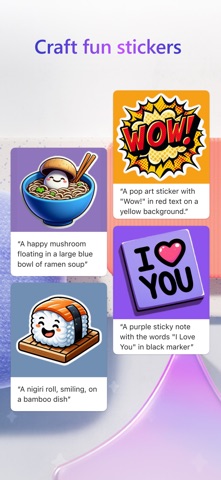
• Stickers: Create something that sticks. Make custom stickers that help you stick out on messaging apps, social, and more.
• Edit with AI: make your photos and images picture perfect with AI.
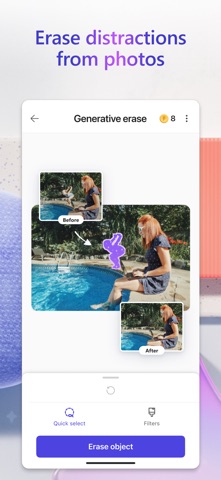
o Generative erase: Erase distractions to make objects you don’t want in your image disappear.
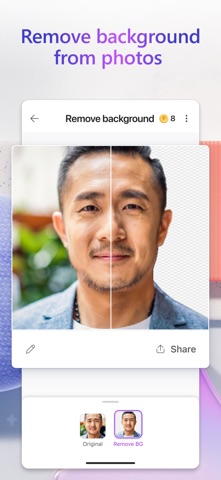
o Remove background: Say bye-bye to bad backgrounds. Easily remove unwanted image backgrounds in one step.
o Blur background: Bring what’s most important into focus. Blur the background of any image to make your subject pop.
o Add filters, adjust brightness, resize: Customize to fit your creative vision, including resizing to turn your creations into a square or custom size that fits just right.
• Wallpapers/Backgrounds: Put it all on display. Create custom wallpaper or background to fit your current mood, make a statement, or to keep a special occasion front and center on your phone screen.
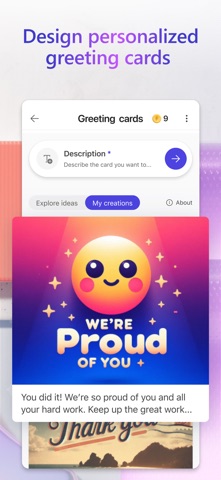
• Greeting cards: Craft the perfect greeting for any occasion. From birthday cards to holiday cards and beyond, create a thoughtful greeting card with personalized messages and images even if you’re at a loss for words.
• Restyle image: Transform photos into a work of art—like turning portraits, landscapes, and pet photos into artwork.
• Monograms: Make your mark. Add some personal pop to your everyday life or for a special occasion like a wedding with custom crafted monograms that use letters and more to define your mark.
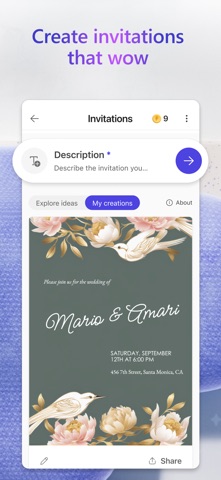
• Invitations: Create invitations that wow. Customize your invitations for every occasion and any event like birthdays, weddings, and anything else big or small.
• Social posts: Stand out online. Elevate and craft your next social post with Designer to create the perfect image and text to share online.
• Icons: Express yourself visually. Create icons to easily communicate your vision and decorate your designs.
• Emojis: Express yourself! Have the perfect reaction on hand with custom crafted emojis to fit any mood.
• Coloring book pages: Color it in and get in your flow. Create custom coloring book pages to make coloring more exciting. Great for all ages.
• Frame image: Turn your photos into a customized framed memory that you can share everywhere.
• Collages: Bring your favorite photos, styles, and descriptions together create a custom collage from your favorite memories.
• Banners: Create banners for newsletter headers, social profiles, and more to grab attention and stand out.
Microsoft Designer is available for free with a Microsoft account. Your Microsoft account provides 5 GB of free cloud storage that you can use to save your designs, files, and photos across your devices.
Additional information about terms of use can be found here: https://designer.microsoft.com/consumerTermsOfUse/en-US/consumerTermsOfUse.pdf
Download Designer and create something new today!