

Midudu is made and published by chaoliang lan. AppBrain is an independent app data site and isn't affiliated with chaoliang lan. The app name, icon, screenshots and description belong to chaoliang lan and are shown as published on the App Store.
AppBrain's verdict
New- Rating on App Store
- 5.00
- 1 ratings
- Last updated
- October 11, 2026
Midudu came out 29 days ago. It doesn't have enough ratings yet to judge what users think.
Rankings
App Store top chartsApp Store Rankings for Midudu
Competitors
Similar apps and more from chaoliang lanMore from chaoliang lan


Releases
Updates seen on the App Store- Version
- 1.5
- Launched
- October 2026
No changelog data
User feedback
Ratings and reviews on the App StoreComments on Midudu for iOS
We don't have enough comments to show example comments. Please check back later.
Technology
Found in the app by AppBrain- Price
- Free
- App size
- 5.39 MB
- Content rating
- Everyone
Technologies used by Midudu
About the app and developer
About Midudu
Midudu is an utilities app developed by chaoliang lan.
What is the rating of Midudu?
Midudu is rated 5.00 out of 5 stars, based on one rating ratings.
Is Midudu free?
Midudu is free. The app size is 5.39 MB. The latest version available is 1.5. The last update was on October 11, 2026.
What are the requirements for Midudu?
The app has a content rating of Everyone. The app has been available on the App Store since October 2026.
Developer information for chaoliang lan
Address:
Store listing
By chaoliang lan, from the App Store


Description by chaoliang lan Written by the developer, not by AppBrain. Click to read.
IMAGE TOOLS
• Batch Resize: Change image dimensions and save the results.
• Stitch Long Images: Join multiple images vertically and adjust their order and visible areas.
• Add Text to Images: Add text and customize its font, color, size, and position.
• Add Mosaic: Brush over an area to apply a mosaic or blur effect.
• Insert Images: Add multiple images to a picture, then move, resize, and rotate them.
• Add EXIF: View photo information and add selected details to an image as text.
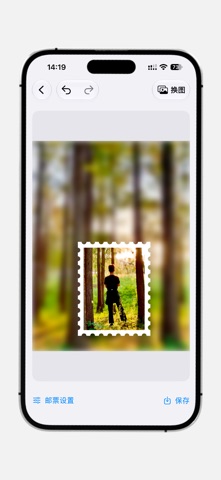
• Stamp-Style Images: Create images with a perforated stamp edge.
• Create Blank Images: Choose custom dimensions and a background color.
VIDEO TOOL
• Video to MP3: Extract and save audio from a video.
Midudu — Light Tools, enjoy unlimited use. Open a tool and get started.