


AppBrain's verdict
Established- Rating on App Store
- 1.00
- 1 ratings
- Last updated
- October 27, 2026
- Size
- 8.15 MB
It doesn't have enough ratings yet to judge what users think.
User feedback
Ratings and reviews on the App StoreComments on MinimalLauncher for iOS
We don't have enough comments to show example comments. Please check back later.
Store listing
By Akihiro Usui, from the App StoreDescription by Akihiro Usui Written by the developer, not by AppBrain. Click to read.
There are many launcher apps available on the App Store, and most of them launch apps by tapping displayed icons.
With those launcher apps, when you register many apps, the screen quickly becomes filled with icons, and in some cases you need to scroll in order to launch apps located at the bottom.
Although the purpose of using a launcher app is to quickly launch apps, I personally found it bothersome that scrolling adds an extra step.
With this in mind, I thought it would be nice to have a launcher app that can display a large number of apps on one screen by listing only app names, and so I created MinimalLauncher.
The number varies depending on the device's screen size and the font size and spacing settings for app names, but it is possible to display around 100 apps on one screen.
*Please note that before removing the limitation via an in-app purchase, the number of apps that can be registered is limited to 10.
After checking the usability, you can make an in-app purchase to remove the limitation and register apps without restriction.
*Please note that this app does not have a feature that automatically sets a URL scheme when you select an app.
By using Apple's official "Shortcuts" app, you can launch apps that do not have a URL scheme or whose URL scheme is unknown.
For details, please refer to the following URL:
https://broad-connect.net/2020/03/01/minimallaunchershortcut/
◆Main Features
・A set of three launchers-MainLauncher, LeftLauncher, and RightLauncher-that can be switched instantly by swiping left or right.
・Freely set the color of each app name (separate colors can be set for Light Mode and Dark Mode)
・Insert line breaks or separators at arbitrary positions
・Display clipboard contents (enter "_CLIP_" as the app name)
・Set URLs using clipboard contents (enter "_ENCCLIP_" in the URL; for example, if you set the URL to "http://www.google.com/search?q=_ENCCLIP_", you can search Google using the clipboard contents)
・Change app icons
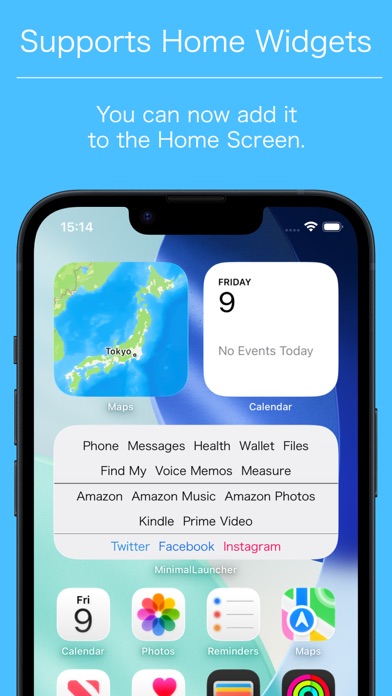
・Home widget support (there are limitations described below; please note that these apply)
・URL scheme support
Launch: minimallauncher://
Add app: minimallauncher://add/?name=[Name]&url=[URL]
*Please note that when using "_CLIP_" or "_ENCCLIP_", on iOS 16 and later, an alert related to pasting is displayed every time.
This issue can be avoided by updating the OS to iOS 16.1 or later and changing the following settings in the Settings app.
①In the Settings app, select "MinimalLauncher" and then select "Paste from Other Apps".
②Change the setting to "Allow".
*Please note that even after changing the setting to "Allow", notifications related to pasting will still be displayed. Due to iOS limitations, these notifications cannot be turned off.
◆Home Widget Limitations
・Since the home widget has a fixed size, it may not be able to display all registered apps.
In that case, please adjust the settings by reducing the font size in the MinimalLauncher app's settings screen or by moving apps you want to prioritize toward the top.
(If you tap the blank area of the home widget, the MinimalLauncher app itself will launch, so you can start apps that could not be displayed in the widget from there.)
・Due to iOS limitations, the home widget cannot access the clipboard.
Therefore, it does not support the feature that displays clipboard contents using "_CLIP_".
・Due to iOS limitations, the home widget cannot directly launch each registered app.
As a result, each registered app is launched after going through the MinimalLauncher app once.
・The launcher in the home widget is generated using a completely different mechanism from the launcher displayed in the MinimalLauncher app itself.
Please note that, as a result, the layout, fonts, and other aspects may not be 100% identical to those of the launcher displayed in the app itself.
Safety and technology
Found in the app by AppBrain- Price
- Free
- App size
- 8.15 MB
- Content rating
- Everyone
Technologies used by MinimalLauncher
Releases
Updates seen on the App Store- Version
- 1.82
- Launched
- March 2020
No changelog data
Alternatives
Similar apps and more from Akihiro UsuiAlternatives to MinimalLauncher


More from Akihiro Usui


Rankings
App Store top chartsApp Store Rankings for MinimalLauncher
About the app and developer
About MinimalLauncher
MinimalLauncher is an utilities app developed by Akihiro Usui.
User Ratings
MinimalLauncher is rated 1.00 out of 5 stars. The rating is based on one rating ratings.
App Information
MinimalLauncher is freely available from the App Store. The app size is 8.15 MB. The latest version available is 1.82. The last update was on October 27, 2026.
Technical Requirements
The app has a content rating of Everyone. The app has been available on the App Store since March 2020.
MinimalLauncher is made and published by Akihiro Usui. AppBrain is an independent app data site and isn't affiliated with Akihiro Usui. The app name, icon, screenshots and description belong to Akihiro Usui and are shown as published on the App Store.
Developer information for Akihiro Usui
Address: