Miscut: Card Centering Tool is made and published by
kenneth edwards.
AppBrain is an independent app data site and isn't affiliated with kenneth edwards.
The app name, icon, screenshots and description belong to kenneth edwards and are shown as
published on the App Store.
About Miscut: Card Centering Tool
Miscut: Card Centering Tool is an utilities app developed by kenneth edwards.
What is the rating of Miscut: Card Centering Tool?
Miscut: Card Centering Tool has no ratings yet.
Is Miscut: Card Centering Tool free?
Miscut: Card Centering Tool is free. The app size is 32.18 MB. The latest version available is 1.7. The last update was on October 5, 2026.
What are the requirements for Miscut: Card Centering Tool?
The app has a content rating of Everyone. The app has been available on the App Store since August 2026.
Description by kenneth edwards(from the App Store)
Is your card centered well enough for a PSA 10? Point your camera at it and know in seconds.
Miscut measures trading-card centering the way graders do — border ratios, left/right and top/bottom — using precise edge detection built for real cards: modern and vintage, English and Japanese, fronts AND backs, holos, full-arts, Pokémon, One Piece and more.
MEASURE • Auto-detects the card, straightens it and locks onto the borders • Left/Right and Top/Bottom ratios with a clear verdict • Card backs measured properly — modern, vintage and One Piece back designs • Full-art and borderless cards handled honestly (approximate readings are labelled, never faked) • Fine-tune any guide by hand with a magnifier loupe • Works from the camera or any photo/scan in your library
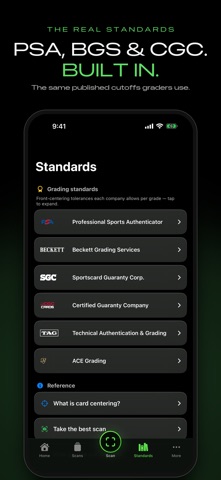
KNOW THE CARD • Identifies the card from the photo — name, set and number • Live market prices for identified cards (TCGPlayer / Cardmarket via TCGdex), including promo cards • Grade ceilings at a glance: what PSA, Beckett and CGC standards allow at your centering
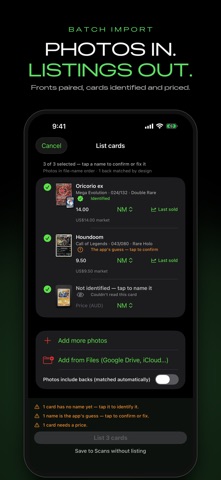
LIST CARDS (NEW) • Photos in, listings out: pick a batch of card photos or scans — from your library, Files or Google Drive — and Miscut pairs fronts with backs, identifies every card and queues them for sale • No centering scan needed — grade a card, or just list it • "Last sold" on eBay, one tap from the price
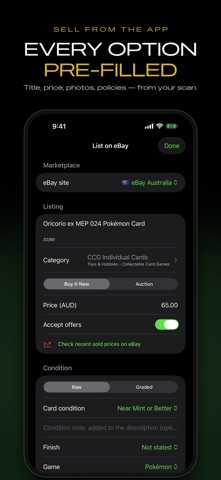
SELL IT • List on eBay from the app — title, category, condition, price and your postage/payment/returns policies, pre-filled from the scan • Your measured centering goes straight into the listing description • Pick the listing photos in the order you want them: scans, corner close-ups, surface views, your branded card — and save your picks as the default • Buy It Now or auctions, best offers, eBay Store shelves, optional Promoted Listings • Bulk listing: select multiple cards, set things once, adjust any card's own options, publish with live per-card progress • Bulk runs keep uploading after you leave the app, with live progress in the Dynamic Island (iOS 26) • Whatnot Show Pack: hosted photos and a ready-to-import CSV for your next live show
TRACK YOUR FLIPS • Log what you paid, grading fees and sale price per card • Profit calculated automatically — see it right in your saved list • One-tap "use market price as sell price" • Export everything as CSV
SHARE IT • Social-ready exports in Square 1:1, Post 4:5 and Story 9:16 — no more cropped posts • Brand Kit: put your own logo and shop name on every shared card (Pro) • Surface check: zoom pass over corners, edges and surface before you submit
Free to use for centering measurements. Miscut Pro adds grade ceilings, surface checks, saved-scan history, Brand Kit, CSV export and selling tools (eBay & Whatnot) — with a 3-day free trial on the monthly plan.
Made by collectors, for collectors. No ads, no tracking.
Terms of Use (EULA): https://www.apple.com/legal/internet-services/itunes/dev/stdeula/
Each subscription will automatically renew 3 days before the expiration date for
the same time period. Subscriptions can be cancelled at any time before the renewal.