AppBrain
AppBrain
  • Apps
  • Apps being viewed right now Trending apps today Most popular apps All-time most installed apps Top rated apps iPhone and iPad apps
  • Intelligence ▾
    Intelligence overview → Track any Android app or your whole market
    Track & analyze
    Keyword Tracker & OptimizerTrack & improve Play rankings App Performance ReportOne-off PDF for any app StatisticsFree Android & Play market stats
    Promote your app
    Featured Apps App Links
  • Intelligence
  • Pricing
  • Dashboard
  • Sign up
  • Log in
App Store Apps > Productivity > Miso - Screen Time Control
Miso - Screen Time Control icon

Miso - Screen Time Control

by Aichi Tsuchihira · Productivity · Free
On the App Store since September 2026 · Data updated 2026-10-24
App Store

Miso - Screen Time Control is made and published by Aichi Tsuchihira. AppBrain is an independent app data site and isn't affiliated with Aichi Tsuchihira. The app name, icon, screenshots and description belong to Aichi Tsuchihira and are shown as published on the App Store.

AppBrain's verdict

Last updated
September 16, 2026
Size
75.7 MB

User feedback

Ratings and reviews on the App Store

Comments on Miso - Screen Time Control for iOS

We don't have enough comments to show example comments. Please check back later.

Store listing

By Aichi Tsuchihira, from the App Store
Miso - Screen Time Control Screenshot 1 of 6
Miso - Screen Time Control Screenshot 2 of 6
Miso - Screen Time Control Screenshot 3 of 6
Miso - Screen Time Control Screenshot 4 of 6
Miso - Screen Time Control Screenshot 5 of 6
Miso - Screen Time Control Screenshot 6 of 6
Screenshots by Aichi Tsuchihira, from the the App Store listing
Description by Aichi Tsuchihira Written by the developer, not by AppBrain. Click to read.
“Miso - Screen Time Control” is an app built for people who want their evenings, focus, and mornings back. It helps you reduce screen time by 3 hours a day by blocking the apps that pull you in and adding a pause before you scroll.

Features:

Block Distracting Apps and Websites. Pick the apps, categories, and websites that steal your attention. Run multiple presets at once so work, evenings, and weekends each have the right rules, and stay consistent while you cut down on screen time.

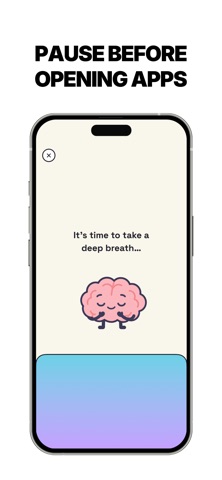
Unlock Interventions. A short step before an app opens breaks the habit of scrolling without thinking. Take a guided breath, or scan a barcode on something nearby like a book or a tea tin so you have to get up first.

Choose How Long Apps Stay Unlocked. When you do unlock, you pick the time so a quick check does not turn into the rest of your night. When the timer ends, the app locks again and you don’t overuse it.

Brain Power Budget. Unlocking spends today’s budget. The longer you stay in distracting apps, the more minutes you use. You’re not banned from your phone. You see the cost of screen time as it happens, and you can change the goal whenever you want.

Scheduled Blocks. Turn blocking on automatically for work hours, evenings, or any routine you set. It runs in the background, so you don’t have to remember to flip a switch every time you sit down to focus.

Whether you want to focus on work, get through studying without checking your phone, keep evenings free for people in front of you, or you’ve already tried built-in limits and still pick it up without thinking, “Miso - Screen Time Control” makes reducing screen time clear, sustainable, and something that actually sticks.

SUBSCRIPTION:

“Miso - Screen Time Control" offers a free trial but does not offer a free subscription tier. Therefore, full
access to all features requires a paid subscription.

Before the subscription, you can only access the screen time analysis.

Your subscription will automatically renew, unless you cancel at least 24
hours before the current period ends. You can cancel or manage your subscription from your Apple account settings.

EULA:
https://www.apple.com/legal/internet-services/itunes/dev/stdeula/

TERMS:
https://hellomiso.vercel.app/terms

PRIVACY POLICY:
https://hellomiso.vercel.app/privacy
Official page on the App Store

Safety and technology

Found in the app by AppBrain
Price
Free
App size
75.7 MB
Content rating
Everyone

Technologies used by Miso - Screen Time Control

Releases

Updates seen on the App Store
Version
1.1
Launched
September 2026

No changelog data

Alternatives

Similar apps and more from Aichi Tsuchihira

Alternatives to Miso - Screen Time Control

Lemio: Lock In Screen Time icon Lemio: Lock In Screen Time
Platobros, Inc
4.8
Free
85 ratings
Regrind: Screen Time Wallet icon Regrind: Screen Time Wallet
PlotPilot Ltd
4.9
Free
71 ratings
Zentime: Screen Time Control icon Zentime: Screen Time Control
Ryunosuke Nagase
0.0
Free
Unglue: Screen Time Friend icon Unglue: Screen Time Friend
Computer go beep AB
4.7
Free
2.7K ratings
BeTimeful: Screen Time 2.0 icon BeTimeful: Screen Time 2.0
Be Timeful Inc
4.1
Free
115 ratings
To-Do Adventure: Habit Tracker icon To-Do Adventure: Habit Tracker
SPARKFUL INC.
3.8
Free
82 ratings
Pattrn - Discipline Tracker icon Pattrn - Discipline Tracker
Pedro Schott
4.8
Free
974 ratings
ScrollGuard: Block Reels icon ScrollGuard: Block Reels
BreakTheScroll
4.3
Free
117 ratings

More from Aichi Tsuchihira

Weight Gain App: Vulk icon Weight Gain App: Vulk
Aichi Tsuchihira
4.8
Free
5 ratings
Push Up Tracker - PushLeague icon Push Up Tracker - PushLeague
Aichi Tsuchihira
3.0
Free
3 ratings
PromiseMe: Build Discipline icon PromiseMe: Build Discipline
Aichi Tsuchihira
0.0
Free
Voyage - Habit Tracker icon Voyage - Habit Tracker
Aichi Tsuchihira
0.0
Free
Habit Tracker - Stacked icon Habit Tracker - Stacked
Aichi Tsuchihira
0.0
Free
Gratitude Journal: Cosmos icon Gratitude Journal: Cosmos
Aichi Tsuchihira
0.0
Free

Rankings

App Store top charts

App Store Rankings for Miso - Screen Time Control

This app is not ranked

About the app and developer

About Miso - Screen Time Control

Miso - Screen Time Control is a productivity app developed by Aichi Tsuchihira.

User Ratings

The app has no ratings yet.

App Information

Miso - Screen Time Control is freely available from the App Store. The app size is 75.69 MB. The latest version available is 1.1. The last update was on September 16, 2026.

Technical Requirements

The app has a content rating of Everyone. The app has been available on the App Store since September 2026.

Developer information for Aichi Tsuchihira

Aichi Tsuchihira

Address:

Frequently asked questions about Miso - Screen Time Control

Is Miso - Screen Time Control free?

Yes. Miso - Screen Time Control is free on the App Store.

Is Miso - Screen Time Control still available?

Yes. Miso - Screen Time Control is on the App Store, and the last update we saw was on September 16, 2026.

How large is Miso - Screen Time Control?

Miso - Screen Time Control is 75.69 MB.

Is Miso - Screen Time Control suitable for children?

App Store rates the content of Miso - Screen Time Control as suitable for everyone.

Who made Miso - Screen Time Control?

Miso - Screen Time Control was developed by Aichi Tsuchihira. It is listed in the productivity category on the App Store.

What are the best alternatives to Miso - Screen Time Control?

People looking at Miso - Screen Time Control also look at these productivity apps: Lemio: Lock In Screen Time, Regrind: Screen Time Wallet, Zentime: Screen Time Control, Unglue: Screen Time Friend, BeTimeful: Screen Time 2.0.

Share Miso - Screen Time Control

Price drops on Google Play Popular Productivity Apps Top new apps Today's trending apps Apps other people are watching
Lemio: Lock In Screen Time icon Lemio: Lock In Screen Time
Regrind: Screen Time Wallet icon Regrind: Screen Time Wallet
Zentime: Screen Time Control icon Zentime: Screen Time Control
Unglue: Screen Time Friend icon Unglue: Screen Time Friend
BeTimeful: Screen Time 2.0 icon BeTimeful: Screen Time 2.0
To-Do Adventure: Habit Tracker icon To-Do Adventure: Habit Tracker
Pattrn - Discipline Tracker icon Pattrn - Discipline Tracker
ScrollGuard: Block Reels icon ScrollGuard: Block Reels
Overview Alternatives Reviews Rankings Technology
AppBrain Intelligence premium content

Subscribe now to get full and unlimited access to AppBrain Intelligence. You'll have access to:

  • App Intelligence dashboard (performance timeline, competitor comparison, country rankings, insight cards)
  • Detailed ranking data per app
  • Full timeline per developer
  • Device market shares data per country
  • Unlimited keyword tracking
1 Month

$75/mo
(billed every month)

SAVE 0%
Subscribe
3 Months

$65/mo
($195 billed every 3 months)

SAVE 13%
Subscribe
1 Year

$57.50/mo
($690 billed every year)

SAVE 23%
Subscribe
Each subscription will automatically renew 3 days before the expiration date for the same time period. Subscriptions can be cancelled at any time before the renewal.

AppBrain is an app data site, we track rankings, ratings, installs for all apps and games on Google Play and the App Store. AppBrain doesn't host app files or APKs, all install links go directly to the official store. All trademarks are owned by their respective owners. As an Amazon Associate AppBrain earns from qualifying purchases.

More apps

  • Top Android apps being viewed
  • Answer It!
  • Supershift Shift Work Calendar
  • BioDigital Human - 3D Anatomy

App statistics

  • Android statistics
  • Google Play Developer stats
  • Trending Android Apps
  • Trending iOS apps
  • Top popular Apps
  • Buy the best Android phone
  • Buy & sell app businesses

About AppBrain

  • Contact
  • Privacy
  • Documentation
  • DMCA takedowns
  • Blog
  • Free App-Ads.Txt Validation
© 2010-2026 - AppBrain