

MiSTer Connect: FPGA Remote
MiSTer Connect: FPGA Remote is made and published by Alberto Paladino. AppBrain is an independent app data site and isn't affiliated with Alberto Paladino. The app name, icon, screenshots and description belong to Alberto Paladino and are shown as published on the App Store.
AppBrain's verdict
- Rating on App Store
- 5.00
- 5 ratings
- Last updated
- October 11, 2026
- Size
- 37.4 MB
It doesn't have enough ratings yet to judge what users think.
User feedback
Ratings and reviews on the App StoreComments on MiSTer Connect: FPGA Remote for iOS
We don't have enough comments to show example comments. Please check back later.
Store listing
By Alberto Paladino, from the App Store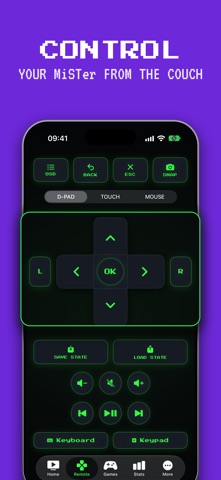



Description by Alberto Paladino Written by the developer, not by AppBrain. Click to read.
MiSTer Connect is a native remote control, retro game launcher and virtual gamepad for the MiSTer FPGA platform. Connect over your home Wi-Fi and take command of your retro console from the couch: browse your game library, launch arcade classics, navigate the menu - no keyboard required. It works with the open-source Remote service from the mrext project, the same one behind the Remote web app - nothing extra to install on your MiSTer.
THE REMOTE
• Full d-pad with real press-and-hold, like a proper controller
• OSD, back and escape keys - reach the save-state menu instantly
• Volume and media keys, full keyboard and number pad
• L and R to jump letters in the MiSTer menu, and a trackpad mode for Amiga, AO486 and Macintosh cores
• Save and load states with a hold, safe from stray taps
• Instant screenshots of whatever is on screen
YOUR COLLECTION
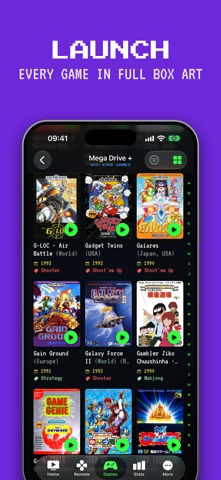
• Search every indexed game and launch it in seconds
• Filter by genre, decade, players, region or developer, across your whole library or a single system, and save any filter as a section of its own
• Tap a game for its page: cover, year, genre, developer, players and a short description
• Scroll your whole library: lists load as you go, with a letter strip to jump ahead
• Star your favorite games: they wait on the Games tab, next to Recently played and your saved filters
• Browse by system or by folder, the way your SD card is organised
• Launch any game with the core you choose, RetroAchievements builds included
• Create menu shortcuts for your favorites
• Manage wallpapers, background music and scripts
• Edit MiSTer.ini settings right from your phone
• Screenshots on game pages, and Find Cover to search another title (like the Japanese name) when a cover is missing or wrong
DISCOVER
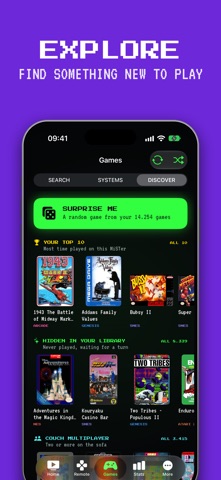
• Surprise Me picks a random game from your own collection
• Shelves built from what is on your card: your top 10, couch multiplayer, party games, a year's releases, a decade of platformers, a developer's collection
• Shuffle for a fresh set whenever you like
PLAY STATS
With PlayLog from the mrext project running on your MiSTer:
• Time played, sessions, streaks, and your top games and systems
• A live play timer on Home, and every game's history on its page
• Filter and sort by what you have played, or never touched
RETRO SOUL
• CRT phosphor look: scanlines, glow and pixel fonts
• Per-system accent colors and haptics everywhere
• Optional 8-bit sound effects
• Choose the font for game descriptions: Terminal, Mono or Clean
CONNECT PRO (one-time purchase)
Everything the web app can do stays free, forever. A single tip unlocks the native extras:
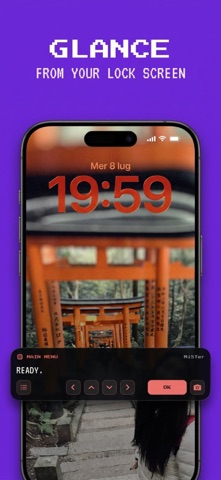
• Live Activity mini-remote in the Dynamic Island and Lock Screen
• Box art from the MiSTer Artwork Pack, as 2D boxes, 3D boxes or box with screenshot, kept offline once seen
• A cover grid you can resize with a pinch
• All themes, including Dot Matrix in Game Boy LCD greens
• Multiple saved MiSTers
• iCloud sync of your favorites, filters, covers, MiSTers and settings across iPhone and iPad
REQUIREMENTS
A MiSTer FPGA device running the open-source Remote service (part of the mrext project) on your local network.
MiSTer Connect is an unofficial companion app, not affiliated with the MiSTer or mrext projects. Thanks to wizzomafizzo for mrext, to chipster6502 for the MiSTer Artwork Pack, and to the libretro-thumbnails project for box art.
TERMS AND CONDITIONS (EULA) & PRIVACY TERMS:
Terms: https://devcells.it/apps/misterconnect/terms.html
Privacy: https://devcells.it/apps/misterconnect/privacy.html
Safety and technology
Found in the app by AppBrain- Price
- Free
- App size
- 37.4 MB
- Content rating
- Everyone
Technologies used by MiSTer Connect: FPGA Remote
Releases
Updates seen on the App Store- Version
- 1.3
- Launched
- August 2026
No changelog data
Alternatives
Similar apps and more from Alberto PaladinoAlternatives to MiSTer Connect: FPGA Remote




More from Alberto Paladino


Rankings
App Store top chartsApp Store Rankings for MiSTer Connect: FPGA Remote
About the app and developer
About MiSTer Connect: FPGA Remote
MiSTer Connect: FPGA Remote is an utilities app developed by Alberto Paladino.
User Ratings
MiSTer Connect: FPGA Remote is rated 5.00 out of 5 stars. The rating is based on 5 ratings.
App Information
MiSTer Connect: FPGA Remote is freely available from the App Store. The app size is 37.40 MB. The latest version available is 1.3. The last update was on October 11, 2026.
Technical Requirements
The app has a content rating of Everyone. The app has been available on the App Store since August 2026.
Developer information for Alberto Paladino
Address: