

Mixet VP is made and published by Gennadii Dudarek. AppBrain is an independent app data site and isn't affiliated with Gennadii Dudarek. The app name, icon, screenshots and description belong to Gennadii Dudarek and are shown as published on the App Store.
AppBrain's verdict
- Rating on App Store
- 5.00
- 1 ratings
- Last updated
- August 14, 2026
It doesn't have enough ratings yet to judge what users think.
Rankings
App Store top chartsApp Store Rankings for Mixet VP
Competitors
Similar apps and more from Gennadii DudarekAlternatives to Mixet VP








More from Gennadii Dudarek

Releases
Updates seen on the App Store- Version
- 6.1.2
- Launched
- November 2023
No changelog data
User feedback
Ratings and reviews on the App StoreComments on Mixet VP for iOS
We don't have enough comments to show example comments. Please check back later.
Technology
Found in the app by AppBrain- Price
- $29.99
- App size
- 24.1 MB
- Content rating
- Everyone
Technologies used by Mixet VP
About the app and developer
About Mixet VP
Mixet VP is a music app developed by Gennadii Dudarek.
User Ratings
Mixet VP is rated 5.00 out of 5 stars. The rating is based on one rating ratings.
App Information
Mixet VP costs $29.99. The app size is 24.05 MB. The latest version available is 6.1.2. The last update was on August 14, 2026.
Technical Requirements
The app has a content rating of Everyone. The app has been available on the App Store since November 2023.
Developer information for Gennadii Dudarek
Address:
Store listing
By Gennadii Dudarek, from the App Store




Description by Gennadii Dudarek Written by the developer, not by AppBrain. Click to read.
Many musicians, same as I do, play in a band where other members (bassists and drummers mostly) may miss rehearsals, or you may play a show in a small venue or an art opening where drums are impossible. Or maybe you are the drummer and need to practice at home like you're with the band. Backing tracks are a great solution, but the standard player is not enough. We need to control the way the next song progresses. We may need a metronome, countdown, and pushing the tempo to all our plug-ins and other band members. We may need to send tracks to specific audio interface outputs to recreate the presence of the missing member. Sending a bass track to a bass amp makes a significant difference compared to mixed stereo on portals. And most importantly, when we are using digital plugins in other apps like AUM, we need a simple way to load presets for each song.
With Mixet it's all possible with one gesture on iPhone, iPad, and Mac. No accounts, no uploads. It's focused on simplicity and usability.
MAIN APP FEATURES
• Sets – songs – tracks. Organize your songs in sets, add tracks to songs, and send any track to any audio interface output or virtual bus.
• Buses and hardware audio outputs. Create buses to audio channels; change bus settings to apply them for all tracks assigned to that bus.
• Virtual MIDI messaging. Manage behaviour of MIDI controlled apps when you select or play song in Mixet. Load presets or adjust parameters.
• Metronome and countdown with audio sample rate accuracy
• Ableton Link integration to push the tempo to all your plug-ins and bandmates
• Visualizer reflecting song dynamics
• Open from Files, GarageBand, or other audio apps
• Click tracks for practicing
• Large play button; never miss it in the show rush
• One touch to change a song — unique picker navigation
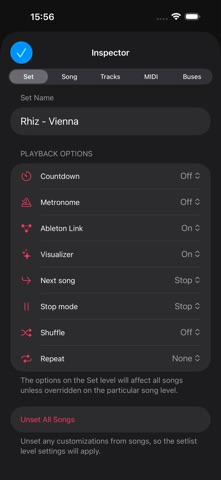
• Control auto-rewind, auto-progress, count down, repeat, and more
• Control the options on the setlists or particular song levels
• Universal design optimized to all orientations and device sizes
• Remote control on Apple Watch and lock screen
• Widget to see the most important status on your Home Screen or Notification Center
• Prevent from sleeping options
• No accounts, no uploads - your tracks are yours.
VIRTUAL MIDI MESSAGING
You can use Mixet to send MIDI messages to other apps. That lets you control what other apps do when a song gets selected or played in Mixet. For example, in the AUM app, you can load sessions with presets, toggle effects, or change parameters. To set that up, connect Mixet as a virtual source in your other MIDI-controlling app and choose what Mixet MIDI command should trigger.
ABLETON LINK INTEGRATION
- Auto-push tempo
Mixet uses Ableton Link technology to push the playing song tempo to the jam. You can enable the Automatic Push feature to push the song tempo automatically to the jam once you start the playback. Note, Mixet does not update tempo when peers change it.
That is a great way to synchronize the tempo of your effects, like delays and vibrato, to match your prerecorded backing tracks and keep the program for your concert.
- Start / Stop sync
You can enable the Start / Stop sync in Ableton Link settings (the link icon in the Sets view) so all jam links supporting this feature will start playing along with Mixet. You can disable the Stop sync to ensure that no peer can interrupt your show accidentally.
EXTRA SYNC OPTIONS
- Start-only sync
Start all peers altogether then stop one of the peers while keeping Mixet playing.
- When to push
Specify when you want to push the tempo to the jam on the song selection or on hitting the Play button.
Terms of Use
The standard Apple Terms of Use (EULA) apply: https://www.apple.com/legal/internet-services/itunes/dev/stdeula/
Enjoy!