

Mobile Helix Link for Intune
Mobile Helix Link for Intune is made and published by Mobile Helix. AppBrain is an independent app data site and isn't affiliated with Mobile Helix. The app name, icon, screenshots and description belong to Mobile Helix and are shown as published on the App Store.
AppBrain's verdict
- Last updated
- April 22, 2025
Rankings
App Store top chartsApp Store Rankings for Mobile Helix Link for Intune
Competitors
Similar apps and more from Mobile HelixAlternatives to Mobile Helix Link for Intune








More from Mobile Helix

Releases
Updates seen on the App Store- Version
- 11.10.9
- Launched
- February 2024
No changelog data
User feedback
Ratings and reviews on the App StoreComments on Mobile Helix Link for Intune for iOS
We don't have enough comments to show example comments. Please check back later.
Technology
Found in the app by AppBrain- Price
- Free
- App size
- 108.9 MB
- Content rating
- Everyone
Technologies used by Mobile Helix Link for Intune
About the app and developer
About Mobile Helix Link for Intune
Mobile Helix Link for Intune is a business app developed by Mobile Helix.
What is the rating of Mobile Helix Link for Intune?
Mobile Helix Link for Intune has no ratings yet.
Is Mobile Helix Link for Intune free?
Mobile Helix Link for Intune is free. The app size is 108.90 MB. The latest version available is 11.10.9. The last update was on April 22, 2025.
What are the requirements for Mobile Helix Link for Intune?
The app has a content rating of Everyone. The app has been available on the App Store since February 2024.
Developer information for Mobile Helix
Address:
Frequently asked questions about Mobile Helix Link for Intune
Is Mobile Helix Link for Intune free?
Yes. Mobile Helix Link for Intune is free on the App Store.
Is Mobile Helix Link for Intune still available?
Yes. Mobile Helix Link for Intune is on the App Store, and the last update we saw was on April 22, 2025.
How large is Mobile Helix Link for Intune?
Mobile Helix Link for Intune is 108.90 MB.
Is Mobile Helix Link for Intune suitable for children?
App Store rates the content of Mobile Helix Link for Intune as suitable for everyone.
Who made Mobile Helix Link for Intune?
Mobile Helix Link for Intune was developed by Mobile Helix. It is listed in the business category on the App Store.
What are the best alternatives to Mobile Helix Link for Intune?
People looking at Mobile Helix Link for Intune also look at these business apps: TodoGoals, Park Tower - South Coast Plaza, nQ Zebraworks, SharePlus for AirWatch, PK Protect for Intune.
Store listing
By Mobile Helix, from the App Store


Description by Mobile Helix Written by the developer, not by AppBrain. Click to read.
LINK makes it simple for lawyers to work securely from anywhere.
LINK provides lawyers and knowledge professionals with seamless workflows in a single, encrypted mobile app. Lawyers can optimize their productivity while protecting their data, so they experience greater ease of work both in the office and in remote settings.
Go beyond just reading email on your phone or tablet. LINK uniquely integrates Document Management and Outlook email in one app. You’ll have all the tools that you need to search DMS, open an iManage NRL or NetDocuments link in email, compare a Word file, annotate or edit, then email or import to DMS, as well as many more features.
LINK uniquely integrates Document Management and Outlook email in one app. With the LINK App on your iPhone, iPad, or MacBook, lawyers can work when and where they want to, using a single, encrypted app.
Access Your Files
iManage Work®
NetDocuments
OpenText Legal Content Management
Microsoft Teams Channels
OneDrive
Windows Files Shares
Optimize Your Workflows
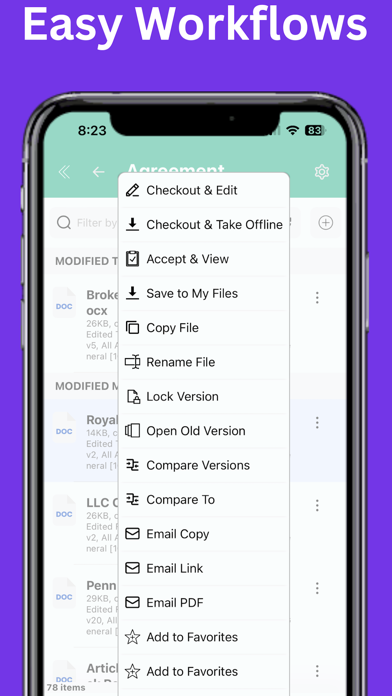
LINK is integrated with the Microsoft Office apps - you can edit a .doc or .docx file with the Word app, then check-in to DMS and then email
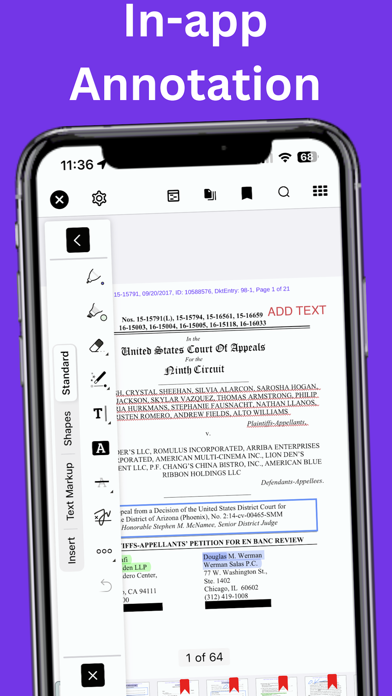
Review and annotate documents in the LINK app using all popular mark-up features, then check-in or email
Open a DMS link/NRL in email, edit the file with Word, check the edited version into DMS, then email a copy or link/NRL
Create and organize notes with LINK Notes App. Notes are automatically synced to DMS, OneDrive, or Windows File Shares per firm IT configuration.
Compare a file in email from your client to a file in DMS, annotate the file, then email to an associate
What Else Can You Do in LINK?
Open NRLs and other proprietary DMS links in email
Search DMS or use quick look-up to find workspaces and files
Predictive and multiple email filing to DMS and Outlook folders
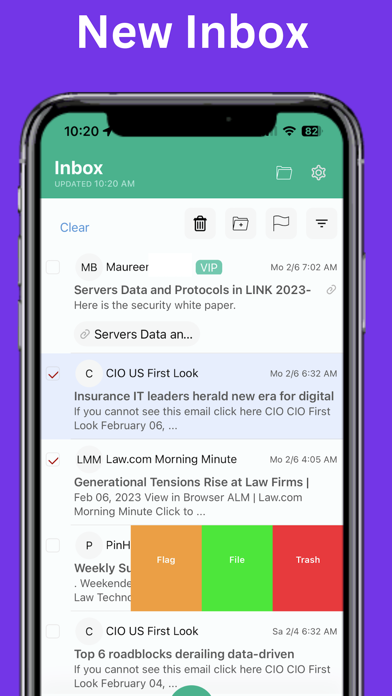
Use powerful Outlook Inbox sort and multi-factor filter
Search Inbox more accurately with filters for From, To, and Any
Compare documents and send redlines in various formats
Access files in Teams from LINK
Share a file to a Teams Channel from DMS
Import a file in email to a folder in DMS or a File Share
Quick multi-selection mode to delete, file, flag, and archive several emails in one pass
Send-and-File functionality
Write with an Apple Pencil, with no latency
View multiple files with tabbed file view and split-screen view
Use the firm portal or intranet, including SharePoint, Handshake, or HTML
Host your web applications such as accounting, expenses, and more
Paperless workflows mean no printer or shredder is needed
LINK Security Features
Data is encrypted at-rest and in-transit
Support for Intune MAM and Microsoft Authentication library (see Mobile Helix Link for Intune app version)
Support for SAML SSO
LINK may be used without Mobile Device Management or can be managed by any MDM
LINK is an encrypted container app which can be remotely wiped
LINK has built-in metadata scrubbing
Optional integration with Microsoft Information Protection to protect data
Certificate-based device provisioning and authentication
Ask us about LINK’s security architecture and full security features
Mobile Helix is an official API partner for iManage Work®, NetDocuments DMS, and OpenText Legal Content Management.
Want to try LINK?
Ask your IT Department to send you a Welcome Email to get started.